Save and Continue Later, also known as Autofill or Continue Forms Later, allows your form fillers to save their partially filled-out form. See How to Enable Save and Continue Later on Forms for more information. These drafts are saved in Jotform Tables as incomplete submissions.
Note
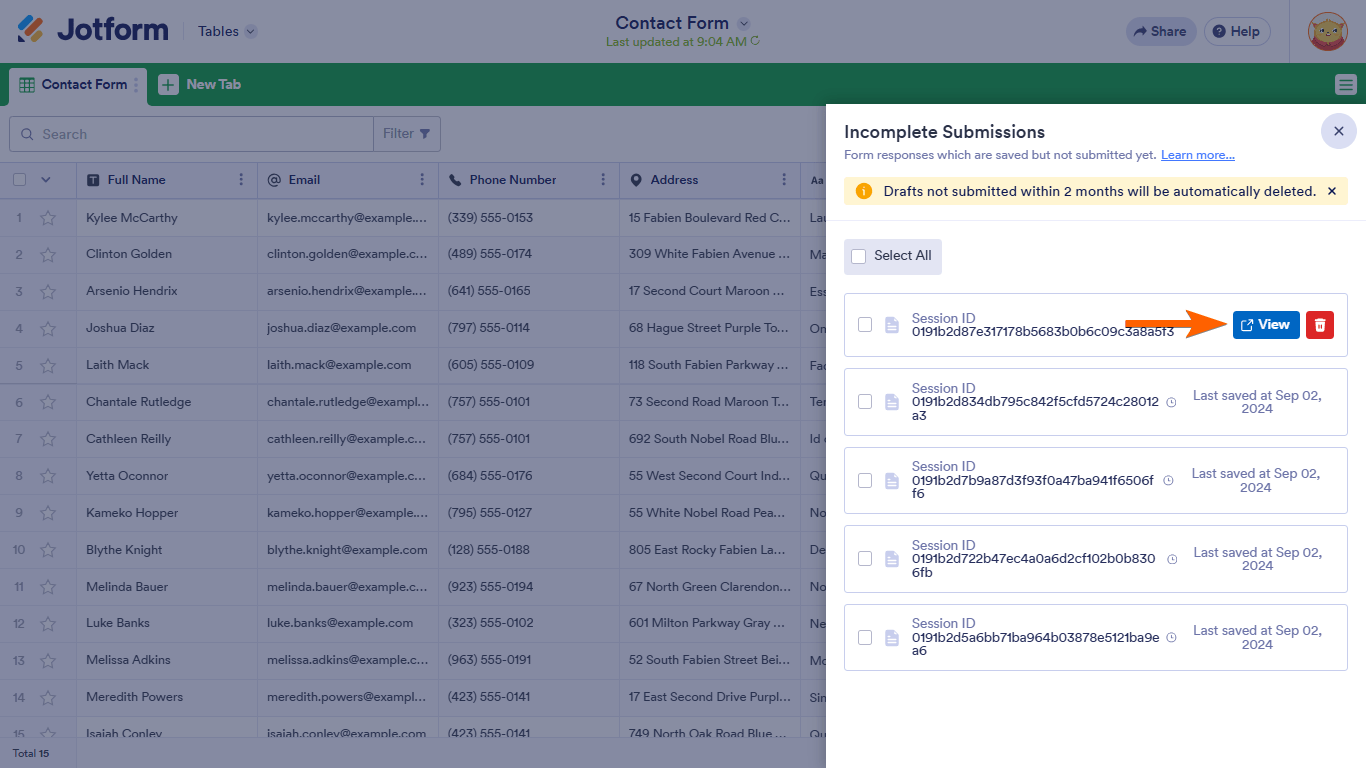
Drafts not submitted within 2 months will be automatically deleted.
To view incomplete submissions
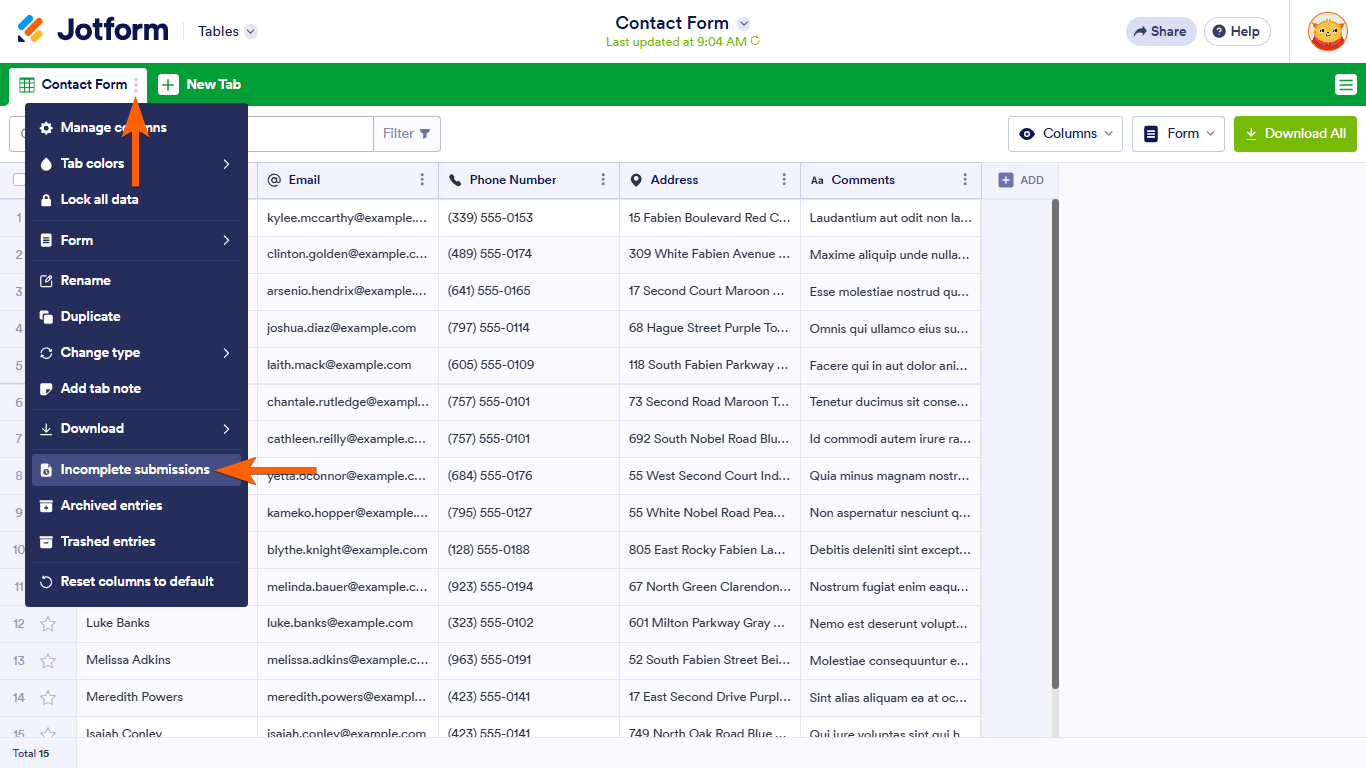
- In Jotform Tables, open the main tab menu in the upper-left corner.
- Select Incomplete submissions.
- In the right panel, select View to check the draft’s details.
See also: How to View Incomplete Payments.

Send Comment:
46 Comments:
February 1, 2026
Is there a way to email or notify the person submitting the incomplete submission? We are using the form as a scholarship application and this function would make it easier to remind those that have not finished their application
December 11, 2025
Is the two months from start date or from last save date?
November 4, 2025
is there a way to extend the form submission longer than 2 months?
August 25, 2025
The form I'm working with is enabled to save the form to continue later. I have found the list of incomplete submissions. However, the only option is to "delete" the submission and there is no option to view. We are using HIPAA compliant version. Does this restrict this option? Thanks
August 5, 2025
Is there a way to send a message to anyone who has started a form but not completed it, as like a reminder email?
May 13, 2025
Is there a way to provide a link to an individual with an incomplete submission?
April 10, 2025
Please resend my work
March 11, 2025
I don't have the option to view the submissions. How do i get the "View" option?
February 21, 2025
Draft link brings up message that it is not found. the draft has been deleted or already submitted. help!
October 13, 2024
Dang... I just deleted about 10 drafts that I did not mean to... can I get them back?
August 5, 2024
How can I view certain fields of all incomplete signups ie: the names of all incomplete signups
June 7, 2024
We are on the Hippa Compliant version - can we not view answers until they are submitted? We used to be able to view incomplete forms but no longer can.
June 6, 2024
Echoing this question since I tried to view the answer provided the last two times this was asked, but it directs to a 404.
"Drafts not submitted within 2 months will be automatically deleted.", does it refer to the creation date or the "last saved".
Thanks,
May 20, 2024
Echoing this question since I don't see an answer yet:
"Drafts not submitted within 2 months will be automatically deleted.", does it refer to the creation date or the "last saved".
Thanks,
May 6, 2024
When you say "Drafts not submitted within 2 months will be automatically deleted.", does it refer to the creation date or the "last saved". Thanks
April 10, 2024
Is there anyway to save partial submissions even if they didnt click "save and continue"?
March 5, 2024
Hi, I know how to access incomplete submissions, but would like to receive emails when people partially filled out the registration form. Is this possible?
Thanks.
September 20, 2023
muito fraco esse relatorio
June 27, 2023
Hello! When I hover over the incomplete submission, it does not show me the "View" option. Why? Thank you!
April 3, 2023
We keep losing our incomplete applications. I go in and view the incomplete applications on the form, but then later it becomes blank... for the person with the edit link and when I go back and view it again. This has happened multiple times, and I need to be able to view incomplete applications without losing the information.
Please Help!!
April 3, 2023
It would be super helpful if we view these incomplete submissions the same way as other submissions, like in a spreadsheet, not viewing the actual form. it is hard to sort through them, especially with only the ID.
March 25, 2023
I'd like to send a message to those who haven't completed the form. Can I do that?
March 14, 2023
please! can we have an email or name of the person who is filling out the form? It is impossible to find in a list like this based only on a submission id and date
January 24, 2023
why can't we update the recipient for the 'save later' email? it doesn't make sense to send the email and link to the account holders email if they are not the ones saving the form.. does this make sense?
July 6, 2022
When I click on "incomplete Submissions" the only option I have is to delete.
I would like to be able to see the submissions.