
Forget about logo redesigns and reinvented mascots. What’s trending these days are AI rebrands, and Salesforce is no exception. In 2024, the software company launched Agentforce, calling it the “third wave of AI.”
What is Salesforce and why are its AI tools such a big deal? It’s a customer relationship management (CRM) platform that helps businesses manage client data and coordinate departments. Its new AI features support and even automate everyday tasks, from scheduling sales demos to writing persuasive emails.
You don’t need to overhaul your entire operation to take advantage of these tools. Here are 10 practical Salesforce AI use cases to consider for your business, along with their benefits and limitations.
What is Salesforce AI and why does it matter?
Salesforce AI is a suite of intelligent tools that improve or even completely take over routine CRM and sales tasks. One signature tool is Salesforce Einstein, combining generative AI and data analytics. Meanwhile, Einstein GPT uses customer data to generate content like emails and knowledge articles.

Agentforce is the latest addition to Salesforce’s AI dynasty. It lets companies build and manage conversational AI agents that interact with customers and team members. For example, a marketing agency could create an agent to draft campaign proposals — then there’s no more spending hours researching and writing the perfect pitches.
Salesforce has also invested $1 billion in AI-first companies like Anthropic and ElevenLabs. John Somorjai, president of Salesforce Ventures, explains, “The companies that will win aren’t just building better models; they’re building more resilient businesses around transformative AI capabilities.”
By focusing on AI, Salesforce aims to help companies adapt and grow. These tools also allow companies to deliver better service by using “humans and agents [to] drive customer success together.” An overworked sales rep, for instance, could use AI to score leads instead of sifting through hundreds of files themselves.
Businesses are already seeing positive benefits from Salesforce generative AI use cases. According to Salesforce’s sixth State of Sales report, 83 percent of sales teams using AI increased revenue in 2024, compared to only 66 percent of non-AI users.
10 practical Salesforce AI use cases that drive results
Salesforce’s AI features won’t replace your human team, but this technology certainly makes their jobs easier. Here are 10 use cases for these handy tools:
1. Lead and opportunity management
It’s no secret that businesses need new clients to grow. However, sales representatives spend only 8 percent of their time prospecting, while non-selling tasks take up 70 percent of their days.
Lead scoring is one of the top Salesforce Einstein AI use cases. It uses predictive analytics and behavioral data to help sales teams spot the most promising prospects. Someone who works at a major enterprise, for instance, may score higher than a prospect at a cash-strapped startup. Sales reps have limited time, so this information lets them focus on people with the resources (and desire) to buy.
Tools like Jotform’s Salesforce Agent also help turn conversations into opportunities. When customers chat with the agent, it gathers their information and routes it to the right team. Is a visitor asking about a product that hasn’t launched yet? The agent can send their contact info to the sales department so you don’t lose the lead. Meanwhile, someone who complains about a broken product will get routed to customer support.
2. Case management
No one enjoys contacting customer support, especially if it takes forever to get a simple answer. And if your team can’t resolve a case — or even worse, loses track of it — you may permanently damage that client relationship.
Prevent this issue by using Salesforce AI to manage support cases. Jotform for Salesforce automatically creates cases and updates clients. It also escalates support tickets as necessary, so customers don’t get stuck in limbo. For instance, a supervisor may need to sign off on a complicated product exchange that the agent can’t handle alone.
3. Order tracking
Your customers are excited about your products and want them to arrive ASAP. Salesforce AI automatically manages shipments and tracks orders, so they always know when to expect the next delivery.
Is your support team constantly fielding calls about missing packages and order dates? With Jotform’s Salesforce Agent, a friendly chatbot handles those conversations instead. It checks the latest Salesforce records and uses them to give customers real-time order updates. If something goes wrong, it can also help resolve claims. That frees up your human staff for more challenging cases requiring empathy or more advanced problem-solving.
4. Appointment scheduling
Clients want face time with your team, but booking appointments can be incredibly time-consuming. And don’t forget the endless requests to reschedule appointments and make up for missed ones.
Save yourself the headache with AI Scheduling Assistants. These digital receptionists communicate directly with clients to find the best appointment slots. A sales team could use this tool to book product demos with prospects, and the AI assistants could send reminders and reschedule customers if something comes up, so your team wastes less time with no-shows.
5. Knowledge and FAQ assistance
Let’s face it: No one wants to search a dozen web pages to find your return policy or figure out if your product is organic. Save time by using an AI Agent or Einstein Search Answers to answer questions. These tools retrieve information from your Salesforce Knowledge Base and share it with clients.
A software firm could use an AI agent to answer product questions, such as “How do I create a report?” and “Where is the save button?” The agent will consult the Knowledge Base to find accurate answers and point visitors to helpful resources on the website. These direct responses reduce customer frustration because they don’t need to go on a scavenger hunt to find information. Plus, the support team will spend less time fielding basic questions.
Salesforce generative AI use cases also include creating resources. Tools like ChatGPT can translate dense product manuals into simple how-to guides and FAQ pages. You can also use AI to spot patterns in customer feedback and develop relevant materials.
6. Employee and HR support
Even well-organized companies often have confusing or convoluted policies. Or maybe there are a few obscure internal processes that only a handful of long-time employees understand.
Salesforce AI can assist employees by answering HR questions. It uses machine learning algorithms to process vast amounts of information and find relevant answers. If an employee asks, “Can I get reimbursed for a client dinner?”, AI gives them an immediate and accurate response.
Additionally, this technology guides workers through internal processes. Is Steve from IT on vacation for the week? No problem. AI can tell a new employee exactly how to request a new monitor or put in a support ticket while he’s gone. These Salesforce AI use cases empower your team to access information when they need it, even if it’s 3 a.m. on a Saturday.
7. Analyze customer feedback
Every business relies on feedback to improve and learn about customer needs. Reviews and surveys quickly pile up though. Suddenly, you’ve got an ocean of data points, and you can’t even tell if the overall sentiment is positive or negative.
Data analysis is one of the core Salesforce agentic AI use cases. This software quickly evaluates vast datasets and detects trends. Tools like Agentforce Tableau go further by visualizing data as charts and other graphics. These visuals make it easier for humans to spot patterns and anomalies that might otherwise go unseen.

If a B2B business launches a new mobile app, the developers can use Salesforce AI to analyze internal data —such as sales figures and surveys —and external information —like Google Reviews and social media activity. If the data analysis shows that customers dislike the app’s user interface, the developers can quickly fix the issue.
8. Forecast sales
Salesforce automatically collects a wealth of sales data, including revenue and number of sales. AI can take these historical figures and project how much revenue your company will earn in the future.
You may already have human data analysts create sales forecasts. However, predictive AI analyzes information faster and more accurately, saving time. It also provides neutral advice about how to grow revenue without the emotions or personal biases that humans often have.
For example, a toy company may plan to invest more in a beloved but pricey “mom-fluencer” campaign. However, AI shows offering incentives for referrals actually has the biggest impact on sales, inspiring a strategy shift.
9. Personalize communications
Mass email blasts and generic Facebook posts don’t cut it anymore. Today’s customers expect genuine and personalized messaging from brands. That’s not always easy, especially if you have hundreds or thousands of clients.
AI is a game-changer in this area. Einstein and other generative AI tools draw on the data you’ve gathered in your CRM to learn about each customer’s interests and needs. Then, they use this information to create personalized content.
Here are a few Salesforce generative AI use cases:
- Multinational companies can generate and translate surveys for people from different cultures.
- Send custom product or service recommendations based on the customer’s purchase history.
- Your marketing team can draft different subject lines for each segment of your audience, such as cat owners and parents.
10. Sales coaching
You don’t need to send your sales team to boot camp or bring in an expensive sales guru. An AI coach can provide personalized training and feedback 24-7.
An easy way to start is by having sales reps roleplay with AI to sharpen their negotiation and communication skills. An AI coach can also listen to sales calls and offer instant feedback, such as, “When you say ‘X,’ it sounds too pushy for our customers. Try to soften your language and appeal to their emotions first.” These suggestions help your sales team step up their game and close more deals.
Benefits and limitations of Salesforce AI tools
From data analysis to faster onboarding, there are clear Salesforce benefits for businesses in every industry. But is it worth investing in AI tools, too? It depends on your goals and workflows.
The advantages of Salesforce AI tools include
- The ability to analyze more data and get unbiased recommendations
- Automation to let employees focus more on customers
- Easy scalability
- Faster customer support with AI agents
- More personalized content
- Less time spent on repetitive tasks, such as drafting cold emails and rescheduling an indecisive client’s appointment for the third time
However, AI isn’t a magic cure-all. Here are a few potential drawbacks:
- Learning curve: Your team may need extensive training to use AI tools effectively, costing time and money.
- Employee resistance: Some people might prefer to handle their responsibilities manually or fret that AI will replace them.
- Not appropriate for every situation: Sensitive customer interactions and complex operations often require a human touch. If a grief-stricken client speaks with an AI chatbot, it may misinterpret their tone as aggressive and shut down the conversation. On the other hand, a human representative can read between the lines and respond with empathy.
- Tools change frequently: AI software can become obsolete faster than the latest iPhone. On February 14, 2026, Salesforce will retire legacy chat products, including LiveAgent and Service Chat.
You can avoid these issues by using a Salesforce alternative like Jotform. Its AI agents don’t require any coding or extensive training, so employees can get up to speed quickly.
Introducing Jotform Salesforce Agent

Get more out of your trusty CRM with the Jotform Salesforce integration. This AI agent automatically creates, updates, and manages Salesforce records as it chats with customers and processes form submissions.
Here are a few standout features of the Jotform Salesforce AI Agent:
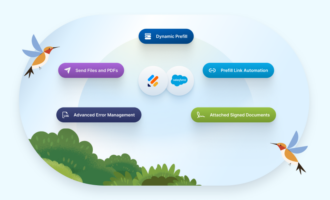
- Auto retrieval of Salesforce knowledge articles: During setup, the AI agent automatically retrieves and trains with your Salesforce knowledge articles for more accurate responses.
- Connects to Salesforce directly: You can set up Salesforce integration with only a few clicks. Your agent can create and reference custom or standard Salesforce forms while chatting with customers.
- Works with any Salesforce objects: Jotform supports both standard and custom objects, so you can fit the agent into your unique setup.
- Omnichannel deployment: The agent provides accurate, human-like AI responses across chat, web, and phone.
- Predefined agent skills and actions: Jotform offers ready-to-use templates for many tasks, including case management, order tracking, employee and HR support, and appointment scheduling. These templates are automatically set up with pre-built actions for fast automation.
- Test and improve your agent: Before you roll out your AI agent, test and refine it so it always strikes the right tone.
- AI-powered interactions: Your Agent will use natural language processing to respond to clients and trigger the appropriate Salesforce action
- Tracking and visibility: Each conversation features integration logs showing every interaction, including successes and failures. That way, you easily see what’s working and where you can improve.Jotform Salesforce forms also keep your CRM updated 24-/7.
By using Jotform as your Salesforce AI assistant, you’ll save time and boost your team’s efficiency. They’ll also appreciate their lighter to-do lists.
Finding the right path for your use case
This article has only scratched the surface of Salesforce AI use cases. There are dozens of ways to use these tools to provide better service and help your team work faster.
Of course, you shouldn’t try to use them all at once — that’s too overwhelming. Follow these steps to get started:
- Audit your current workflows and pick two or three areas where AI will have the most impact.
- Subscribe to a plan with access to Einstein and other Salesforce AI features. You may need to pay extra licensing or add-on fees for some tools.
- Configure the AI features in Settings, or hire a consultant to help.
- Train your staff to use AI agents and other features.
As you build your AI toolkit, explore Jotform’s Salesforce integration. It’s an easy way to dip your toes into the wonderful world of automation and sync your forms with Salesforce. Get the free app today!
FAQs about Salesforce AI use cases
Nope! Like Jotform, Salesforce offers no-code customizations, so you can tweak the platform without any programming knowledge.
Yes, Salesforce tools like Einstein GPT use generative AI to create marketing and sales content.
This article is for marketing agencies, CRM administrators, content managers, and anyone who wants to understand how Salesforce AI tools like Einstein and generative AI are driving real-world results across sales, marketing, and customer service operations.













































































Send Comment: