
Salesforce dominates the CRM landscape with a 20.7 percent global market share in 2024, serving 150,000-plus companies worldwide. That scale gives it unmatched ecosystem depth but also more complexity than smaller teams often need.
Salesloft plays a different game. The platform is used by 6,100-plus companies globally, and it zooms in on the sales engagement layer: the day-to-day actions that move deals forward.
So when teams compare Salesloft vs Salesforce, they’re deciding between a focused sales accelerator and a full-scale revenue platform. This isn’t just a platform comparison — it’s the classic CRM vs sales engagement debate.
We’ll dig into how these two platforms handle the realities of selling today: setup speed, automation depth, analytics, integrations, and growth potential. By the end, you’ll know which system fits your workflow.
Here’s a quick snapshot of how Salesloft and Salesforce stack up:
 Salesloft |  Salesforce | |
|---|---|---|
| Industry fit | Most common in B2B mid-market (companies ~50–200 employees, ~$10–50M revenue), especially software and professional services | Broad, all-industry coverage via industry clouds (e.g., financial services, healthcare, retail, public sector) built on Customer 360 |
| Scalability | Grows from mid-market to enterprise with enterprise tiers; recognized as a Leader in Forrester Wave for Revenue Orchestration (2024) | Proven enterprise scale with Hyperforce (global data residency, compliance, elastic capacity) and Data Cloud for real-time, large-scale customer data |
| Core functionality | Sales engagement and revenue orchestration: cadences, dialer, email, conversation intelligence, deal management, pipeline/forecasting | CRM platform: account/lead/opportunity management, forecasting, pipelines, approvals, and extensibility across sales/service/marketing on Customer 360 |
| AI and automation | AI-assisted prioritization and workflows (Rhythm), conversation intelligence, and coaching | Einstein for Sales (scoring, recommendations, next-best actions) plus CRM analytics for embedded predictions and insights at scale |
| Entry cost | ~$1,000/month for a small team (depending on features, calls and messaging add-ons) | $25/user/month for Starter Suite |
What is Salesloft?
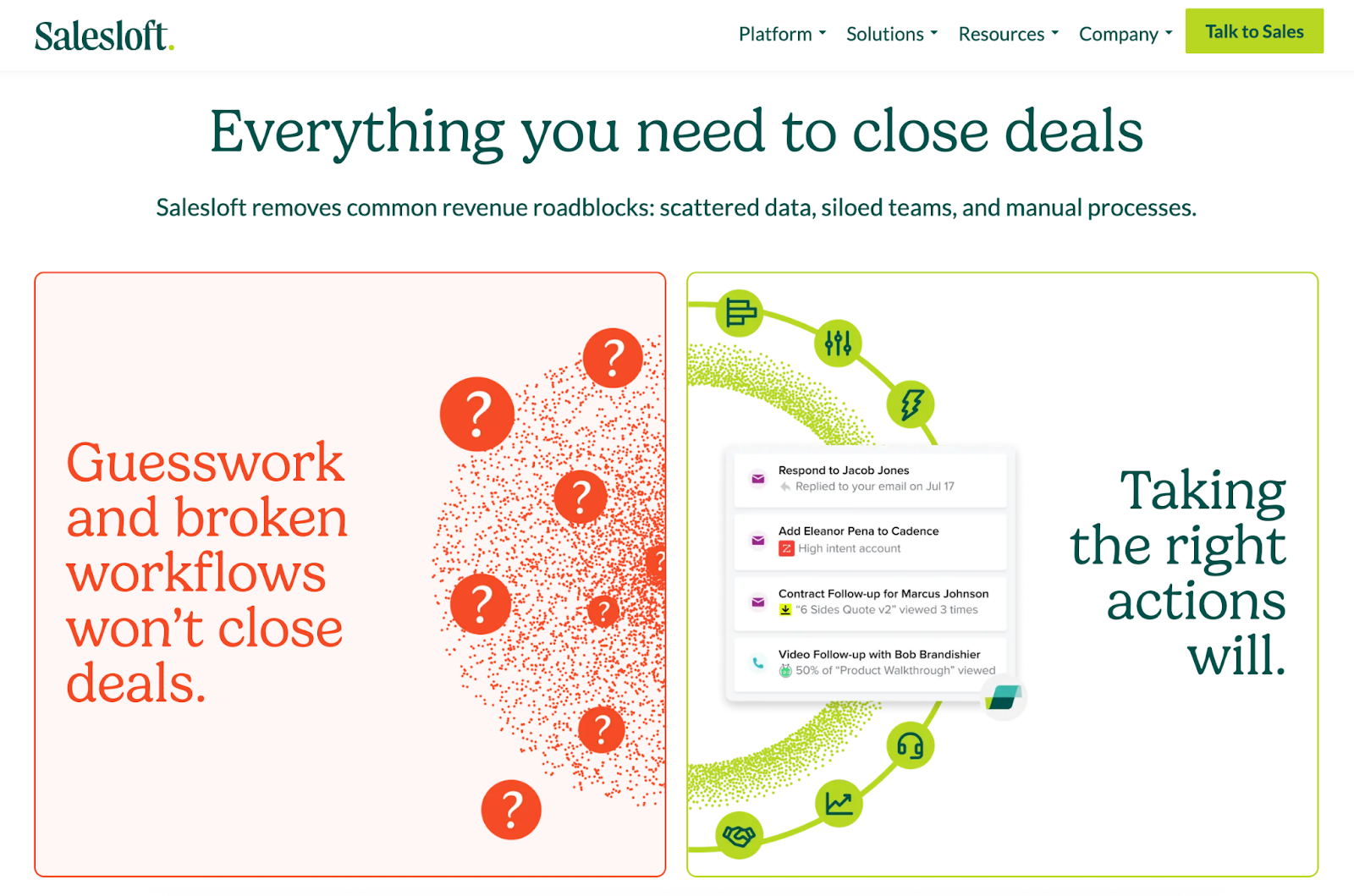
Salesloft is a sales engagement platform designed to help teams manage the daily work of selling — the calls, emails, and follow-ups that turn prospects into pipeline.
Founded in 2011 in Atlanta, Salesloft grew from a prospecting plug-in into what it now calls an “AI revenue orchestration platform.”
Overall Salesloft G2 rating: 4.5/5
Overall Salesloft Capterra rating: 4.3/5
At its core, Salesloft helps sales teams
- Build and automate cadences across email, phone, and social channels
- Log activity automatically by syncing with CRMs like Salesforce, so nothing slips through the cracks
- Review and improve conversations through call recordings, transcription, and coaching tools
- Prioritize next steps with Rhythm, its AI assistant that surfaces deals or accounts most likely to move
- Measure performance with detailed dashboards that connect activity metrics to actual revenue outcomes
In 2024, Salesloft was recognized as a Gartner Peer Insights Customers’ Choice for Sales Engagement Applications for the second consecutive year — a signal that it’s become the default choice for teams serious about structured, repeatable outreach.
For teams exploring a Salesloft alternative, it’s worth noting that most comparable tools — Outreach, Apollo, Groove — focus on similar engagement workflows, but few offer the same level of cadence automation and AI prioritization.
Salesloft pricing
Salesloft offers two main pricing tiers as of October 2025 — Advanced and Elite — each designed for teams at different stages of growth and process maturity. While the company doesn’t publish per-seat pricing publicly, the tiers are differentiated by the depth of analytics, workflow customization, and admin controls available.
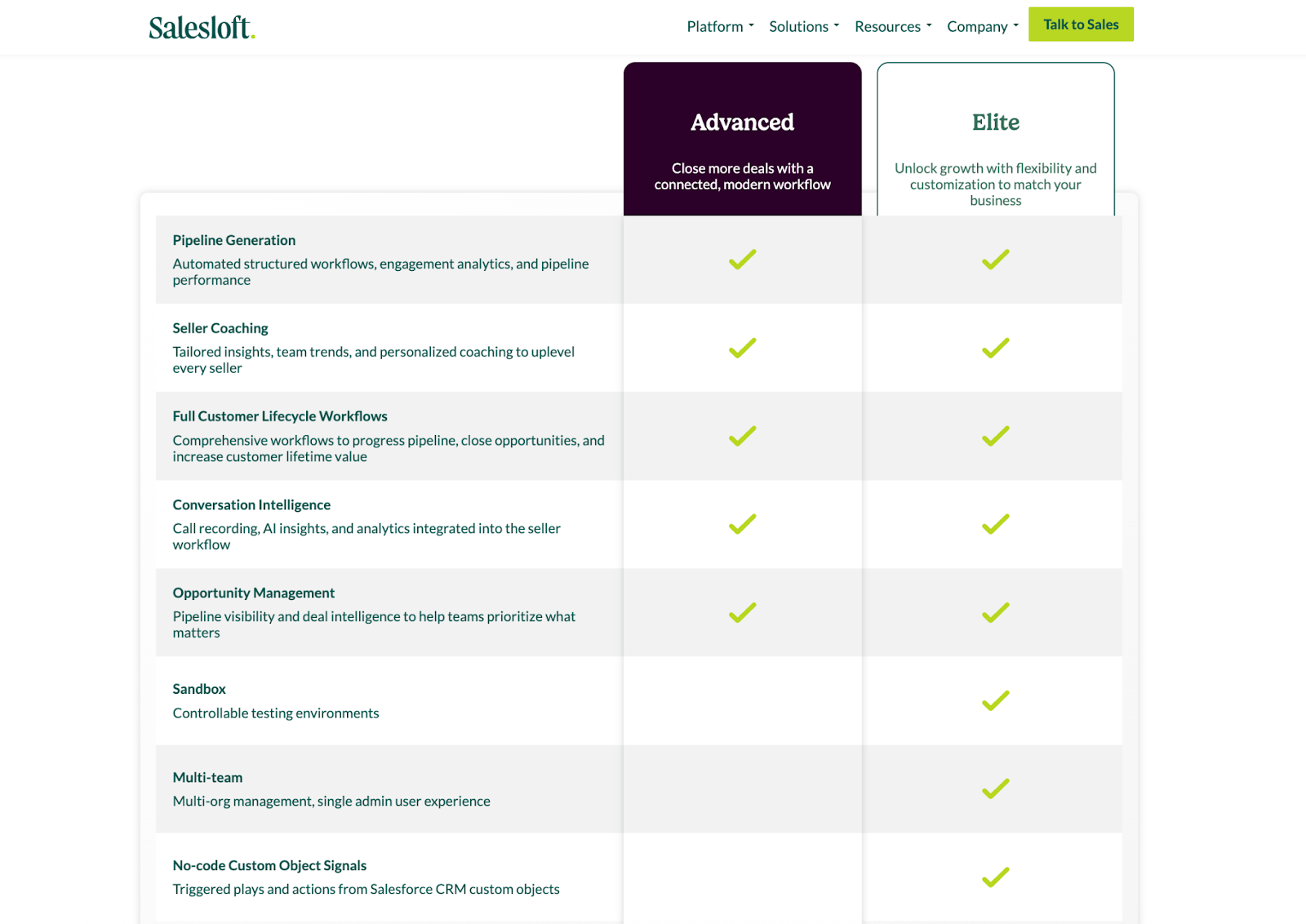
The Advanced plan is built for revenue teams that want a connected, modern workflow to close deals faster:
- Pipeline generation tools that automate outreach sequences and provide engagement analytics
- Seller coaching with team insights and personalized performance recommendations
- Full customer lifecycle workflows, helping teams progress deals and improve retention
- Conversation intelligence for call recording, transcription, and AI-driven coaching
- Opportunity management to visualize pipelines, identify risks, and forecast more accurately
The Elite plan adds flexibility and customization for larger organizations or those with complex sales structures. In addition to everything in Advanced, Elite includes
- Sandbox environments for controlled testing before rolling out workflow or automation changes
- Multi-team management, allowing admins to manage multiple orgs under a single unified view
- No-code custom object signals, which let teams trigger automated plays or alerts from Salesforce CRM custom objects
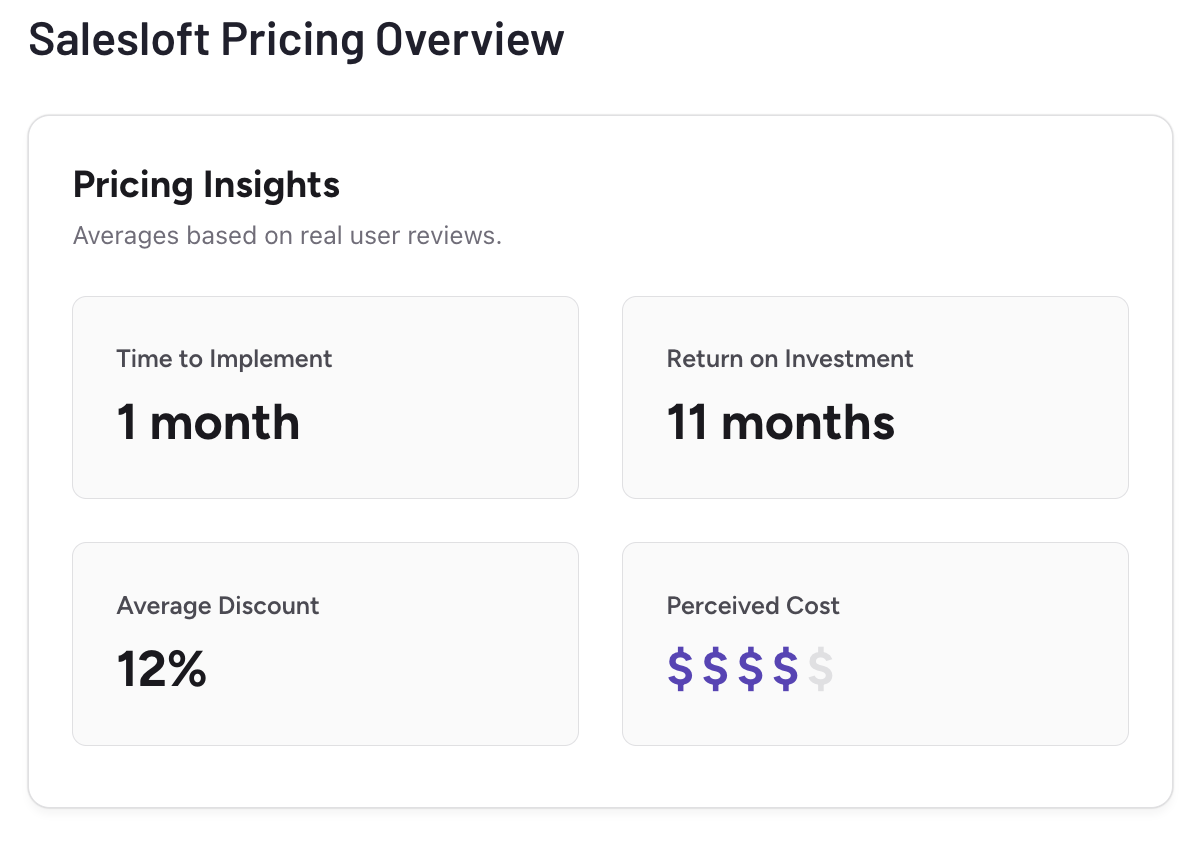
According to aggregated G2 user reviews, the average time to implement Salesloft is one month, with users reporting a return on investment after roughly 11 months.
The average discount across contracts is 12 percent, and the perceived cost falls in the “four-out-of-five dollar signs” range; indicating a premium, but often justified, spend for a lot of teams.
What is Salesforce?
Salesforce is a customer relationship management (CRM) platform that centralizes all customer data and business processes — from marketing touchpoints to support tickets — under one unified system.
Founded in 1999 in San Francisco, it turned the traditional on-premise CRM model into a flexible, cloud-based system. Over the years, Salesforce has evolved from a sales tracking tool into a full-scale business platform used for sales, marketing, support, and analytics.
Overall Salesforce G2 rating: 4.4/5
Overall Salesforce Capterra rating: 4.4/5
At its core, Salesforce helps teams to
- Track and manage relationships through structured records for leads, accounts, contacts, and opportunities
- Automate repetitive tasks like follow-ups, approvals, and deal routing
- Forecast and analyze revenue with dashboards and real-time reporting
- Integrate data from other tools: email, ERP, or marketing platforms, through built-in APIs and connectors
- Enhance workflows with AI via Einstein, which predicts conversion likelihood, recommends next steps, and generates insights from historical data
- Customize or extend the system using low-code tools or third-party apps from the AppExchange marketplace
For most organizations, Salesforce functions as the system of record: the central hub where customer data, workflows, and revenue forecasting all converge.
Salesforce pricing
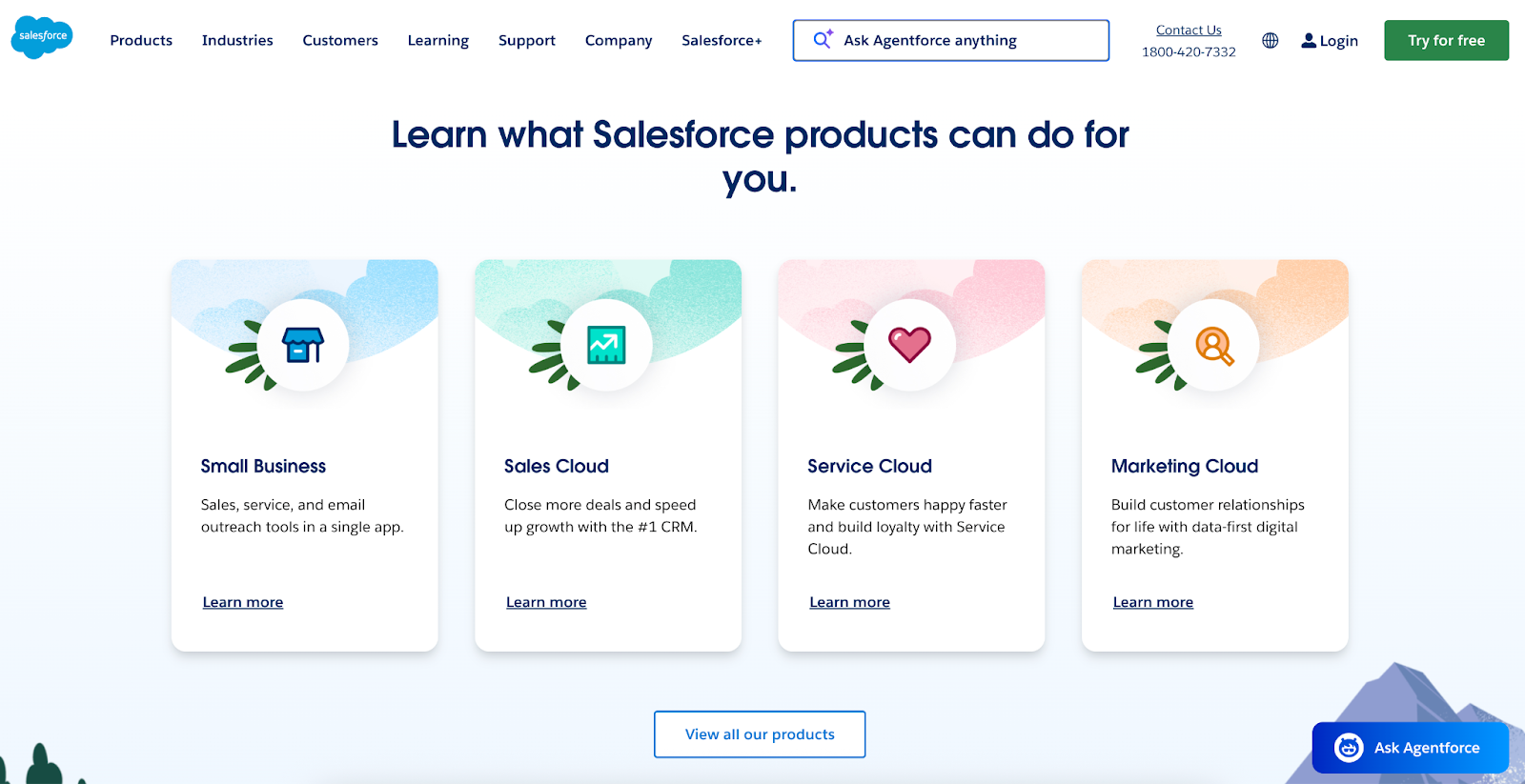
Salesforce offers a wide range of pricing plans depending on the product module: Sales Cloud, Service Cloud, Marketing Cloud, Commerce, and more. For this comparison, we’ll focus on Sales Cloud, Salesforce’s core CRM for sales teams.
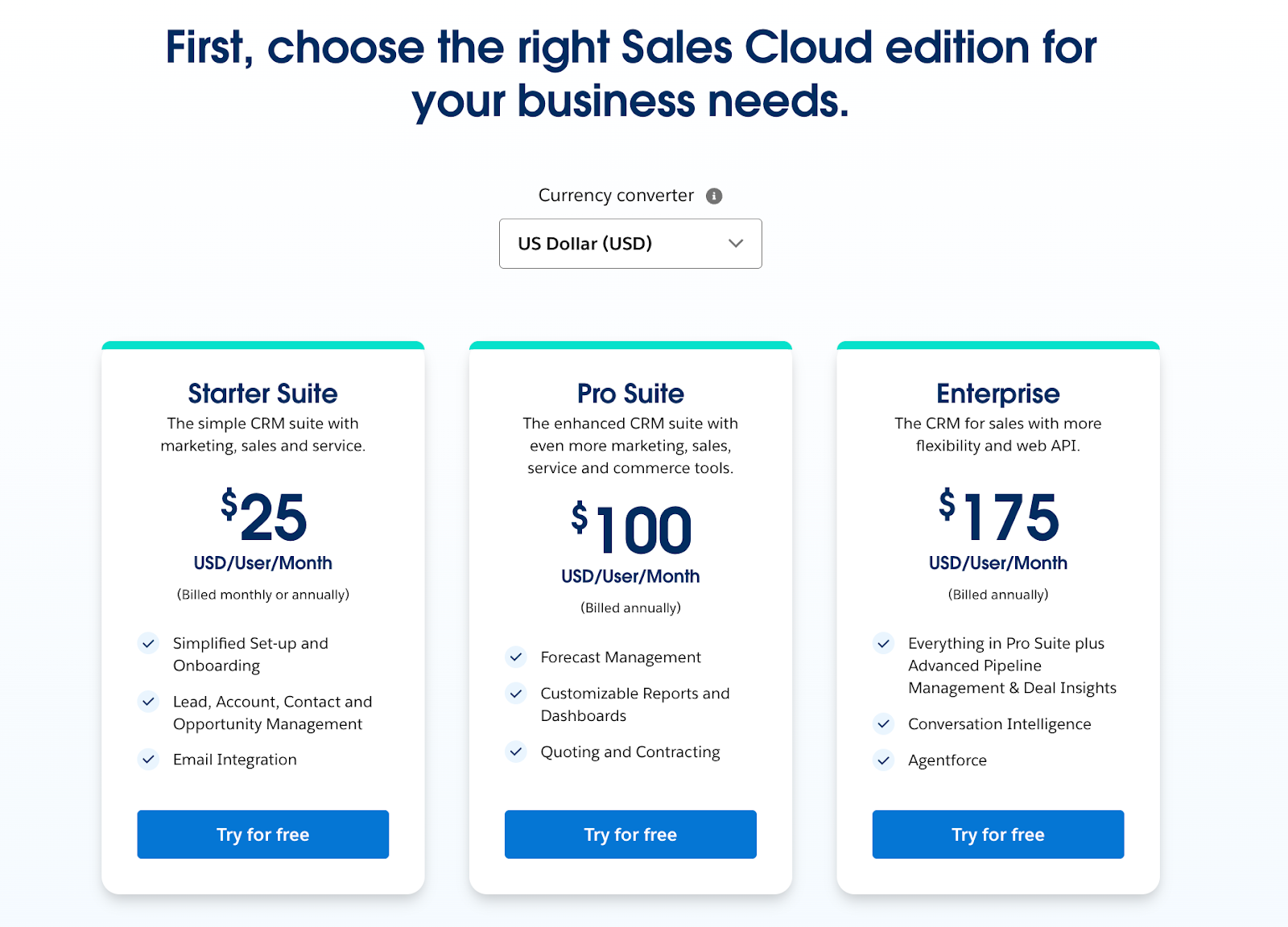
- Starter Suite at $25 per user per month: A streamlined CRM for small teams that need quick setup and core functionality; includes simplified onboarding, lead and opportunity management, contact and account tracking, and email integration
- Pro Suite at $100 per user per month: Adds deeper management tools for growing teams; includes forecasting, customizable reports and dashboards, quoting and contracting, and broader collaboration features
- Enterprise at $175 per user per month: Designed for larger organizations with complex sales processes; includes everything in Pro Suite, plus advanced pipeline management, deal insights, conversation intelligence, and Agentforce (Salesforce’s AI layer for predictive guidance)
- Unlimited at $350 per user per month: A premium plan offering everything in Enterprise plus Predictive AI, Sales Engagement, a Premier Success Plan, and a full sandbox environment for testing automations before deployment
- Agentforce 1 Sales at $550 per user per month: The most comprehensive CRM tier; includes unlimited access to Salesforce’s full AI suite and real-time data integration through Data Cloud; bundles advanced tools like Salesforce Spiff, Sales Planning, Maps, Tableau, and Slack Enterprise, along with 2.5 million Data Cloud credits and one million Flex credits per year
Who uses Salesloft vs Salesforce?
We’ve already mapped out what each platform does. But who actually uses them?
According to G2’s side-by-side comparison, Salesloft scores higher in ease of use and email tracking/automation, while Salesforce outperforms in deeper CRM functions and integration capabilities.
This suggests that the kinds of teams that prioritize ease and outreach will favor Salesloft, while those needing depth and integration will go for Salesforce.
Salesforce has a significantly larger footprint than Salesloft in the “Sales Force Automation” category. Salesforce serves 158,574 customers, while Salesloft serves 5,205.
Salesforce’s footprint is global, with the largest clusters in the United States, United Kingdom, and India. Salesloft’s user base is more concentrated in the United States, with smaller pockets across Brazil, France, and the UK.
With that in mind, let’s take a closer look.
Who is Salesloft’s target audience?
- Mid-market B2B companies that typically have 50–200 employees and $10M–50M in revenue and rely on outbound sales for growth
- Sales development and account executive teams that need structured cadences, call tracking, and automated follow-ups to stay consistent at scale
- Sales managers and RevOps leaders looking for better visibility into rep activity, sequence performance, and deal progression
Why they choose Salesloft:
These teams want a focused engagement platform that brings discipline and data to daily selling. They value automation, accountability, and coaching tools over complex CRM architecture.
Who is Salesforce’s target audience?
- Large or fast-scaling organizations with multiple sales teams, long buying cycles, and layered approval structures
- Enterprises and global brands that need to unify sales, service, marketing, and support data in one ecosystem
- Industries with strict compliance or data governance needs, like finance, healthcare, and government, where Salesforce’s security and custom architecture matter
Why they choose Salesforce:
These companies treat Salesforce as their operational backbone. They need a system that connects every customer interaction, automates reporting, and scales reliably across teams, regions, and business units.
Still, there’s overlap. Many companies use Salesloft and Salesforce together. Salesloft handles the engagement layer (calls, cadences, and follow-ups), while Salesforce serves as the system of record.
Salesloft’s key features
Salesloft combines automation, coaching, and analytics to help sales teams manage outreach at scale. According to the company, these are the platform’s defining features:
- Cadence automation: Salesloft’s cadence engine structures how reps reach out — through a mix of calls, emails, LinkedIn touches, and reminders. It removes guesswork by automating when and how to follow up, keeping every lead on track through consistent, repeatable workflows.
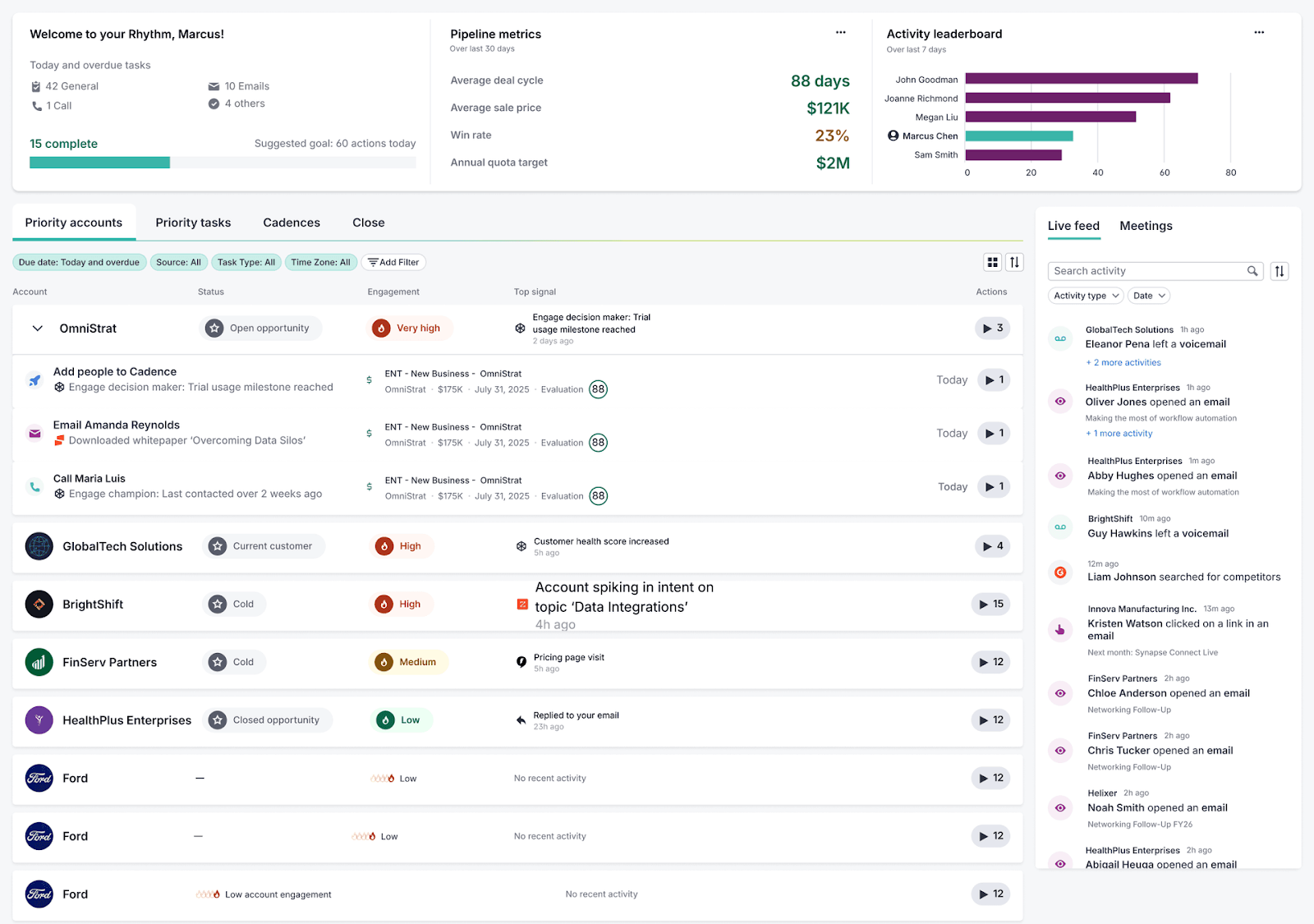
- Rhythm (AI-powered prioritization): Rhythm pulls every buyer signal into one place — from email engagement to intent data — and turns it into a daily, prioritized to-do list for each seller. The Prioritizer AI Agent translates those signals into clear next steps, so sellers know exactly where to focus.
- Conversation intelligence: Every call and meeting can be recorded, transcribed, and analyzed. Salesloft’s AI identifies key moments, objections, and talk-to-listen ratios, giving managers the insights they need to coach effectively and standardize winning talk tracks.
- Deal and pipeline management: The “Deals” module visualizes every opportunity in motion. It shows where deals are stalling, which accounts need engagement, and how activity aligns to forecast targets — turning rep actions into measurable revenue impact.
- Native integrations with CRMs like Salesforce: Salesloft integrates directly with leading CRMs — most notably Salesforce — syncing calls, emails, and deal updates automatically. This keeps both systems aligned without manual entry, giving teams the engagement tools of Salesloft and the data foundation of Salesforce.
Salesforce’s key features
Salesforce combines data, automation, and cross-team connectivity to serve as a central hub for customer lifecycle management. Here are some of its defining capabilities:
- Contact, account, and opportunity management: Salesforce gives you structured records for leads, contacts, accounts, and deals. You can see a full timeline of interactions, manage hierarchies of accounts, and maintain visibility into the health of every opportunity.
- Workflow automation and process builder: Automate repetitive tasks like assignment rules, alerts, approvals, triggered actions, so your team doesn’t have to babysit every step. Salesforce’s drag-and-drop process builder makes it possible without heavy coding.
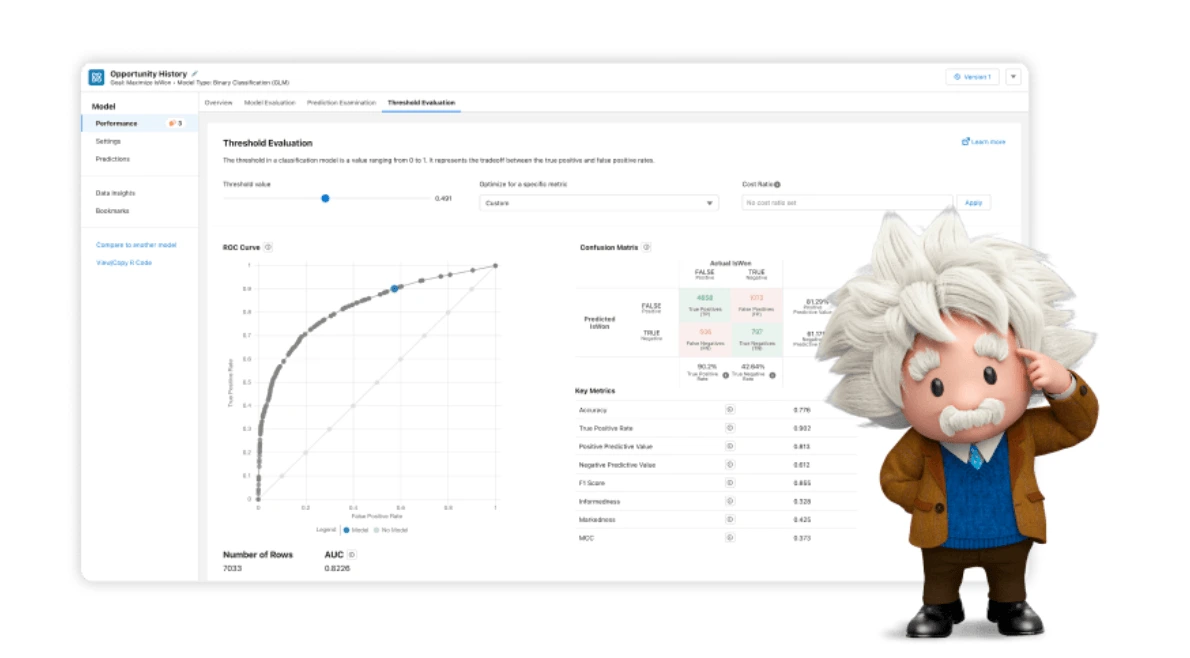
- AI and predictive tools (Einstein): With Einstein built in, Salesforce can score leads, predict conversion likelihood, recommend next steps, and surface insights drawn from historical data.
- Mobile and cloud access: As a cloud CRM, Salesforce can be accessed from anywhere. The mobile app lets sellers update tasks, view dashboards, and log activity in the field.
- Platform and extensibility: Salesforce is built for customization: you can extend it using the AppExchange, build custom apps, integrate with ERP/email/other systems, or embed logic with low-code tools.
The common ground between Salesloft and Salesforce
We’ve already touched on how these two platforms connect, but let’s look closer at the features they share — and how teams use them alongside each other.
Workflow automation
Both platforms help sales teams replace repetitive manual work with automated workflows.
- In Salesloft, automation shows up in cadences and sequences, automatically sending emails, logging calls, and triggering reminders.
- In Salesforce, automation lives inside Flows and Process Builder, allowing teams to auto-assign leads, update deal stages, or send notifications based on rule-based logic.
In practice, many companies use both platforms in tandem: Salesloft for daily outreach automation and Salesforce to ensure those actions sync into broader sales processes and reports.
AI-powered sales insights
Both platforms have integrated artificial intelligence to guide sellers toward better decisions.
- Salesloft’s Rhythm and AI Agents surface the next best actions, analyzing engagement and deal data to highlight what to prioritize.
- Salesforce’s Einstein AI predicts conversion likelihoods, scores leads, and forecasts revenue.
Together, they form a feedback loop: Salesloft drives activity, Salesforce measures the impact, and AI in both tools continuously refines the cycle.
Analytics and reporting
Visibility is also a shared strength for both systems.
- Salesloft’s Analytics dashboard ties engagement metrics — email open rates, call activity, cadence performance — directly to pipeline outcomes.
- Salesforce’s Reports and Dashboards offer deeper drill-downs across opportunities, accounts, and regions, with full customization for leadership visibility.
When integrated, these insights connect seamlessly, letting teams see both what’s happening with Salesloft and why it’s happening with Salesforce.
Revenue intelligence
Each system provides visibility into deal health and pipeline performance.
- Salesloft’s Deal Intelligence highlights stalled opportunities and engagement gaps.
- Salesforce’s Revenue Intelligence brings predictive forecasting and AI-generated insights into deal progression.
For RevOps teams, using both tools means connecting seller activity (Salesloft) to revenue forecasting accuracy (Salesforce).
What do real users say about Salesloft vs Salesforce?
Here’s something interesting: according to Info-Tech’s SoftwareReviews, Salesforce Sales Cloud currently holds a 9.1 composite score across 107 verified reviews, compared to Salesloft’s 8.3 based on 71 reviews.
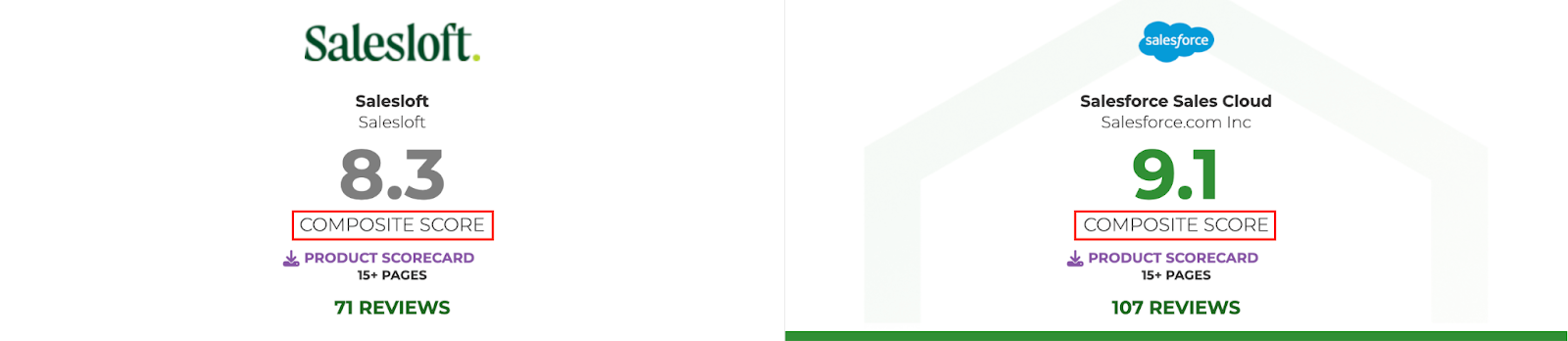
On the surface, that’s not shocking. Salesforce serves a far broader audience.
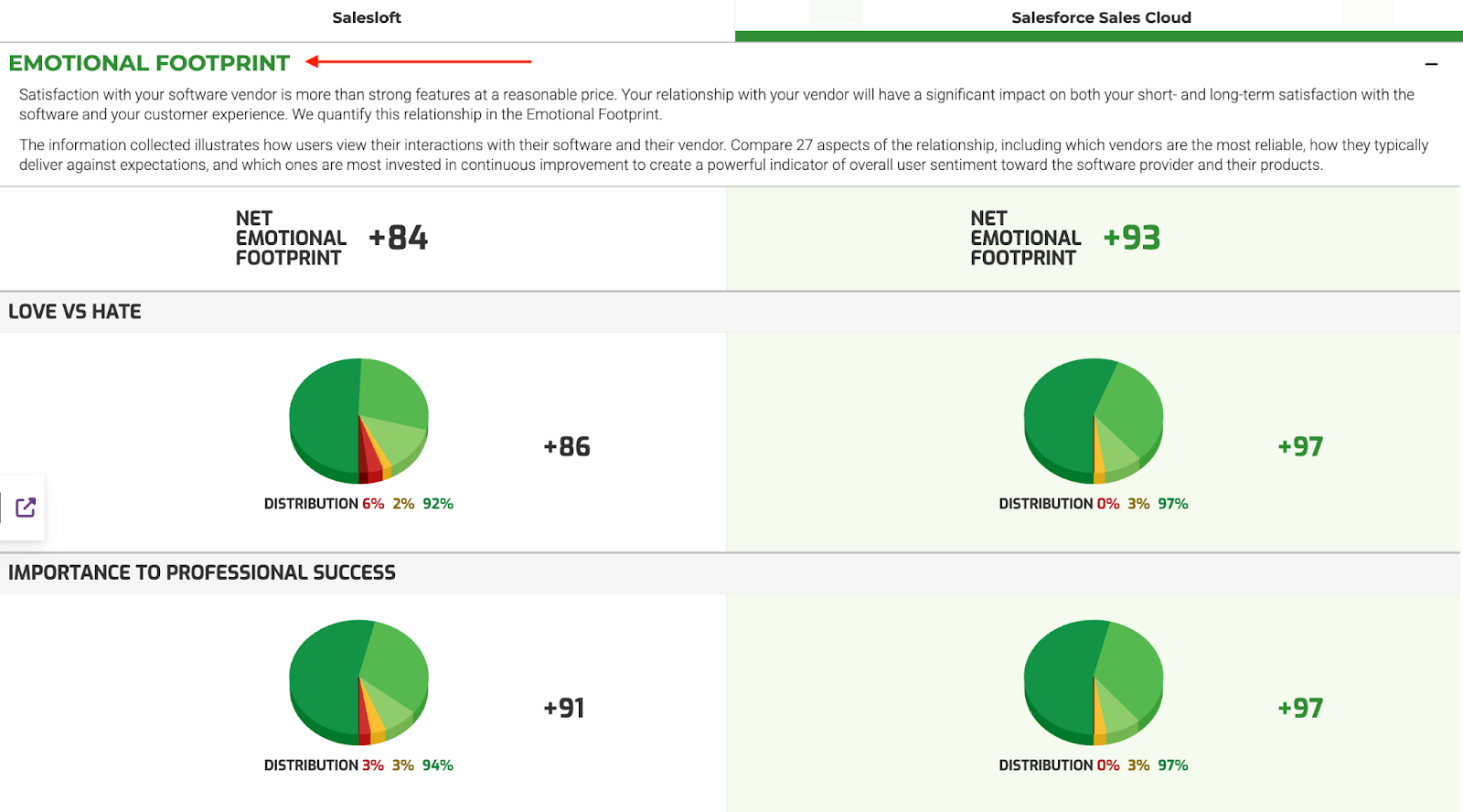
But what stands out is the “emotional footprint” metric Info-Tech tracks — basically, how users feel about working with each vendor day to day.
Salesloft | Salesforce | |
|---|---|---|
| Net emotional footprint | +84 | +93 |
| “Love vs hate” sentiment | +86 | +97 |
| Importance to professional success | +91 | +97 |
What does this mean?
- Salesloft wins hearts for usability and team-level speed.
- Salesforce wins trust for long-term reliability and vendor support.
That emotional layer matches what we’ve seen throughout this piece: Salesloft feels lighter and faster, but Salesforce feels like home base for teams that want stability, integrations, and scale.
What key problems does Salesloft vs Salesforce solve?
Beyond the overlap, each tool takes a different approach to solving the sales puzzle. Here’s where they truly diverge in terms of their unique features:
Salesloft is your sales engagement engine
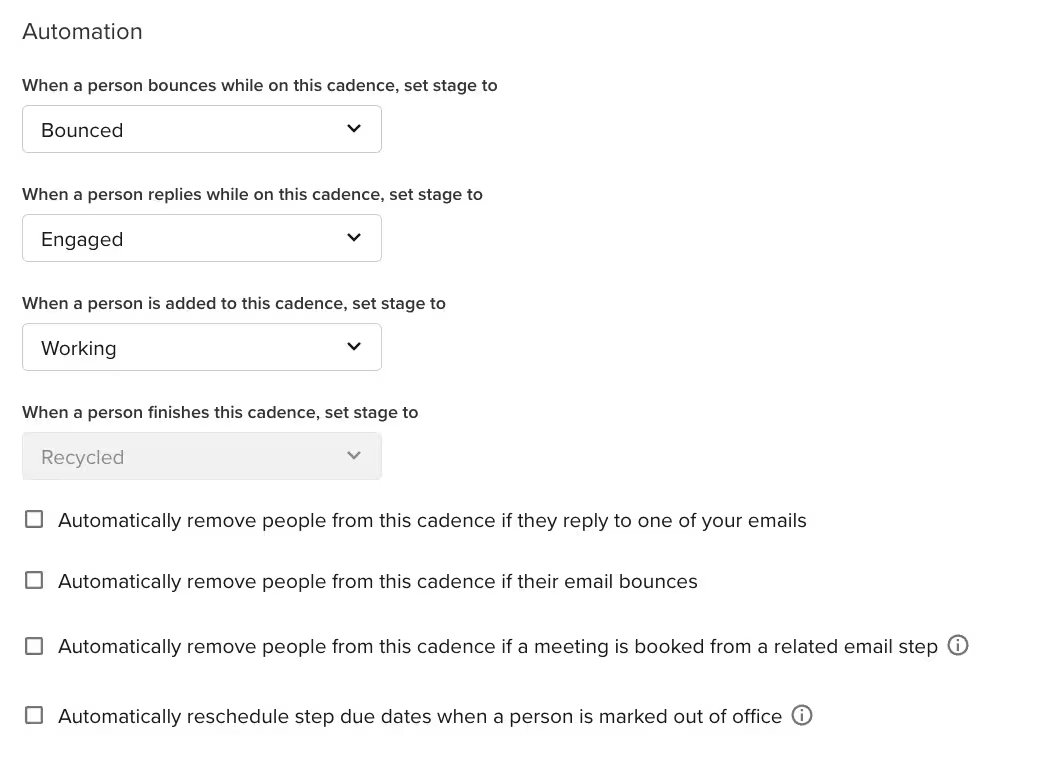
The platform unifies multichannel outreach — emails, calls, LinkedIn messages, and reminders — into automated “cadences.” The cadence builder lets you chain multiple steps — for example, email > call > social touch — and set automated delays between them.
You can also define branching logic based on reply or no response.
Salesloft’s Conversation and Deal Intelligence lets you track, transcribe, and analyze every call and email. The AI flags moments worth coaching like objection handling, talk ratios, and buyer hesitation, so leaders can target training with data instead of anecdotes.
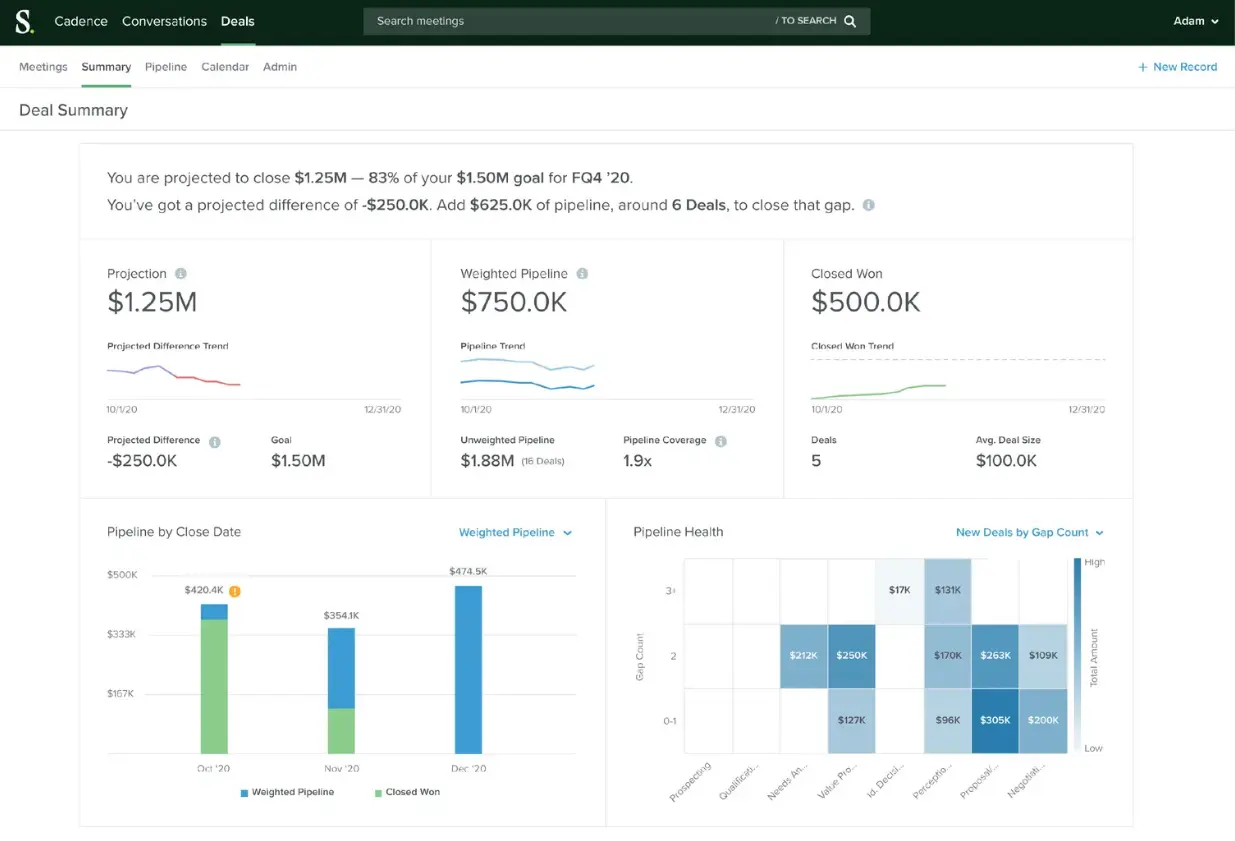
Rhythm and AI Agents aggregate buyer signals (intent data, engagement, CRM updates) and turn them into a daily to-do list. So, instead of guessing, sellers log in and see their highest-impact actions: who to call, who to re-engage, and what deals need a push.
Salesforce is your revenue command center
Sales Cloud gives teams a full view of every lead, opportunity, and account. Reps can track deals through custom stages, set up automated triggers for next actions, and use built-in forecasting to see how today’s pipeline converts into tomorrow’s revenue.
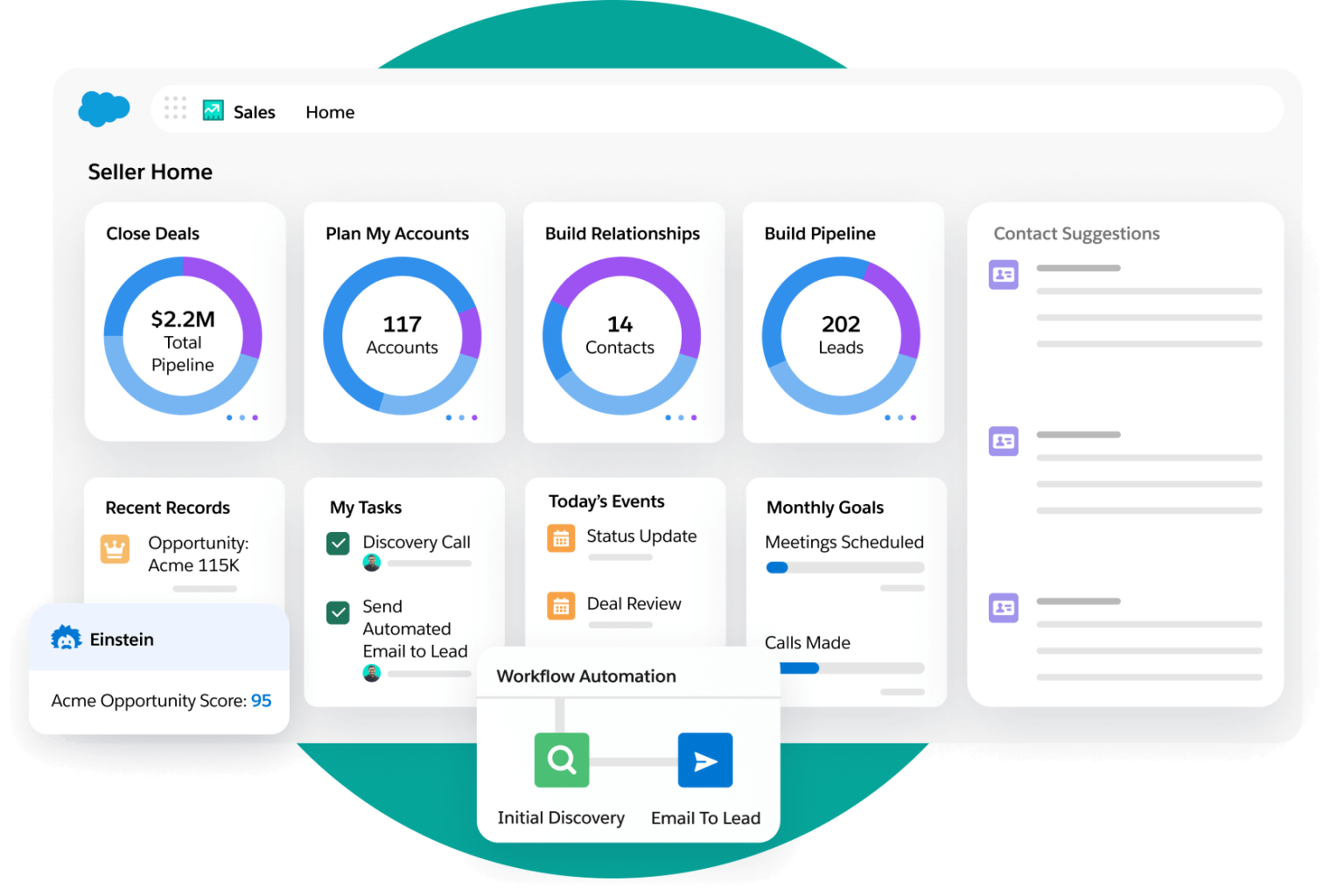
Einstein AI takes that a step further — scanning historical deal data to predict win probabilities, scoring leads based on engagement patterns, and surfacing insights like “which opportunities are most likely to close this quarter.” These predictions feed directly into dashboards, helping leaders plan with real accuracy.
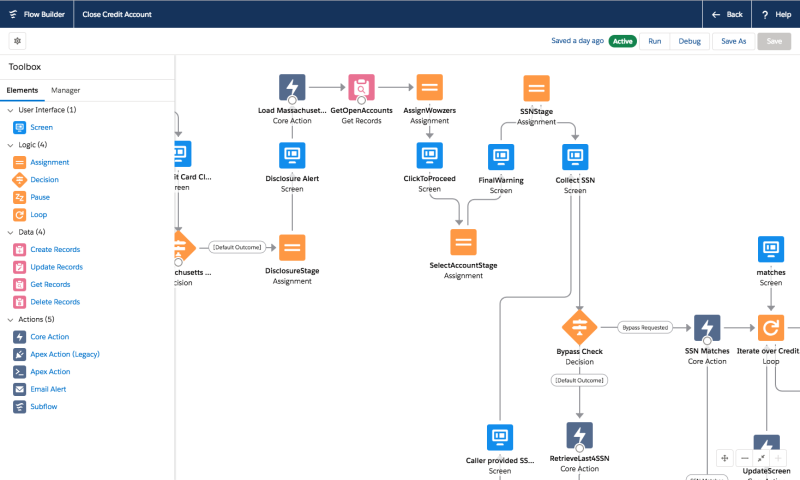
Flow Builder and automation tools handle everything from lead assignment to approval chains. You get drag-and-drop workflows or developer-level logic, and teams can automate nearly any repetitive process, from routing inbound leads to generating renewal reminders, without writing complex code.
Finally, Salesforce’s AppExchange ecosystem ties it all together. Thousands of vetted integrations including Jotform for Salesforce let teams extend the platform safely.

In short: Salesloft is where work happens. Salesforce is where everything connects.
Salesloft vs Salesforce comparison: Which is the best sales-engagement platform?
We’ve touched on these features throughout the post. Now let’s stack them side by side to see where each platform stands out for you.
Your decision scorecard
Salesloft | Salesforce | |
|---|---|---|
| Automation and AI | Cadence automation with branching logic and delays (email > call > social touch) via built-in workflow tools. | Flow Builder, Process Builder, and Einstein AI that predicts deal outcomes, recommends next steps, and scores leads. |
| Sales pipeline management | Deal Intelligence gives real-time visibility into stalled deals, flags risk, and links engagement metrics to pipeline movement. | Fully customizable pipelines, opportunity stages, forecasts, splits, and team-level rollups available in Sales Cloud. |
| CRM and data storage | Primarily an engagement layer — logs calls, emails, sequences; relies on integrations for full record keeping and relational data. | Central system of record: accounts, contacts, leads, opportunities, cases, activities — all unified in one database. |
| Integrations and ecosystem | Native sync with Salesforce, plus integrations with Drift, LinkedIn, ZoomInfo, and others for signal enrichment. | Huge ecosystem (AppExchange) and robust APIs for connecting with marketing, ERP, BI, service cloud, and niche tools. |
| Pricing and scalability | Tiered (Advanced, Elite) with add-ons. | Multiple editions (Starter, Pro, Enterprise, Unlimited, Agentforce) to fit small teams up to complex global organizations. |
| Security and compliance | SOC 2 Type II certified and GDPR compliant. Uses OAuth-based authentication and role-based permissions. | Enterprise-grade security with SOC 2, ISO 27001, HIPAA, and GDPR compliance. Advanced authentication, field-level encryption, and granular role controls. All AppExchange partners (including Jotform for Salesforce) undergo security reviews before listing. |
To make the differences easier to weigh, from our research, here’s how both platforms rank across the same five dimensions, scored on a 1–5 scale (5 = excellent fit):
| Aspect | Salesloft | Salesforce | Verdict |
|---|---|---|---|
Automation and AI |
5/5 ⭐ |
4/5 ⭐ |
Salesloft wins for daily outreach automation and cadence intelligence; Salesforce’s Einstein AI shines for forecasting, not front-line engagement. |
Sales pipeline management |
4/5 ⭐ |
5/5 ⭐ |
Salesforce’s forecasting, stage customization, and multi-team reporting are unmatched; Salesloft excels at pipeline visibility tied to activity. |
CRM and data storage |
2/5 ⭐ |
5/5 ⭐ |
Salesforce is the gold-standard system of record; Salesloft relies on CRM sync for full visibility. |
Integrations and ecosystem |
4/5 ⭐ |
5/5 ⭐ |
Salesloft connects easily with sales tools like Drift, LinkedIn, and ZoomInfo; Salesforce’s AppExchange remains the largest and most secure ecosystem. |
Pricing and scalability |
4/5 ⭐ |
3/5 ⭐ |
Salesloft’s pricing is less transparent but scales well for mid-market teams; Salesforce scales infinitely but comes with setup cost and admin overhead. |
Security and compliance |
4/5 ⭐ |
5/5 ⭐ |
Both are secure, but Salesforce’s governance and vetted ecosystem set a higher enterprise standard. |
If you’re choosing between Salesloft and Salesforce, start by asking what kind of “selling” you’re optimizing for.
- Choose Salesloft if your priority is sales execution, and integrate it with Salesforce later.
- Choose Salesforce If you need a complete revenue operating system — then layer on engagement tools as your team scales.
How the Salesforce–Salesloft Drift breach exposed shared vulnerabilities
Recent events show that the depth cuts both ways. In August 2025, several cybersecurity firms, including Proofpoint, SpyCloud, Tanium, and Tenable, confirmed that data in their Salesforce instances was compromised as part of the Salesforce–Salesloft Drift attack.
The breach, which affected more than 700 organizations, highlighted how tightly connected Salesforce and Salesloft are — and why integrations need strong access controls and periodic reviews.
So, what can you do?
Audit OAuth permissions regularly, restrict token scopes to the minimum necessary, and enforce periodic credential rotation.
Pro Tip
The Drift incident didn’t stem from Salesforce’s infrastructure itself but from how an external app handled its permissions. In contrast, vetted partners that follow Salesforce’s AppExchange security and review standards — like Jotform for Salesforce — show how third-party integrations can expand functionality without compromising safety.
But what if neither sales platform is the “perfect” fit for you?
Even though Salesloft and Salesforce together cover most bases, sometimes your team’s workflow doesn’t map neatly onto either. Or you see gaps you need to fill.
Say your sales team uses Salesloft for outbound cadences and Salesforce as your CRM. The native integration keeps activity logs synced: every call, email, and cadence step flows back into Salesforce automatically.
But new inbound leads from webinars, landing pages, and chatbots still need to be captured, qualified, and enriched before they ever make it into Salesforce.
That’s the gap.
Enter Jotform AI Agents
Jotform AI Agents come in, not as a competing CRM, but as the glue that stitches together your data and engagement workflows more cleanly.
Here’s what that means in practice:
- AI-driven lead capture and qualification: Instead of generic forms, Jotform AI Agents create conversational experiences that adapt in real time — asking follow-up questions, verifying inputs, and scoring leads automatically. They can even pass structured data straight into Salesforce or your email outreach tool.
- Smart workflow triggers and automations: Each AI Agent can perform actions based on user responses, from sending emails and calling APIs to kicking off approval flows or updating CRM records. That means no more manual handoffs between marketing and sales.
- Multichannel reach: Agents work across web, chat, SMS, WhatsApp, and even QR-based touchpoints, letting you capture and qualify leads wherever they engage.
- Seamless Salesforce integration: Through Jotform for Salesforce on AppExchange, you can map submissions directly to leads, contacts, or custom objects and attach files or signed PDFs right inside your CRM. Enterprise users can embed Jotform forms and approvals natively within Salesforce, keeping everything in one governed environment.
- Data validation and compliance: Jotform AI Agents run on secure, role-based infrastructure with SOC 2 and GDPR compliance, making sure the customer data flowing between systems stays protected.
If Salesforce gives you scale and Salesloft gives you speed, Jotform AI Agents give you flow — automating the messy middle where data capture, qualification, and follow-up often break down.
And in case you want to see it in action …
📺Watch the Jotform Salesforce Agent webinar recording that shows how AI can autonomously create and update records, resolve common issues, and bridge forms-to-CRM workflows. You’ll see a sneak peek of the solution in action and examples of real-world usage:

Takeaway: Instead of forcing your process to fit a tool, build a flow that fits you.
That’s what Jotform AI Agents do. They close the loop between capture, CRM, and conversion, so your sales tech finally feels like one motion.
Salesloft vs Salesforce FAQs
Not exactly. Salesloft is a sales engagement platform, not a full CRM. For deal history, account hierarchy, or customer support records, you’ll still need a CRM like Salesforce.
It depends on your priorities. Zoho CRM is more affordable and easier to deploy for small teams that want essential CRM and automation features without heavy customization. Salesforce, by contrast, is designed for scale: complex workflows, deep analytics, and enterprise-grade governance.
Salesloft integrates directly with Salesforce through a native, bidirectional sync. You can connect the two in a few steps:
1. In Salesloft, go to Settings > Integrations > Salesforce.
2. Authenticate with your Salesforce credentials and grant permissions.
3. Map your Salesloft fields (like leads, accounts, activities) to Salesforce objects.
4. Enable real-time sync to push engagement data — emails, calls, cadence activity — back into Salesforce records
This article is for mid-market B2B sales leaders, RevOps professionals, and decision-makers at scaling companies who want to compare Salesloft and Salesforce to choose the right platform for sales engagement, CRM functionality, and revenue growth.












































































Send Comment: