
If you’re a product manager, notifications are one of the first communication decisions you’ll face. You need a way to reach users instantly, whether you’re confirming an action, sharing an update, or prompting a customer to return to your app. When notifications work well, they drive faster responses. When they don’t, users disengage.
That’s why notifications consistently outperform email for time-sensitive communication. Emails get buried — notifications get seen.
In practice, most teams rely on two channels: SMS notifications and push notifications. Both deliver messages instantly. Both are widely used across mobile apps and platforms. And both come with trade-offs that aren’t always obvious, especially for teams learning how to create an app without coding.
Choosing between push and SMS notifications is no longer about what’s easier to build. No-code tools remove that constraint, which means you’re free to select the channel that best fits your goals. But you’re also responsible for understanding the impact each has on delivery.
In this guide, you’ll learn how push and SMS notifications compare, when each option makes sense, and how no-code tools like Jotform Apps let you send notifications without adding technical overhead.
What are SMS notifications?
SMS notifications are text messages sent directly to a user’s mobile phone number. They don’t require an app download, a user login, or an internet connection, making them one of the most reliable ways to reach someone quickly.
Because SMS messages arrive in the same inbox as personal texts, they’re hard to miss. This makes them effective for urgent or time-sensitive communications as well as for situations where you can’t assume users have installed your app or enabled notifications. For many teams, SMS is the “guaranteed delivery” option.
That reliability comes with some trade-offs, though. The use of SMS requires collecting phone numbers, managing consent, and paying per message. As your audience grows, costs and compliance considerations can scale quickly too, which is why many teams reserve text messages for high-priority moments rather than everyday updates.
Common SMS notification use cases
SMS notifications are best suited for messages where timing and certainty matter more than branding or rich interaction, such as:
- Internal alerts for employees (shift changes, schedule updates, urgent notices)
- Patient appointment reminders and care-related notifications
- Nonprofit fundraising or volunteer outreach, especially for time-bound campaigns
- Delivery, booking, or order confirmations
- Emergency alerts or critical system notifications
What are push notifications?
Push notifications are messages sent via a mobile or web app to users who have opted in. Instead of relying on a phone number, mobile push notifications are tied to the app itself, allowing you to reach users directly on their devices when something relevant happens.
Because push notifications are delivered within the app ecosystem, they support richer messaging, clearer context, and stronger branding than SMS. You can keep users informed without invading their text chats, while maintaining ongoing engagement and communication.
For no-code teams, push notifications are especially appealing because they scale well. Once users opt in, you can send updates, reminders, and prompts without per-message fees or additional data collection.
Common push notification use cases
Push notifications are most effective when your goal is to keep users informed, engaged, and returning to your app over time. Examples of common push notification scenarios include
- Feature announcements or highlights that introduce new functionality
- App customization or preference updates
- Feedback or survey requests after key actions
- Content or media updates, such as new posts or resources
- Reminders encouraging users to complete a task or return to the app
Unlike SMS alerts, push notifications are less about urgency and more about continuity. They help reinforce your app’s value without overwhelming users — especially when paired with thoughtful timing and clear opt-in choices.
Did you know?
For teams familiar with Jotform form notifications, push notifications offer a natural next step, moving user alerts from email to app-based communication.
Push vs SMS notification: Key differences
If you’re deciding between push and SMS notifications, the right choice comes down to context. Both channels are effective, but they serve different purposes depending on urgency, audience expectations, and the scalability of your app.
Here is a practical breakdown to help you choose the right channel for your particular use case.
Delivery method
- SMS notifications are sent directly to a user’s phone number and appear in their text message inbox.
- Push notifications are delivered through a mobile or web app to users who have opted in.
User opt-in requirements
- SMS notifications require explicit consent and the collection of phone numbers, and they are often subject to regulatory requirements.
- Push notifications require users to opt in within the app or browser, usually with a single tap.
Cost structure
- SMS notifications typically incur a per-message cost, which can add up quickly as usage grows.
- Push notifications don’t usually have per-send fees, making them more cost-effective at scale.
Internet dependency
- SMS notifications work without an internet connection.
- Push notifications require internet access for delivery.
Urgency suitability
- SMS notifications are ideal for urgent, time-sensitive, or critical messages.
- Push notifications are better for important but nonurgent updates.
Engagement type
- SMS notifications are interruptive and transactional by nature.
- Push notifications support ongoing engagement and user journeys.
Branding and customization
- SMS notifications offer limited branding and formatting options.
- Push notifications can include app branding, icons, and contextual messaging.
Scalability
- SMS notifications scale reliably but become more expensive and complex over time.
- Push notifications scale efficiently as your user base grows.
How to send push notifications with Jotform
If you’re building an app, the last thing you want to deal with is extra tools or a complex setup. Jotform Apps is a no-code app builder that lets you create apps, share them, and send push notifications from a single interface.
With Jotform Apps, you can build fully functional apps using premade layouts — including 800+ app templates — then add content such as text, links, documents, images, and buttons. You can also customize splash screens and app icons so that notifications feel like a natural extension of your brand, rather than a generic alert.
Sharing your Jotform Apps is just as flexible. With social links, QR codes, custom URLs, and granular access controls, you can decide exactly who receives push notifications without the hassle of collecting phone numbers or paying per message.
For product managers and no-code teams, the biggest advantage to Jotform Apps is simplicity: push notifications are built in, not bolted on. You don’t have to decide between tools or integrations — you just decide what to send and when.
How to enable push notifications in Jotform Apps
Sending push notifications in Jotform Apps is intentionally straightforward:
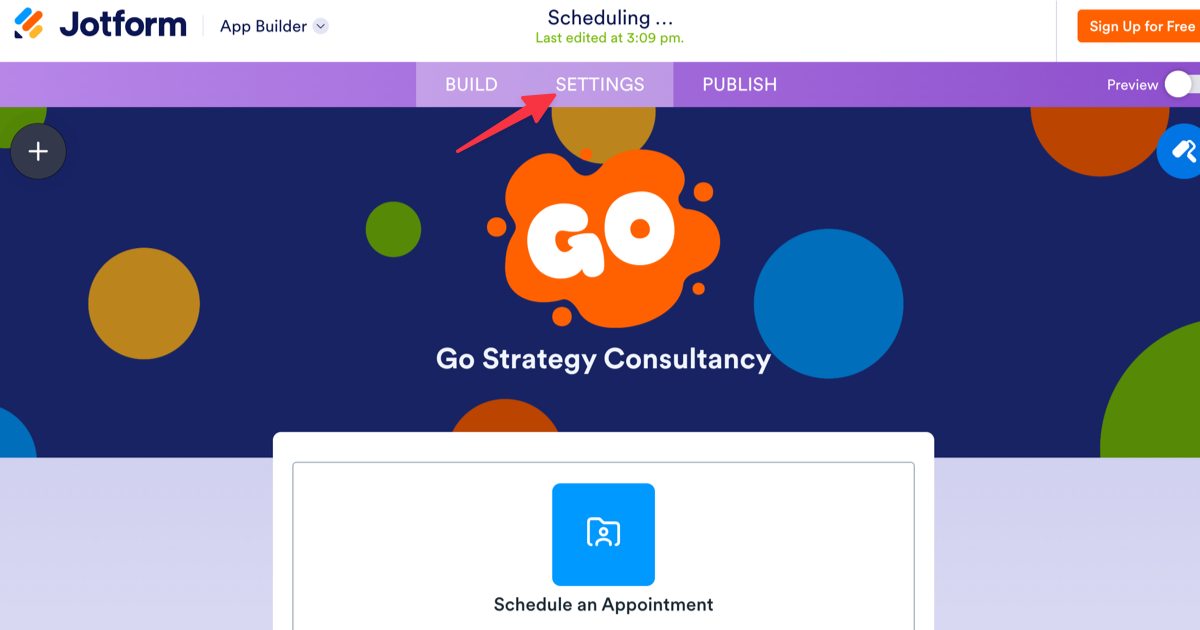
- In the App Builder, click Settings from the top navigation bar.
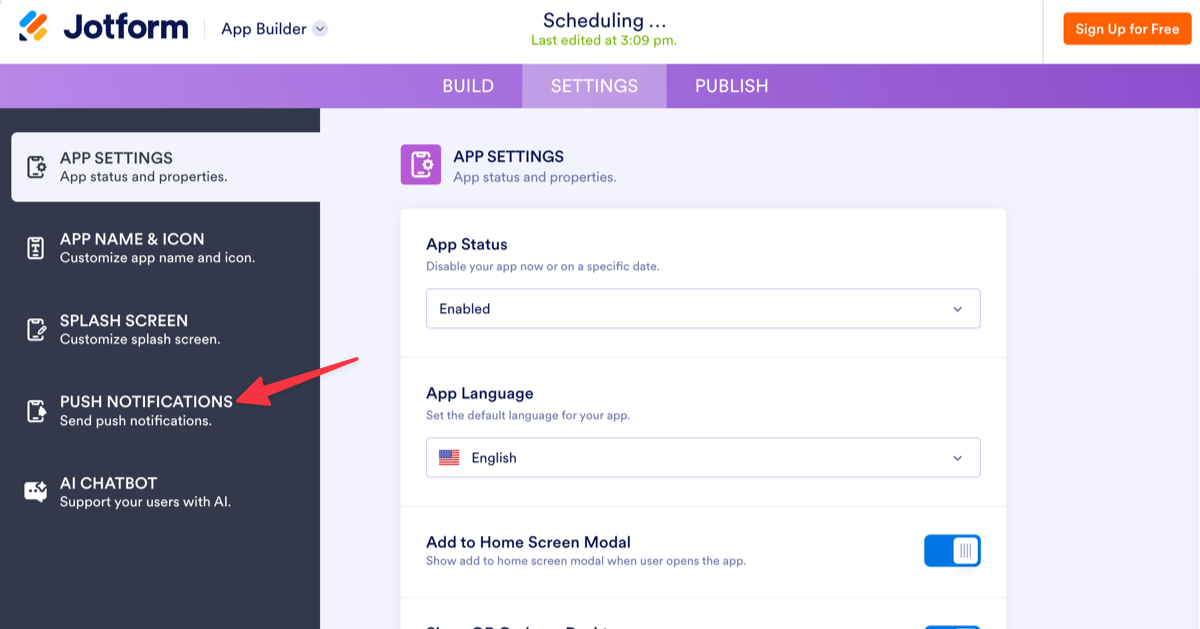
- Select Push Notifications from the left menu.
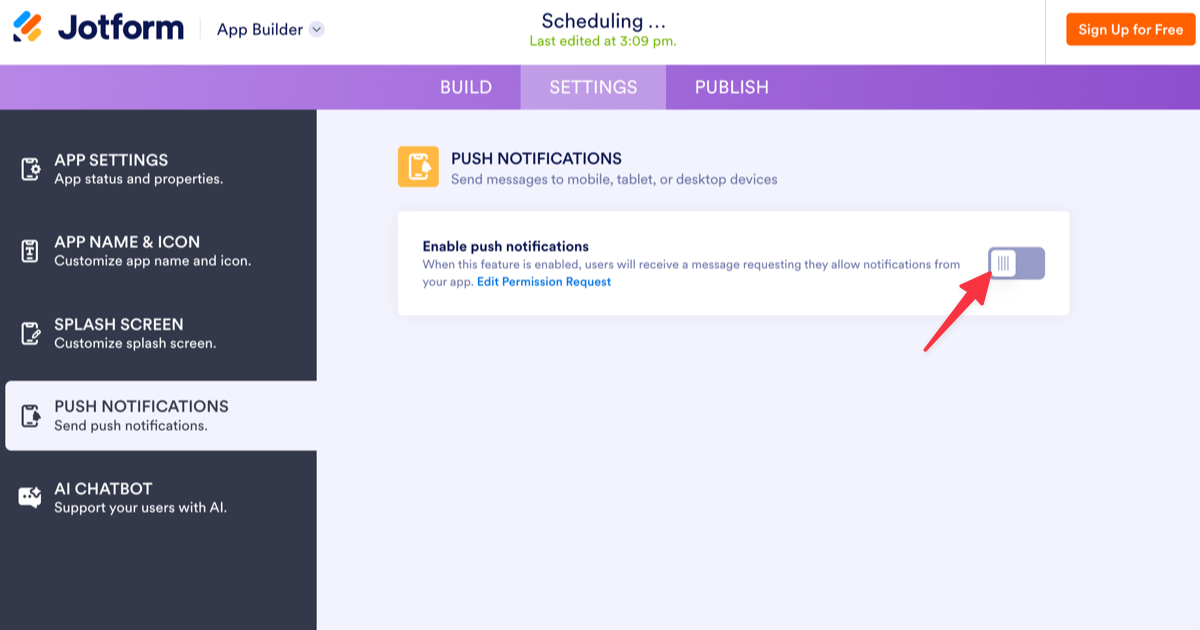
- Toggle Enable push notifications to the on position.
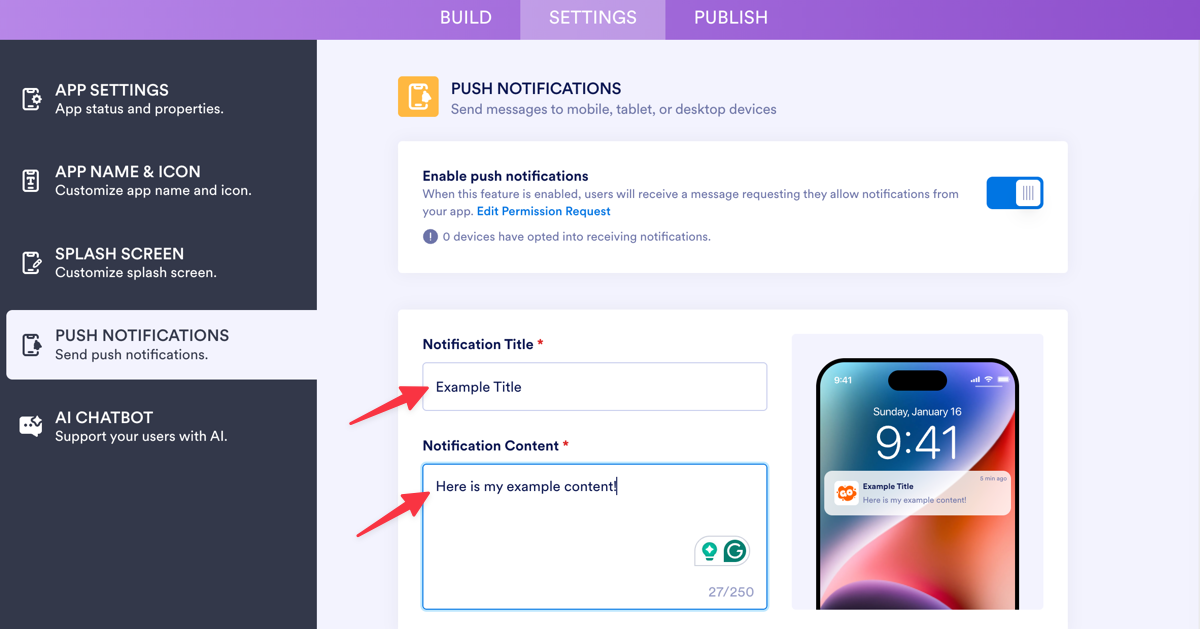
- Enter your preferred text for the notification title and message.
- Click Send.
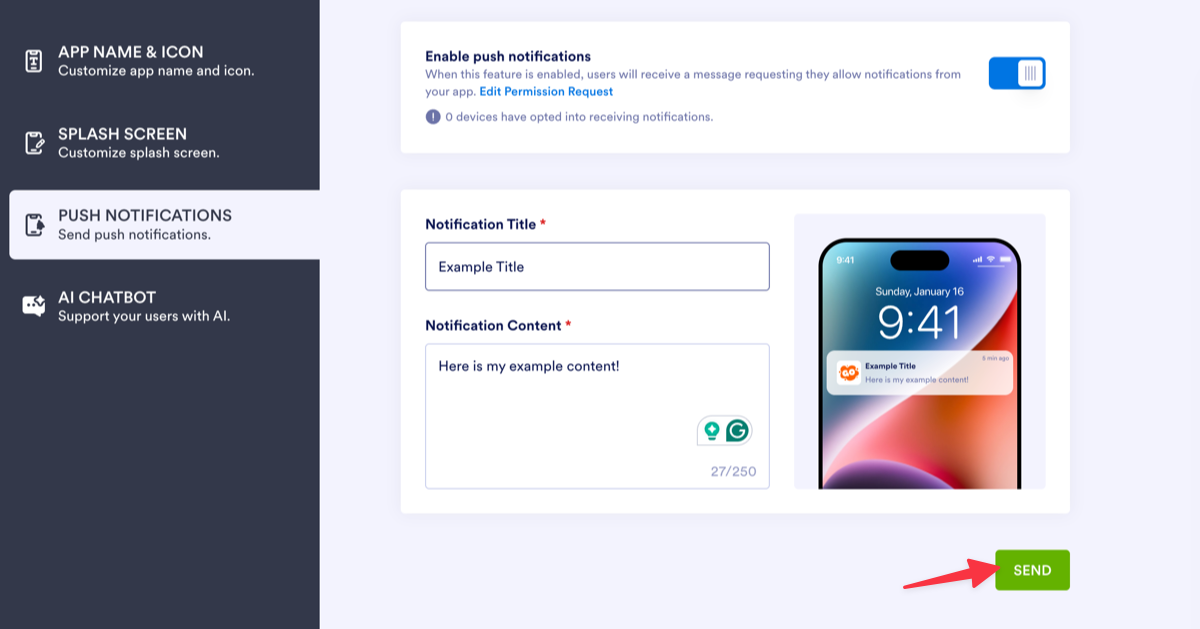
That’s it! No code, no software development kits (SDKs), and no separate messaging platform to manage.
For teams already learning to build an app without coding, this approach reduces friction and keeps communication scalable. You can use push notifications for updates, reminders, and engagement, while reserving SMS notifications for moments when guaranteed delivery is essential.
Pro Tip
Did you know Jotform can send SMS notifications too? Set up instant text alerts for form submissions so you never miss an important response. Perfect for time-sensitive inquiries or when you’re away from your desk. Learn how to enable SMS notifications in Jotform.
The choice is easy
The choice between push notifications and SMS notifications comes down to purpose. SMS notifications are best for urgent messages with guaranteed delivery. Push notifications are better for engagement, updates, and ongoing app communication where cost and scalability matter.
For teams that want to build apps without coding, push notifications offer a clear advantage. With Jotform Apps, you can quickly enable Jotform push notifications, manage communication in one place, and scale without technical overhead or per-message costs. If your goal is to keep users informed and engaged, Jotform push notifications are an easy place to start.
Frequently asked questions
Not necessarily. Push notifications are most effective when they’re relevant and well timed. Instead of turning notifications off completely, you can manage notification settings so users only receive updates that add value, such as reminders, important updates, or feature announcements.
On Facebook, push notifications are alerts sent through the Facebook mobile or web app, while SMS notifications are sent as text messages to your phone number. Users can typically choose which notification channels they want to enable in their account settings.
A “push text message” isn’t a formal technical term, but people often use it to describe a push notification that looks similar to a text message. Unlike SMS, push notifications don’t require a phone number and are delivered via an app rather than the messaging inbox.
This article is for people building or managing apps who need a clear way to choose between SMS and push notifications, plan when to use each channel, and communicate with users without adding technical complexity or extra tools.































































































Send Comment: