

Voucher Templates

Admit One Ticket Template
A ticket is a piece of paper or a small document representing as a proof of purchase entitling an individual for admission to an event, it may also be a voucher, to set as a control for a participant to claim freebies in an event a host is holding, or it may also be an invitation or an exclusive pass for a person to attend or participate in a celebration. This Admit One Ticket PDF template is a piece of printable document which you can variably put for any occasion. The Admit One Ticket template can be for a special celebration themed invitation, a ticket or pass for an event, or a voucher for a promotion.
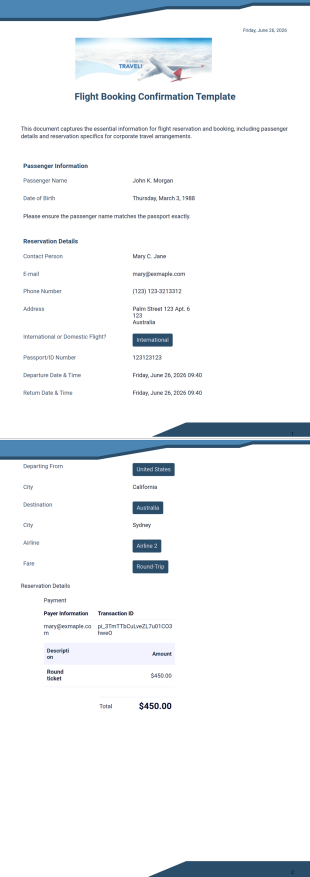
Flight Booking Confirmation Template
Jotform's Flight Booking Confirmation Template is designed for airlines and travel agencies to clearly communicate booking details, including the itinerary, passenger information, flight times, and payment summary.
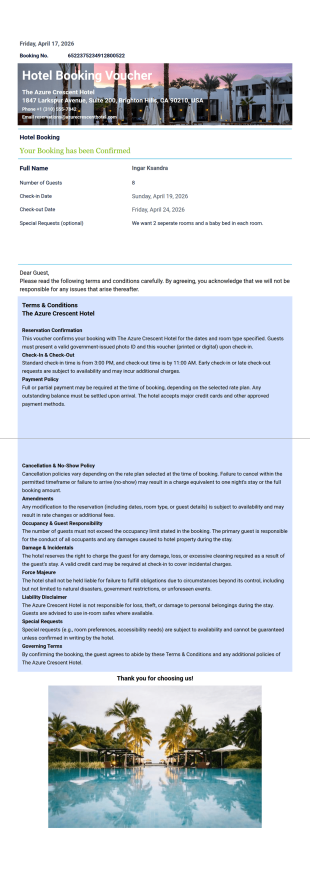
Hotel Booking Voucher Template
A Hotel Booking Voucher Template is an essential document for confirming reservations. Provide guests with clear booking details and ensure a smooth and professional check-in experience.
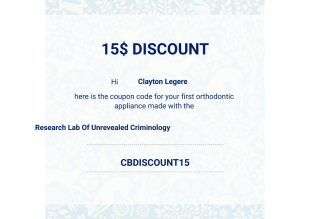
Discount Voucher Template
We have prepared this discount voucher PDF template with this discount request form template that includes the doctor's full name, laboratory name, doctor's email, doctor's business address, and phone number.
About Voucher Templates
Voucher PDF Templates are specialized digital templates designed to facilitate the creation and management of vouchers in various professional settings. These templates are crucial in industries where vouchers are routinely used as a form of incentive, discount, or refund, such as retail, hospitality, or corporate environments. By utilizing Voucher PDF Templates, businesses can streamline the process of issuing, tracking, and redeeming vouchers, ensuring a consistent and efficient workflow. From creating promotional discount vouchers to managing gift certificate distribution, these templates provide a structured approach to handling what can often be a paper-heavy and error-prone process.
Jotform stands out as the premier online form builder for creating and managing Voucher PDF Templates. Not only does it offer a user-friendly interface that simplifies the customization of templates, but it also facilitates the automation of data collection, allowing for seamless operational integration. With Jotform's centralized data management capability through Jotform Tables, businesses can efficiently organize, store, and access voucher data, significantly reducing the risk of data loss and redundancy. The drag-and-drop functionality of Jotform ensures that even complex voucher systems can be designed and deployed with ease, enhancing overall operational efficiency.
Why Use Voucher Templates?
- Voucher templates provide a high level of accuracy in data handling, ensuring that all necessary information is captured consistently across all issued vouchers. This reduces the potential for errors that can occur with manual entry, leading to smoother transactions and customer satisfaction.
- Speed is a significant advantage when using voucher templates. The automation features in Jotform allow for rapid generation and customization of vouchers, which means businesses can respond quickly to market changes or promotional needs without the delay of traditional methods.
- Professional data handling is at the core of voucher templates' benefits. With the ability to manage data securely and efficiently, businesses can ensure that all voucher-related information is kept organized and accessible, facilitating better analytics and reporting.
- Voucher templates help in maintaining brand consistency. By using pre-designed templates, businesses ensure that all vouchers align with their brand guidelines, providing a professional appearance that reinforces brand identity.
- The use of voucher templates also supports environmental sustainability by reducing the reliance on paper-based systems. As these templates are digital, they contribute to less paper waste and promote eco-friendly business practices.
Common Problems Solved by Voucher Templates
- One major challenge that voucher templates address is the cumbersome nature of paperwork. Traditional voucher systems often require physical documents that can be easily misplaced or damaged. By transitioning to digital templates, businesses eliminate the need for paper, reducing clutter and the risk of lost documents.
- Manual entry errors are another significant issue for many organizations. The repetitive nature of data entry can lead to mistakes that are costly and time-consuming to rectify. Voucher templates automate data capture, significantly reducing the likelihood of such errors and saving valuable time.
- Lost data is a critical concern, especially in industries where vouchers are integral to operations. Voucher templates, when used with Jotform, offer secure data storage solutions that protect against data loss through centralized management and automatic backups.
- The inefficiency of traditional systems often leads to delays in voucher issuance and redemption. By using voucher templates, businesses can streamline these processes, ensuring that vouchers are generated and processed quickly and efficiently, enhancing both operational flow and customer experience.
Matching Use Cases to Features
- In scenarios where businesses need to customize voucher templates frequently, Jotform's Drag-and-Drop Form Builder is invaluable. This feature allows users to easily adjust template design and fields, ensuring that each voucher meets specific requirements without extensive redesign efforts.
- For businesses that require dynamic voucher issuance based on certain conditions, using Conditional Logic within Jotform can automate decisions. For example, a voucher can be automatically generated if a user meets predefined criteria, streamlining promotional campaigns.
- Electronic Signatures (Jotform Sign) are essential for vouchers that require formal authorization. This feature allows businesses to capture secure electronic signatures directly on the voucher, adding an extra layer of authentication and security.
- Automated PDF Generation through Jotform's PDF Editor ensures that once a voucher is created, a professionally formatted PDF version is automatically generated. This is particularly useful for businesses that need to distribute vouchers digitally while maintaining a consistent format.
- Secure Data Management with Jotform Tables allows businesses to store and manage all voucher data in a centralized location. This feature is crucial for tracking voucher usage, analyzing trends, and making data-driven decisions.
How to Create a Voucher Template
- Browse the Template List for a Voucher template or start from a blank Template. This initial step involves selecting a template that closely matches your business needs, ensuring a solid foundation for customization.
- Customize the design and fields using the Drag-and-Drop Form Builder. With this step, you can easily tailor the template to include specific fields, design elements, and branding components, ensuring it meets your exact requirements.
- Publish and share via Direct Link, Email, or Website Embed. Once your template is ready, you can distribute it through various channels, allowing for flexible and wide-reaching voucher distribution.
Top Use Cases for Voucher Templates
- For Managers: Managers benefit significantly from voucher templates as they allow for streamlined oversight and control over voucher issuance and redemption processes. By using these templates, managers can easily track voucher distribution, monitor redemption rates, and adjust marketing strategies accordingly. This enhances their ability to make informed decisions and optimize promotional activities.
- For Teams: Teams utilizing voucher templates experience improved collaboration and efficiency. With centralized access to voucher data and the ability to customize templates for specific campaigns, teams can work together seamlessly to execute promotional strategies. This ensures that everyone is aligned and that the voucher process is integrated smoothly across different departments.
- For Customers: Customers enjoy a more seamless and convenient experience when businesses use voucher templates. The digital nature of these templates means that customers can receive, store, and redeem vouchers with ease, without the hassle of physical documents. This leads to a more satisfying customer journey and can increase customer loyalty and engagement.
Summarizing Voucher Templates
Voucher templates offer significant business value by enhancing accuracy, speed, and professionalism in voucher management. By leveraging Jotform's capabilities, businesses can automate and streamline their voucher processes, reducing errors and improving operational efficiency. With the ability to customize, distribute, and manage vouchers digitally, organizations can respond quickly to market demands while maintaining high standards of data handling. Overall, voucher templates represent a modern solution to traditional voucher challenges, offering both practical and strategic advantages.
Frequently Asked Questions
1) Is it free to create Voucher Templates on Jotform?
Yes, creating voucher templates on Jotform is free. Users can take advantage of Jotform's free plan, which provides access to a range of templates and customization options, though some advanced features may require a paid subscription.
2) Are the templates and submitted data secure?
Jotform prioritizes the security of both templates and submitted data. With advanced encryption and secure data management protocols, businesses can trust that their information is protected against unauthorized access.
3) Do I need coding knowledge to build a Voucher template?
No, coding knowledge is not required to build a voucher template on Jotform. The platform's intuitive drag-and-drop interface is designed to be user-friendly, allowing users to create and customize templates without any technical expertise.
4) What is the purpose of Field Mapping in voucher templates?
Field Mapping is used to ensure that data from web form inputs is accurately transferred to specific positions on a PDF document layout. This feature is crucial for maintaining consistency and accuracy in voucher documentation.
5) Can these Templates be used on mobile devices?
Yes, voucher templates created on Jotform are mobile-friendly. They can be accessed, filled out, and submitted via mobile devices, ensuring accessibility and convenience for both businesses and customers.
6) How does the Autoresponder PDF Attachment feature work with vouchers?
The Autoresponder PDF Attachment feature allows businesses to automatically send a PDF version of the voucher to the submitter's email. This streamlines the delivery process and ensures that customers receive their vouchers promptly.
7) What is the role of Dynamic Elements in voucher templates?
Dynamic Elements in voucher templates, such as placeholders for submitter names or unique IDs, automatically populate with real data upon submission. This feature enhances personalization and ensures that each voucher contains accurate and relevant information.
8) How can Page Settings be adjusted in a voucher template?
Page Settings in a voucher template can be adjusted to change document dimensions, orientation, margins, and background elements. This customization ensures that the final PDF meets specific business requirements and presentation standards.