Email Notifications allow you to receive form submissions directly in your inbox. Whenever someone submits your form, Jotform can automatically send a notification email to you or other recipients you specify.
When you add the first element to your form, Jotform automatically creates one Notification Email for you. If you want to create additional notification emails, you can do it in two ways:
- Email Copilot — Use AI to automatically generate and configure a notification email.
- Manual Setup — Create and customize the notification email settings yourself.
Note
- The Starter (Free) plan is limited to one Notification Email and one recipient per form. Paid plans support up to 10 recipients. Check out our guide on Understanding Your Account Usage and Limits to learn more.
- The Test Email button always sends the test to your account’s email address. To check other recipients, submit a test entry to your form.
Setting Up Email Notifications Using Email Copilot
Email Copilot helps you quickly generate and configure email notifications using AI. It can automatically create email content based on your form fields. To set up notifications with Email Copilot, here’s how:
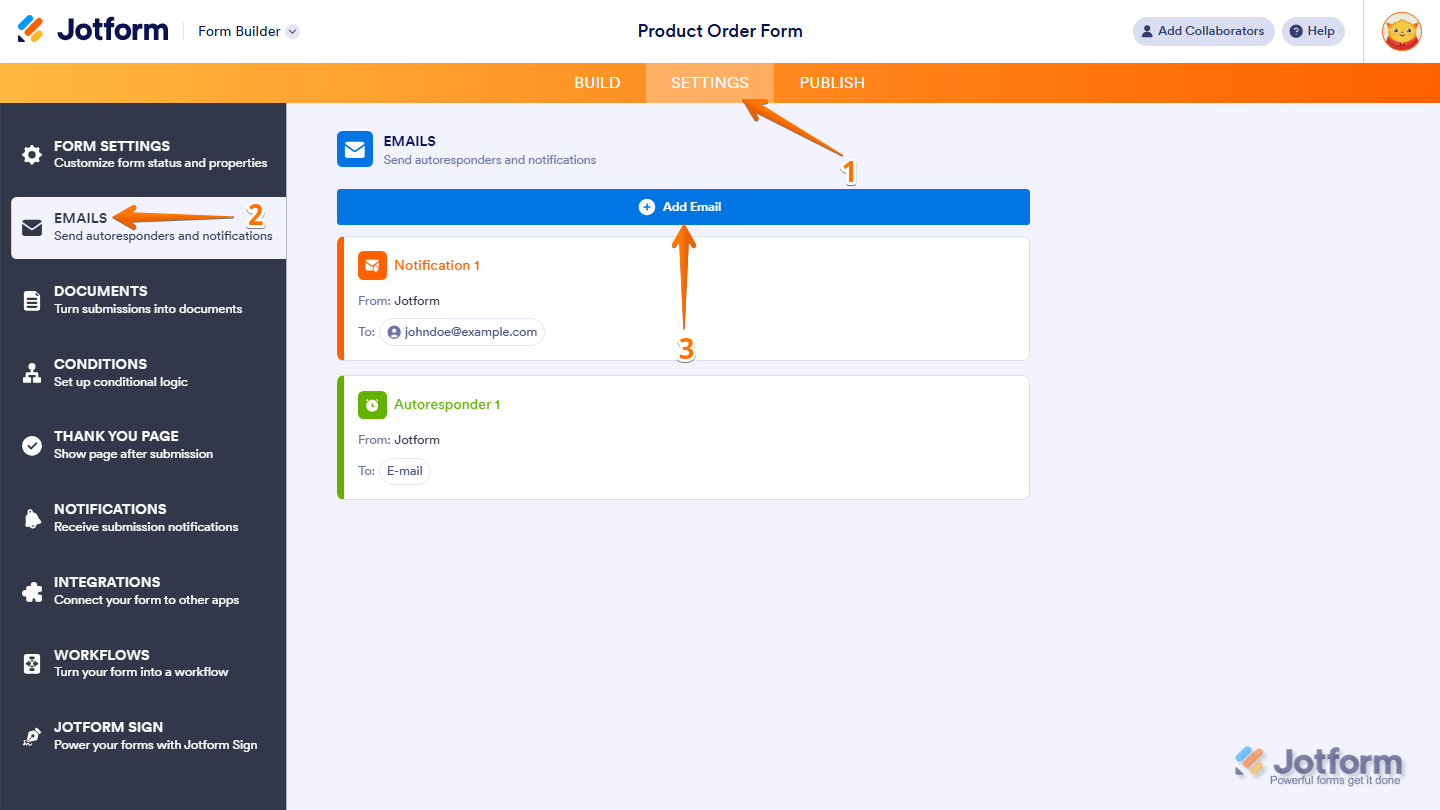
- In Form Builder, in the orange navigation bar at the top of the screen, click on Settings.
- Then, in the menu on the left side of the page, click on Emails.
- Now, click on Add Email.
Note
Some predefined templates may generate confirmation or autoresponder emails. To ensure the correct type is created, make sure your prompt clearly specifies that you want to generate a Notification Email.
- Next, in the Email Copilot section, you can generate your Notification Email using several options:
- Enter a Prompt — Type instructions describing the email you want to generate. For example: Build a consice new order notification email in professional blue tones, summarizing customer and payment info for quick processing.
- Predefined Template — Select one of the suggested templates that helps you quickly generate a notification email for common scenarios.
- Microphone Icon — Click the microphone icon to describe your email instructions using voice.
- Plus Icon — Upload an image so the AI can match the email style with your branding or visual references.
- Once you’re ready, click on Generate.
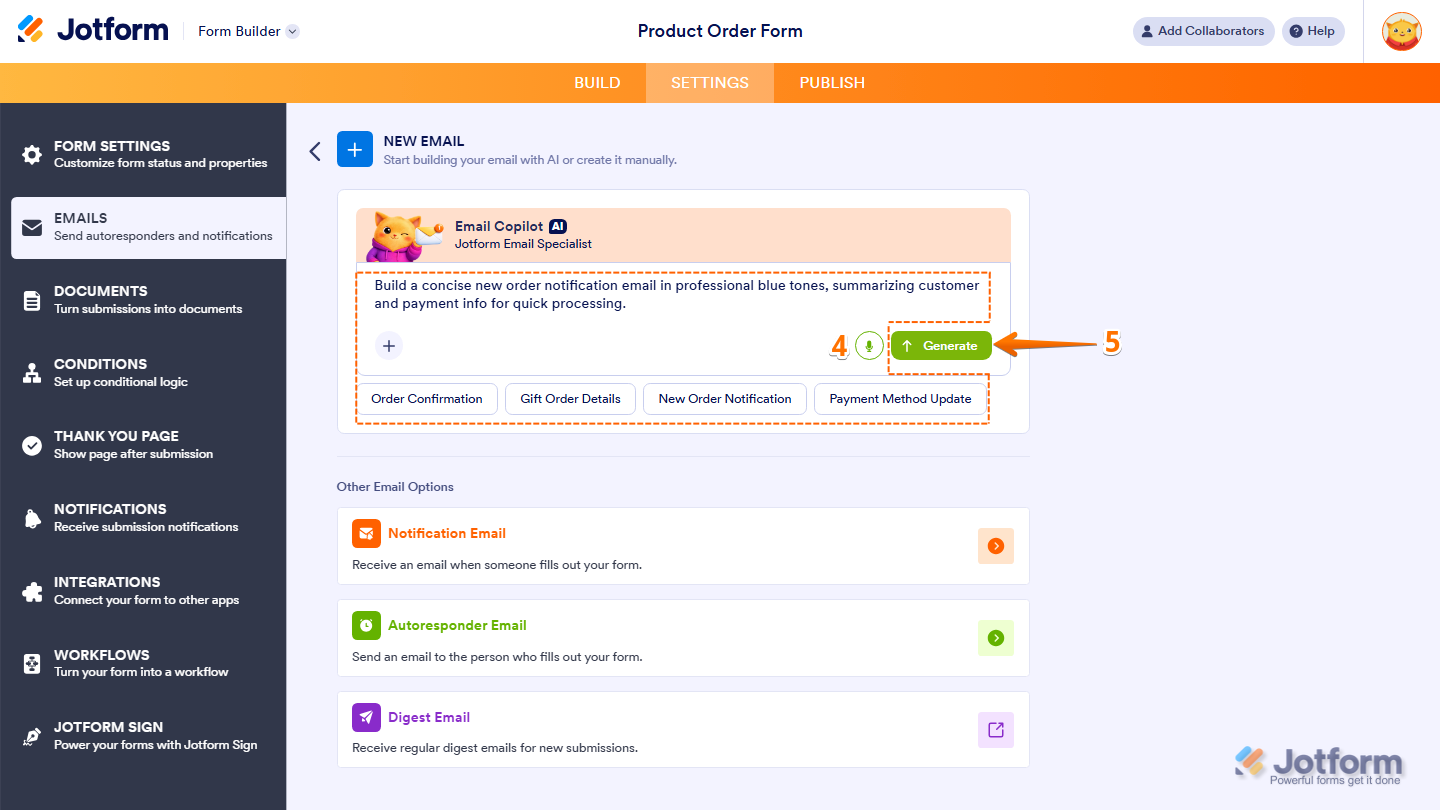
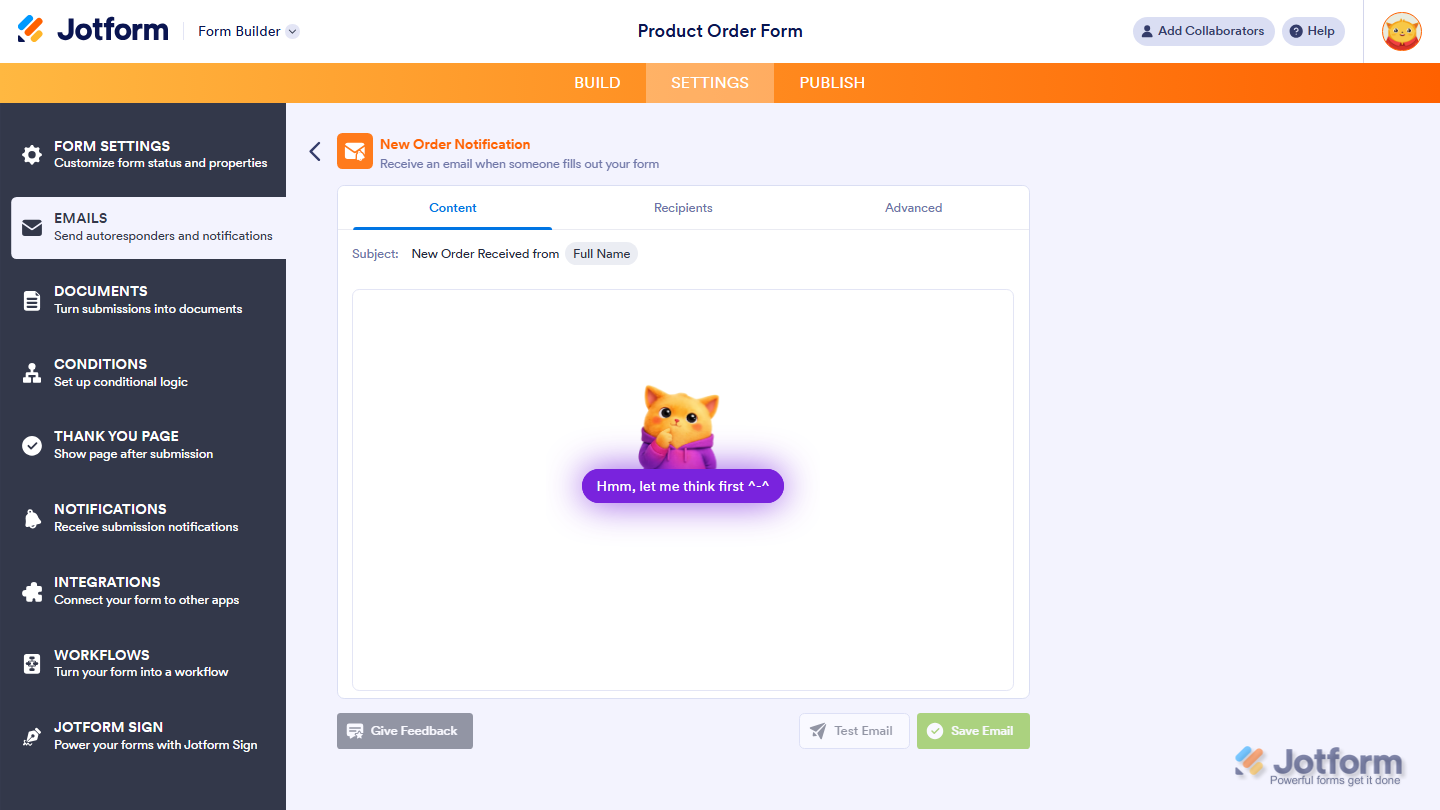
Email Copilot will now generate a notification email based on your prompt and form fields.
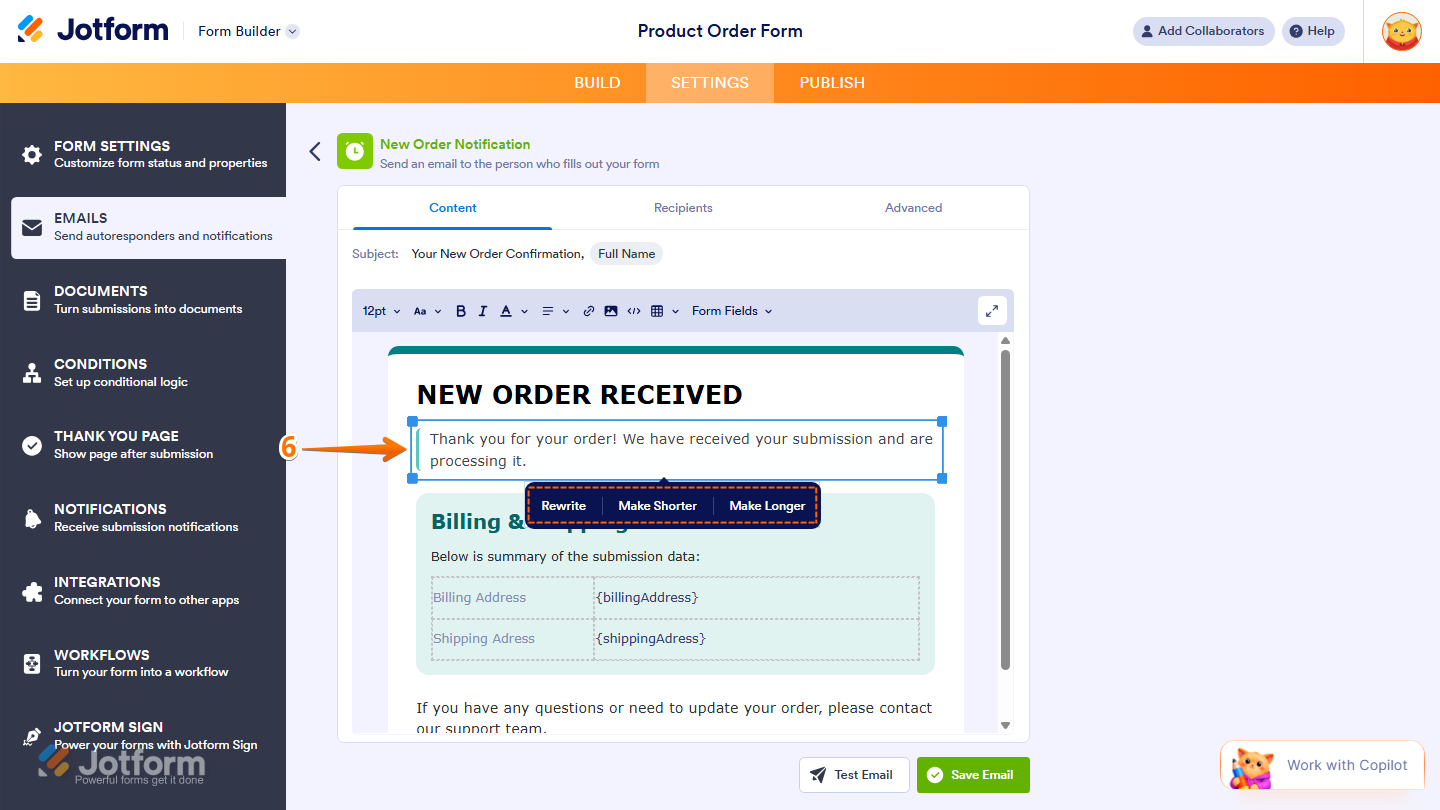
- Now, you can review the generated subject line and email content directly in the editor. If you want to refine the message, you can click on any text block in the Email Content tab to access the following AI editing options:
- Rewrite — Rephrases the selected text while keeping the same meaning.
- Make Shorter — Condenses the text into a more concise version.
- Make Longer — Expands the text with additional details.
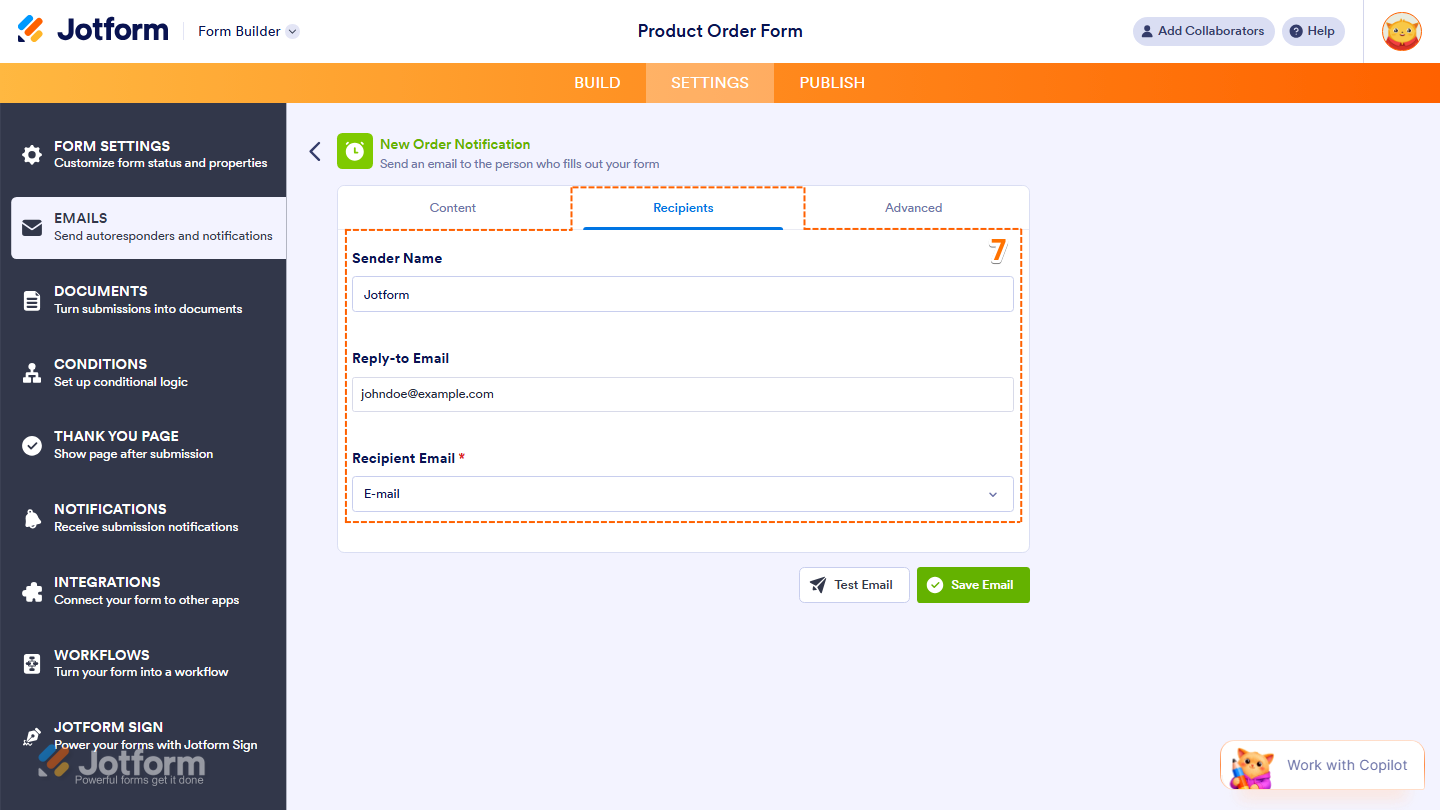
- Then, under the Recipients tab, configure these things:
- Sender Name — The name that will appear as the sender of the email.
- Reply-to Email — The email address where replies will be directed.
- Recipient Email — The email address that will receive the notification.
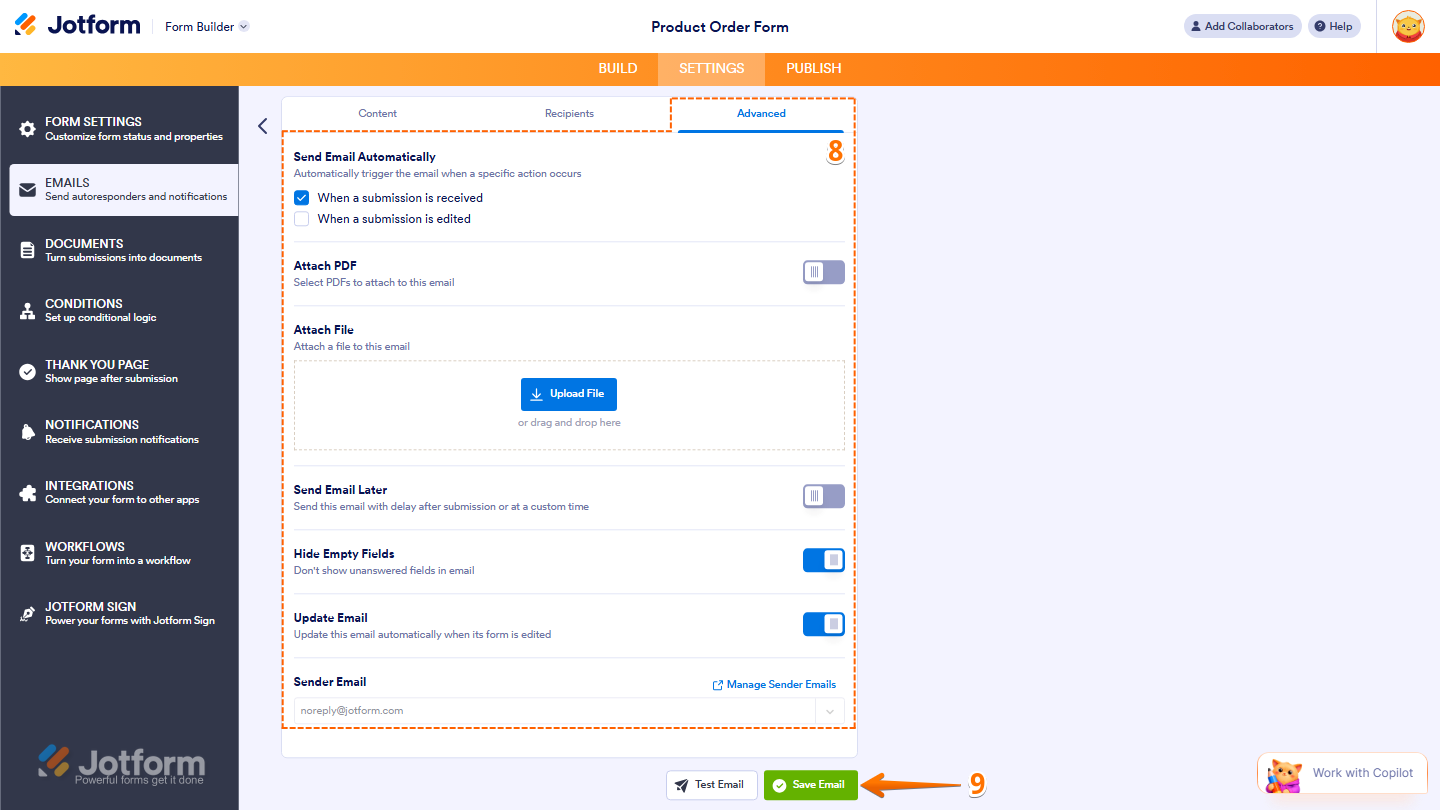
- Now, under the Advanced tab, setup these things:
- Send Email Automatically — Check this option if you want the email to be triggered automatically when a submission is received or edited.
- Send File Uploads as Attachments — Toggle on this option to attach files uploaded through your form.
- Attach PDF — Toggle on this option and select which PDFs to attach to the email. Take a look at our guide on How to Include Submissions as PDF Attachment in the Email Notifications for more details.
- Hide Empty Fields — Toggle on this option to hide unanswered fields in the email.You’ll find more info in our guide on How to Hide Empty Fields on Email Alerts.
- Update Email — Toggle on this option to automatically update the email when the form is edited.
- Sender Email — Set up your sender email address. For a full breakdown of how to do it, head over to our guide on How to Set Up a Custom Sender Email with SMTP.
- Finally, once everything’s set, click on Save Email.
Note
For better results, describe the tone and purpose of the email in your prompt. For example, you can mention your website, brand style, or upload your logo so Email Copilot can generate an email that matches your branding.
Setting Up Email Notifications Manually
If you want full control over the email content and settings, you can add and configure the Notification Email manually. Here’s how to do it:
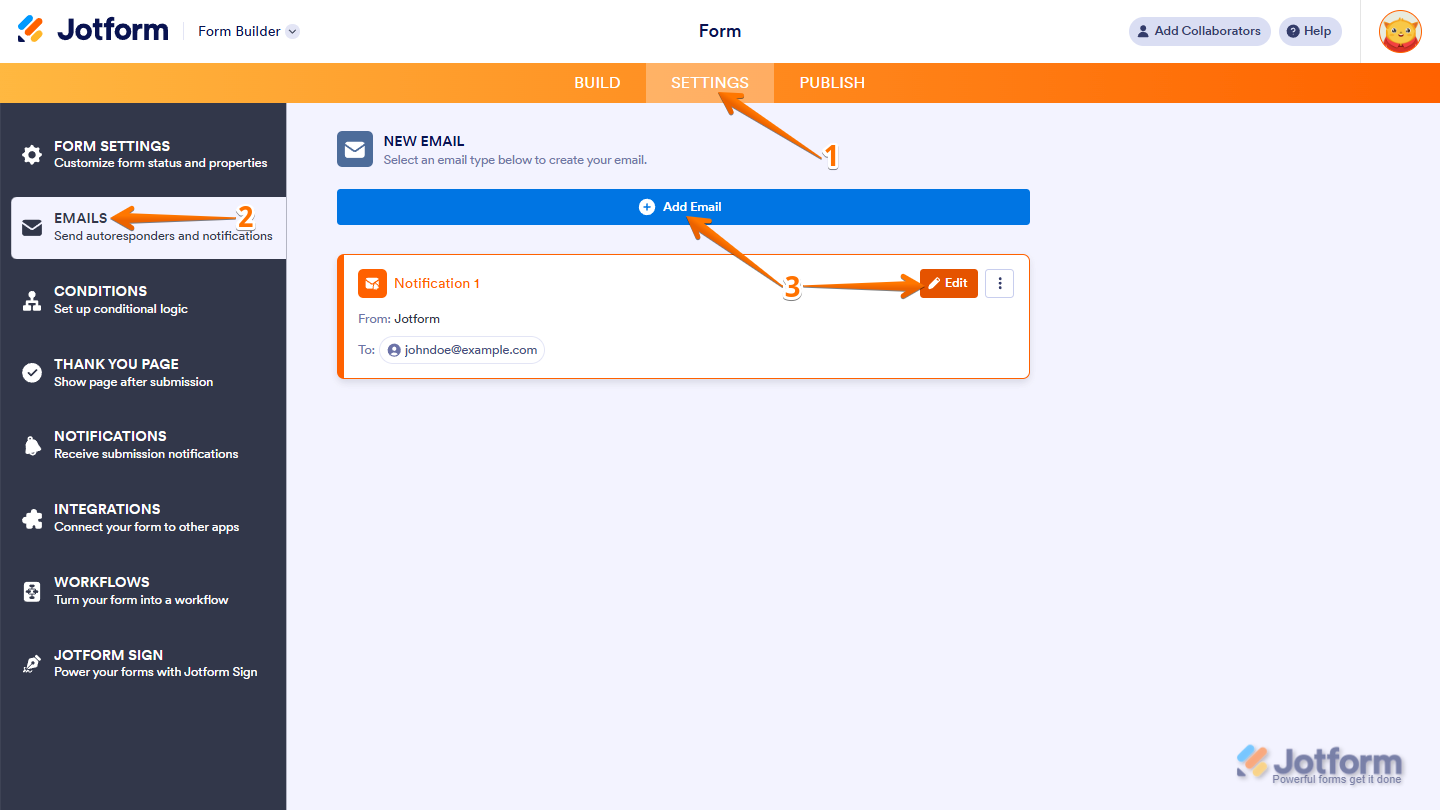
- In Form Builder, in the orange navigation bar at the top of the screen, click on Settings.
- Then, in the menu on the left side of the page, click on Emails.
- Now, hover your mouse over an Email Notification and click on the Pencil icon to edit it, or click on Add Email to create a new one.
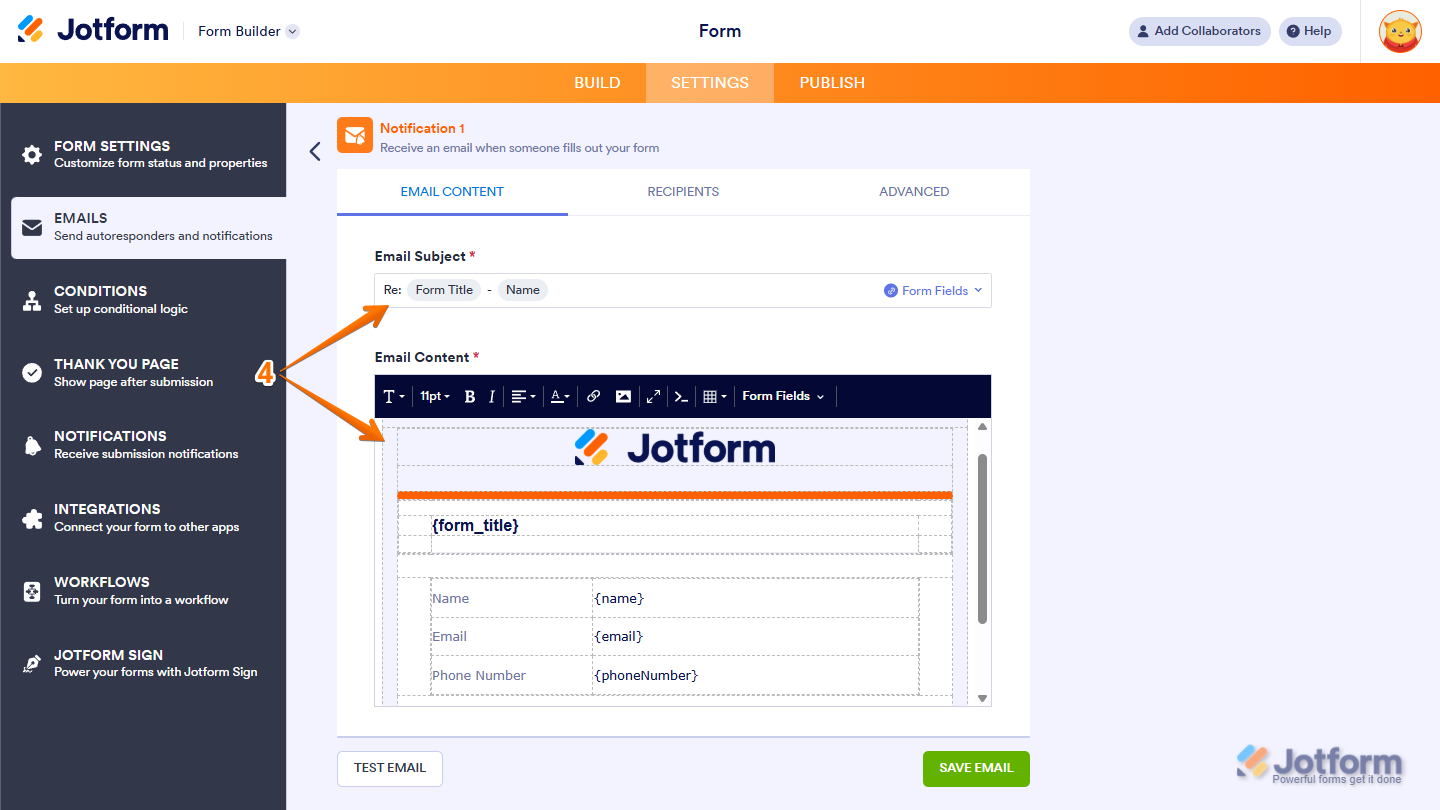
- Next, under the Email Content tab, you can customize the following:
- Email Subject — Set the subject line that appears in the recipient’s inbox.
- Email Content — Edit the body of the email, including the layout and the information shown in the message.
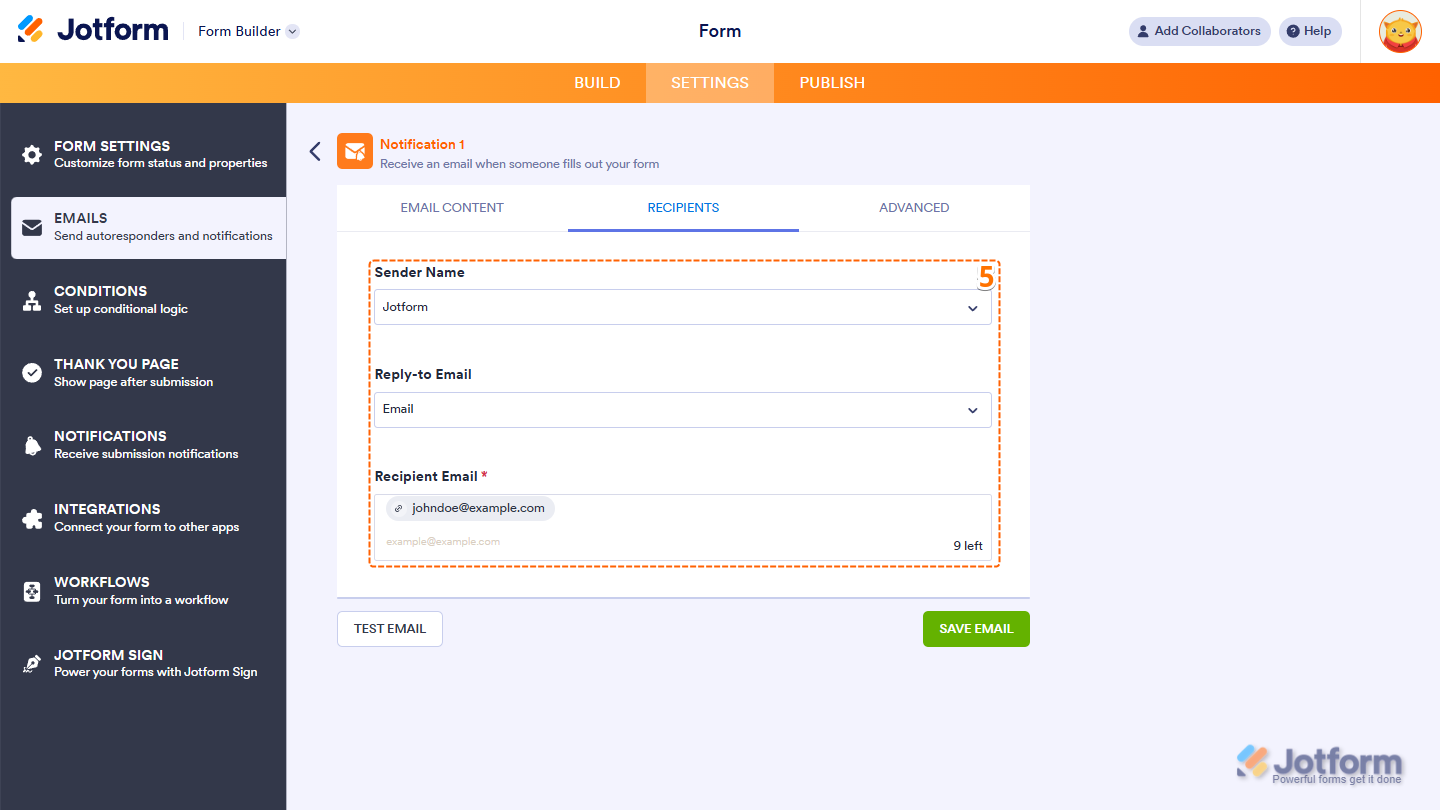
- Then, under the Recipients tab, configure these things:
- Sender Name — The name that will appear as the sender of the email.
- Reply-to Email — The email address where replies will be directed.
- Recipient Email — The email address that will receive the notification.
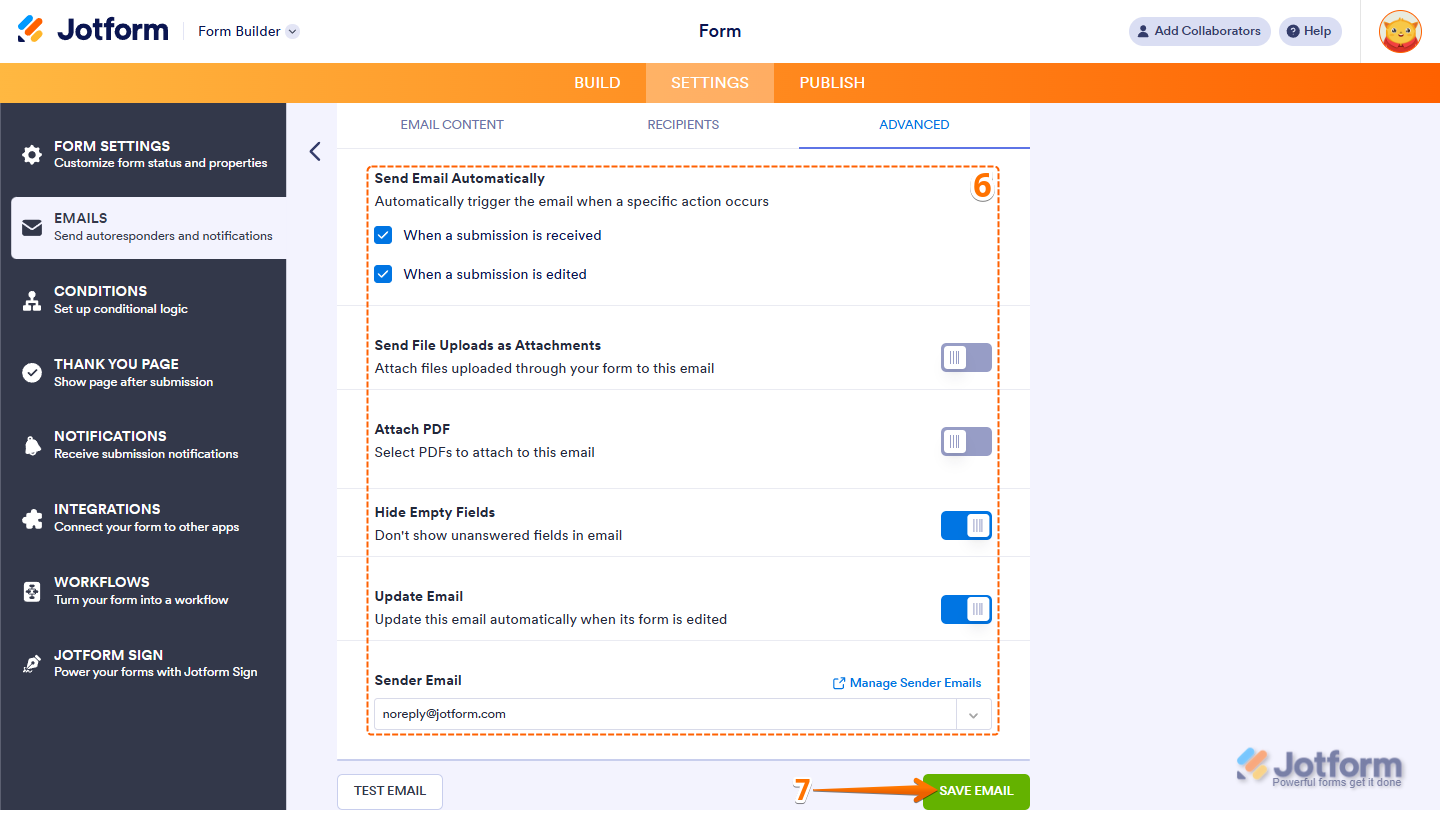
- Now, under the Advanced tab, setup these things:
- Send Email Automatically — Check this option if you want the email to be triggered automatically when a submission is received or edited.
- Send File Uploads as Attachments — Toggle on this option to attach files uploaded through your form.
- Attach PDF — Toggle on this option and select which PDFs to attach to the email. Take a look at our guide on How to Include Submissions as PDF Attachment in the Email Notifications for more details.
- Hide Empty Fields — Toggle on this option to hide unanswered fields in the email.You’ll find more info in our guide on How to Hide Empty Fields on Email Alerts.
- Updated Email — Toggle on this option to automatically update the email when the form is edited.
- Sender Email — Set up your sender email address. For a full breakdown of how to do it, head over to our guide on How to Set Up a Custom Sender Email with SMTP.
- Finally, click on Save Email and you’re all set.
And that’s it. Once configured, Notification Emails make it easier to stay on top of incoming submissions, review details quickly, and respond when needed. If you want to explore more features about Email Notifications, here are some helpful guides:



Send Comment:
209 Comments:
June 13, 2026
Does this work on Jotform Sign Builder too or only Jotform Form Builder? I would like the Sign Builder to look like the emails are from me.
October 30, 2025
I need assistance in getting each form sent as a separate email rather then a stream of forms linked on the same email. For instance. A form filled out at 10am, is also in the same email as on at 8am and 2pm. I would like each to be a separate email. how can i fix this
May 29, 2025
I'm using the email field in all of my Jotform tables, but that field is not "actionable." When an address like xxxcxxx@abc.com is entered, you cannot click on that email address in the table and have it invoke the native email program you use. All other databases have this feature including Airtable. PLEASE Help!!
January 18, 2025
How do I make it stop notifying me each time a form is sent. Since it already emails me the actual form I do not need 2 notifications.
September 13, 2024
I don't see a Notification to edit in the "Email" section of my form. There's only the Autoresponder that I customized. As a free user, can I not turn off the automatic notification?
August 16, 2024
Can we have an notification email sent when the form has a sync error? I can't see this option but it would be great to have this standardised.
May 27, 2024
Is it possible to set an email notificatiom daily? I'm a data manager and I would like to.remaimd daily to all my clients that their data report is done
November 30, 2023
unable to save the email setting because the error msg is " more than 65k characters." please help.
August 30, 2023
I can not send a test email. It says "You're not authorized". Why am I not authorized to send a test email from Notifications etc.
May 7, 2023
Hello: Did I miss something? Might there be a way to "add SMS notification" to completed and submitted forms, in addition to email notifications?
February 17, 2023
What is the minimum paid level to send the form submission email to 2 people?
February 12, 2023
Hey
I am still wondering why it doesn't explain why the info is in curly brackets {}
October 12, 2022
I have different Managers (Recipients) that would need to be notified for the one Form. They don't need a notification to view all completed forms of that same form; only to view from particular Supervisors. Is there a way to filter out the notification emails so they can only receive from certain individuals rather than receiving from all?
e.g. if one of the fields in my form was titled 'Division' and the answers when completing the form were preset to A B C or D - the email mapping would be 'Division' > A > enter recipients OR 'Division' > B > enter recipients.
Grouping recipients to only receive completed forms from A B C or D rather than all would be a great addition.
If it already does this would love to know how to do action
August 26, 2022
We use jotforms for our users to request to be contacted...we use to have the ability to see name/email/phone number/question when the submission was sent to our emails, but now those fields are hidden...what happened and can we change it back.
August 18, 2022
Doesn't explain why the info is in curly brackets {}
August 11, 2022
We would like to use the internal messaging feature on a form to communicate with the person filling out the form. How can we set up a notification that lets us know when someone has sent a message or reply, and also notifies them when we have sent a message or reply?
August 4, 2022
When someone fills out my form I get an email notification, then when another person sends an email I get another notification as a continuation to the previous email. Is there a way that I can get separate emails for each submission?
July 13, 2022
I don't want any backround colour in the email notification I receive on form submission. How to remove it?
July 12, 2022
Hi Jotform,
I am unsure how to set up/ why it is not happening that completed forms are sent to my email address. Is this possible? Please help
April 25, 2022
How do you remove the "edit this submission" option.
Once people submit an order I do not want them to be able to edit it.
April 20, 2022
We have a questionnaire for our employees to fill out and we want them to put in the email of their supervisor so that when they hit submit it will send the email directly to their supervisor. Is there a way to do setup the Notification so that the "recipient email" looks at the "supervisor email" for where to send it. Right now it looks like we have to manually type it in. We have too many variables here to use the dropdown method. Please advise.
April 9, 2022
Is there a limit to the email notification? I have a long form. When I create the email template, it does not recognize many of the last fields.
April 8, 2022
I can’t get into the account. The forgot password doesn’t come to me...
March 1, 2022
hello! how do I receive the results. from the jot form? once the person clicks "submit" where does it go?
February 23, 2022
Recipient Email - how I can send an the entire form, not just the data submitted?