
Constantly updating the look and content of your WordPress site can be a chore. Adding your Twitter (X) feed to WordPress is a simple solution that keeps your site fresh and up to date by directing live content to your users.
Integrating your social media into your website also bridges the gap between your marketing channels, creating a seamless brand experience. Every update, announcement, and interaction will connect to your website — showing your users that your brand is active and engaged.
But how do you connect the two? While the WordPress Gutenberg editor does include an embed block for X feeds, its functionality has been limited by updates to the X system. X also offers a publish option for WordPress users to embed a feed into their site, but this option is rigid and impossible to style to match your visual branding.
To navigate around these limitations, WordPress users have two core solutions at their disposal: installing bloated social aggregator third-party plug-ins directly onto their server, or using a free, lightweight serverless widget to protect their page speed.
In this blog, we’ll break down how to use WordPress plug-ins to embed a Twitter feed on your site, highlighting how an alternative can save you time while protecting your website’s functionality and aesthetic.
Option 1: Install a dedicated WordPress Twitter feed plug-in
The standard solution for embedding an X feed in your WordPress site is to pull a third-party plug-in from the Plugins marketplace. To do this, you’ll need to find a dedicated plug-in and install it into your site’s back end and server.
Here’s how it works:
- Open your WordPress dashboard and click the Plugins button, then Add Plugin to open the Plugins marketplace.

- Search for a “Twitter feed plug-in” and select the option you prefer.

- Click Install and Activate to start setting up your plug-in.
- Connect and verify your Twitter account using your preferred plug-in’s integration method.
- If you want to embed this feed on a certain page, copy the dedicated shortcode.
- Use either the shortcode block or a dedicated Gutenberg Twitter timeline block to add space for your feed.
- Paste your code inside your block and publish your page.
Once your feed is published, many third-party tools will allow you to customize your feed using limited design tools — adjusting things like how many tweets are displayed as well as layout and feed height.
While using native WordPress plug-ins may seem like the easiest option, recent updates to X’s policies have made many of these solutions obsolete. X has cracked down on data scraping, increased the price of API access, and implemented stronger bot-detection automations. These changes have caused some plug-ins to simply stop working altogether — or, at the very least, lose functionality.
Many plug-ins that have made it through these changes still rely on server-side PHP requests to securely pull tweets from the X API. This method may help protect your API keys and avoid hitting X’s API limits, but it also slows down your site’s performance.
These options also often lack premium design features — or hide them behind paywalls. This may include design features such as
- Swipeable carousels
- Full-page feeds
- Visible profile and user count
- Matching branding and removal of X branding
Some options also limit the number of times per day you can refresh your embedded feed. These tools charge extra for more frequent updates and lack a true real-time option.
Option 2: Add a free, customizable Twitter widget (recommended)
If you want a truly custom Twitter feed for WordPress, you don’t need to pay for a third-party “embed X feed” WordPress plug-in. Instead, you can use a free Twitter widget for WordPress to create a dynamic X feed with custom grid layouts — all without generating API keys or bloating your site.
The Jotform Twitter/X Feed Widget is a free WordPress Twitter plug-in alternative that simplifies the embedding process. Using the Gutenberg editor, you can create a responsive feed in minutes that handles all data fetching and styling off-server.
Here’s how to get started:
- Open the Jotform Twitter/X Feed Widget and click the Add first source button.
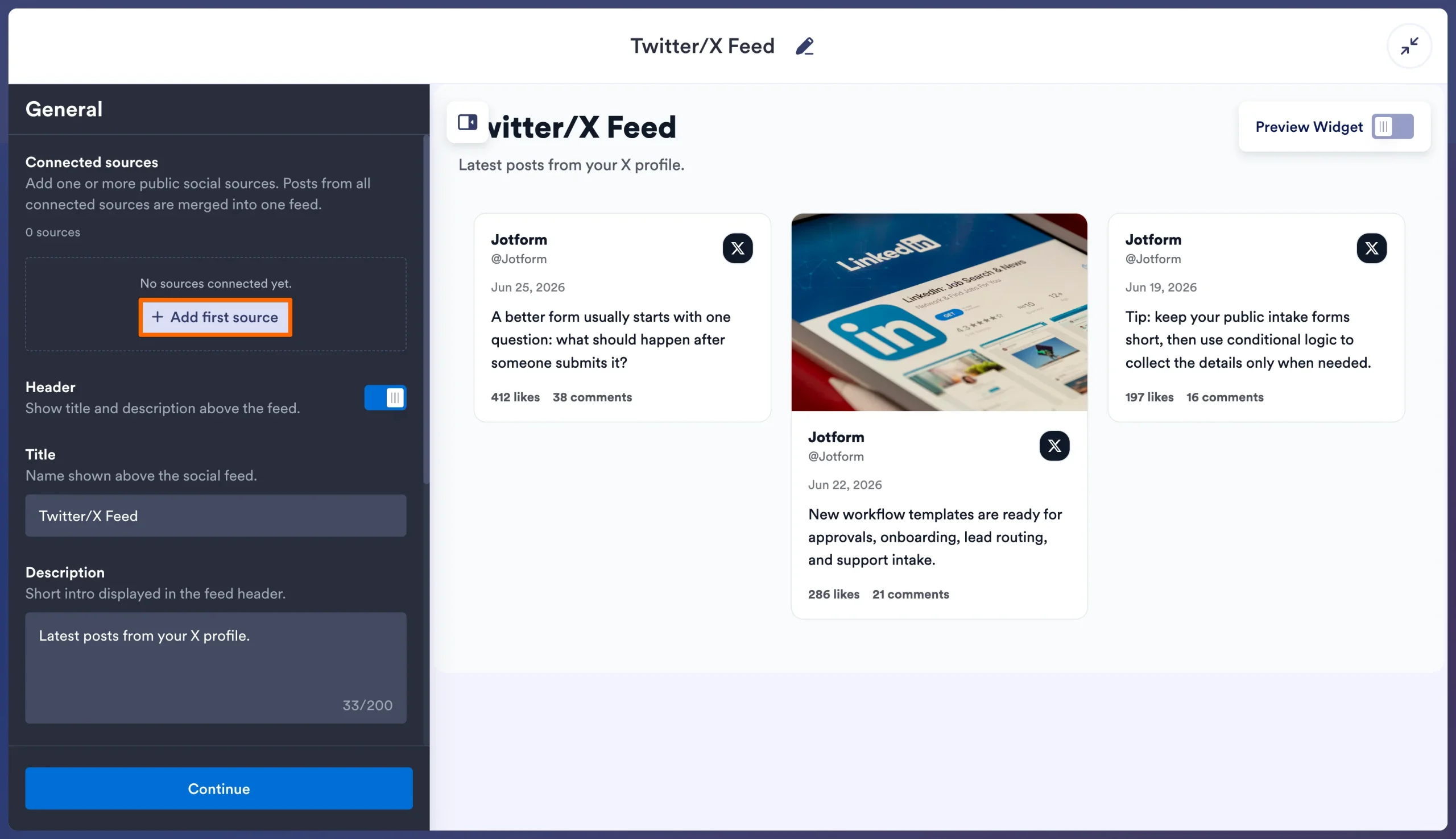
- Type in your account handle or public X profile URL, then click Connect. The widget will automatically retrieve the 25 latest posts from your Twitter feed.
- Update your settings in the General menu, then click Continue.

- Update your visual settings in the Style menu, then click Continue.

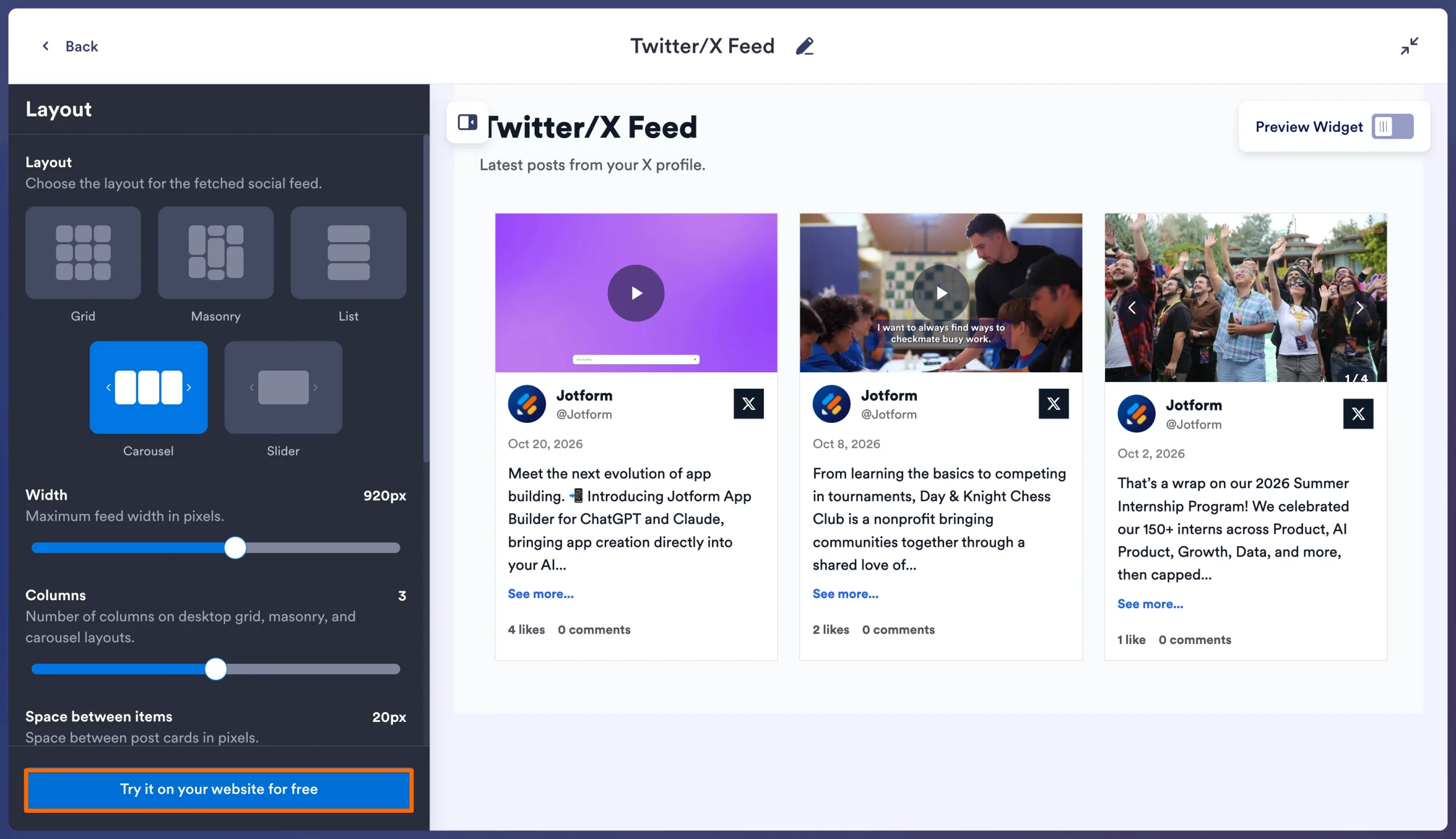
- Update your layout settings in the Layout menu, then click Try it on your website for free to get your embed code.
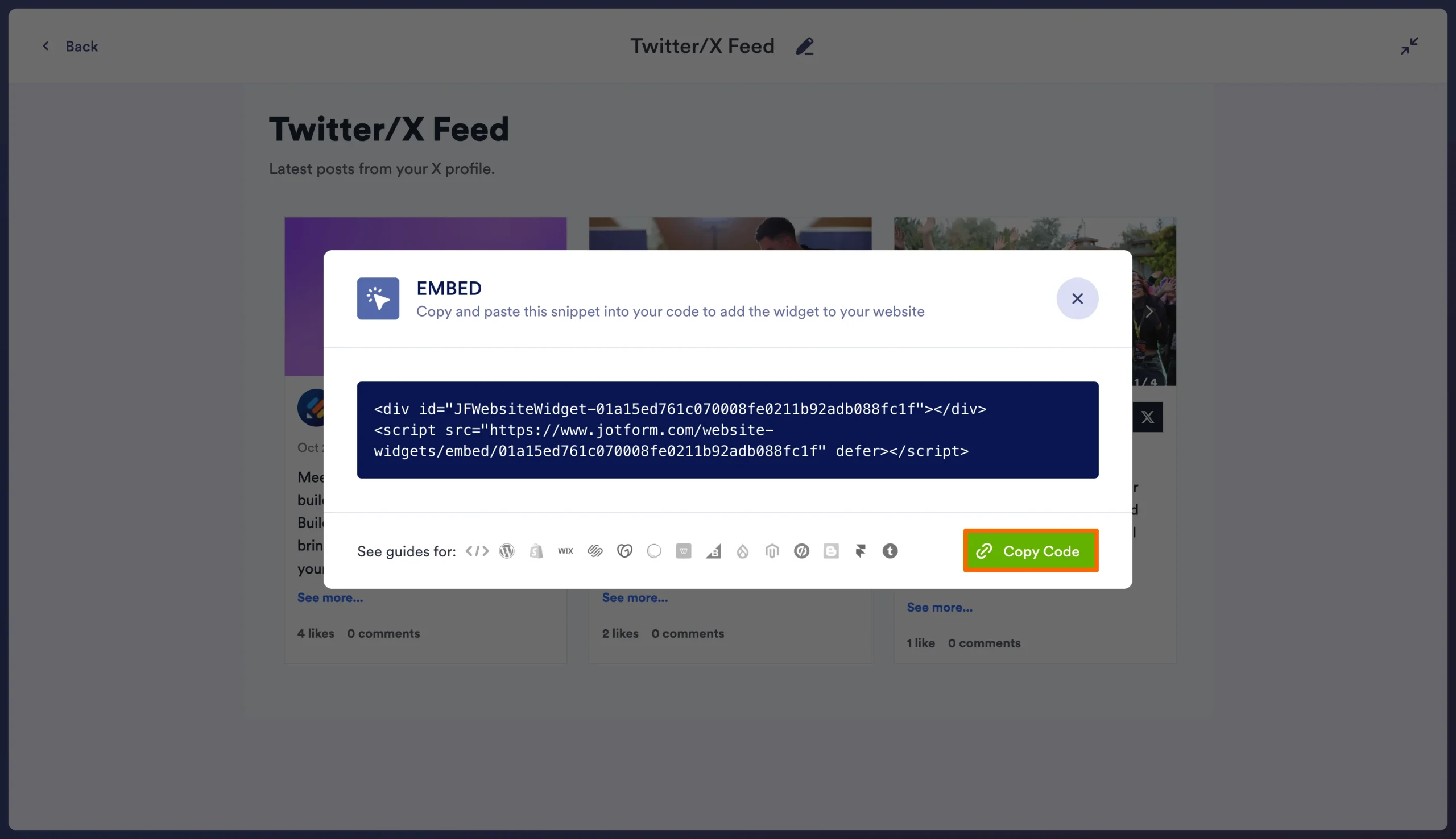
- Click the Copy Code button to copy your embed code.
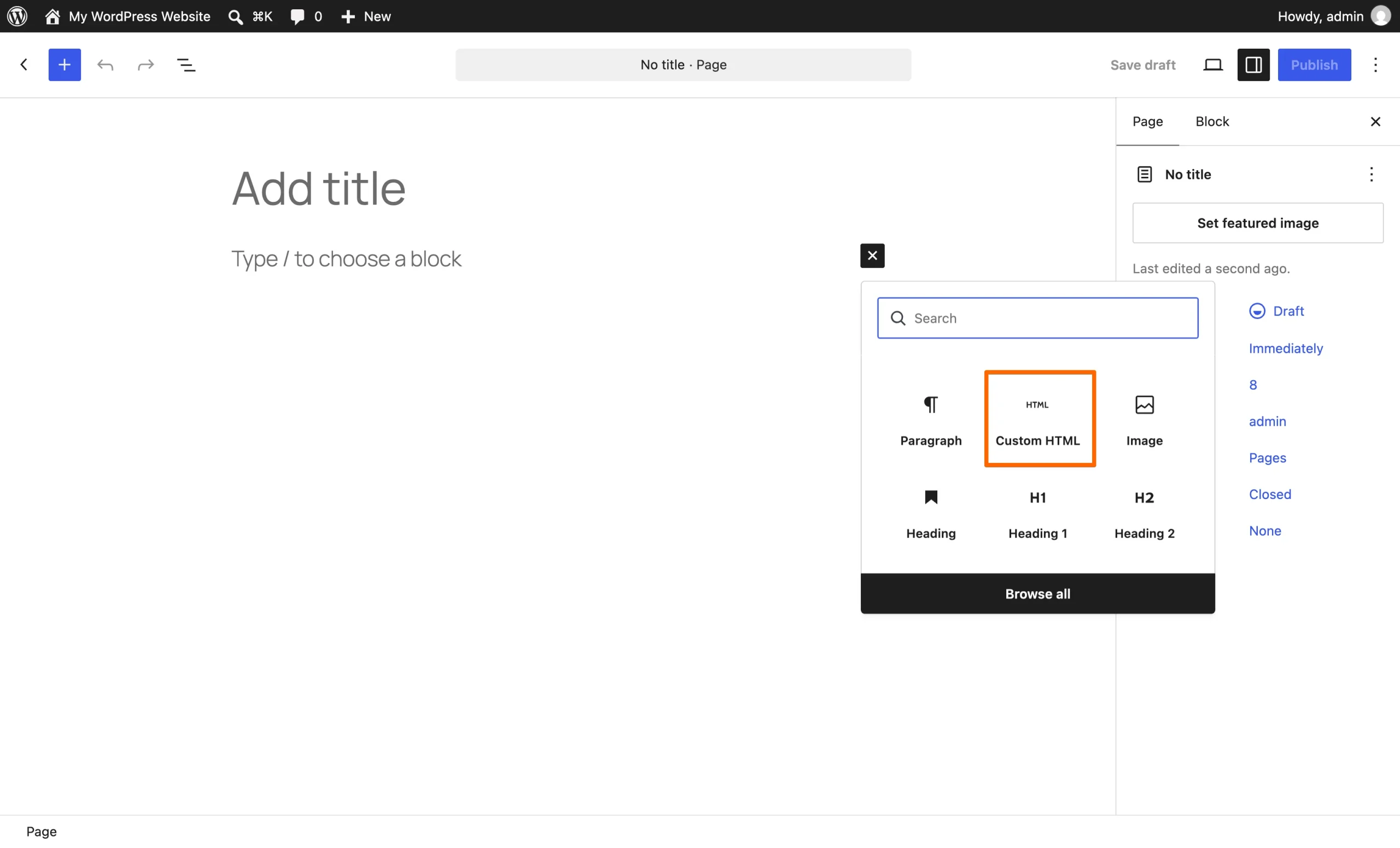
- In your WordPress site, enter the site editor and create a new content block using the Custom HTML block.
- Once your block is created, click the Edit HTML button to insert your code.
- Paste your embed code into the HTML block and click Update to finish adding your feed to your page.
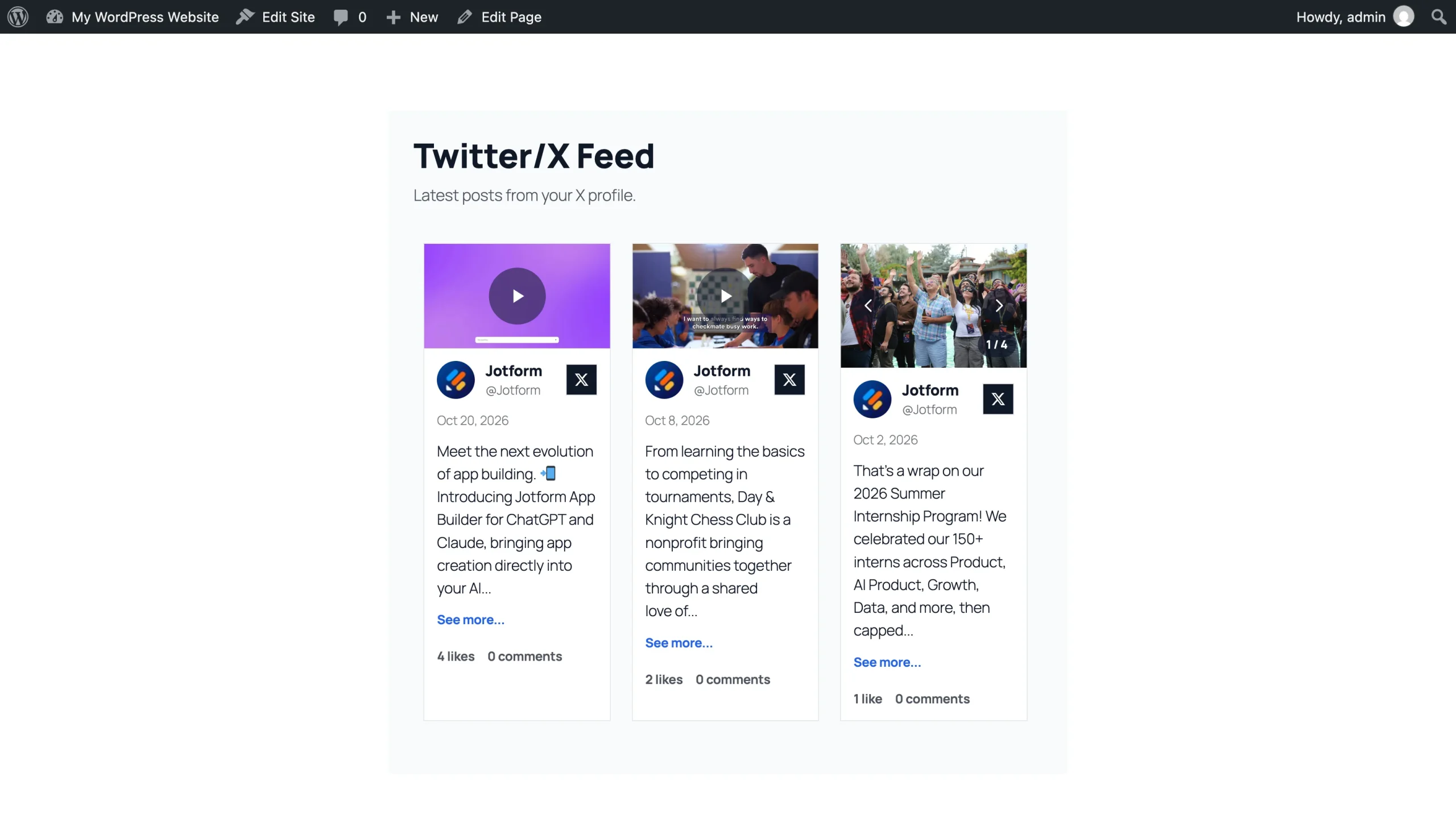
Once your block has been created and updated, you can share your X feed with your website visitors.
Jotform’s free X feed widget offers superior customization tools, even compared to paid options. With this solution, you can avoid paying for premium plug-ins or navigating API developer accounts. Simply connect your public feed and fully customize your layout.
This alternative lets you adjust card colors, hide author dates or captions to save space, and ensure your feed matches your website theme — all for free. Plus, because the Jotform widget is an off-server embed, it won’t slow down your WordPress load times, consume your server’s processing power, or clutter your dashboard with constant upgrade notifications.
Supercharge your WordPress site with smart, serverless widgets
The Jotform Twitter/X Feed Widget is just one of many free website widgets you can use to enhance your website with Jotform. These solutions help keep your content fresh, provide a dynamic user experience, eliminate premium plug-in costs, and boost performance without impacting your site speed.
Some of these website widgets include
Jotform can also elevate your WordPress site with online forms. Seamlessly connect your WordPress forms using the native Jotform WordPress integration to better engage with users and collect leads.
As a creator or business owner, you’re better off spending your time and resources on creating quality content — not managing expensive plug-ins. With the help of user-friendly, off-server solutions like Jotform Website Widgets, you can instantly deploy premium assets on your site and stand out from the competition.
This article is for WordPress site owners, bloggers, creators, and news sites who want to display dynamic, live updates from their X (Twitter) profile without installing heavy, API-draining plugins or wrestling with basic native embeds.







































































































Send Comment: