
Top Google Maps plug-ins for WordPress
When Google Maps launched in 2005, it was a state-of-the-art online map that gave you driving directions and helped you find the nearest pizza place. But that was about it. If you wanted to embed it on your website, you couldn’t, and you also couldn’t use its data to build a custom map or product. So a developer named Paul Rademacher hacked a way to overlay Craigslist real estate listings on Google Maps data, which prompted Google to quickly release an official Google Maps API. Not long after that, it introduced a user-friendly copy-and-paste embed code.
That’s where things still stand today: Most people either paste the code straight from Google Maps, or they install an API-powered Google Maps WordPress plug-in when they need something more polished. But with dozens of map plug-ins available on WordPress, many of which are poorly maintained or have feature gaps, it’s hard to know which ones deserve your time.
For this article, I tested a range of Google Maps plug-ins for WordPress and picked the five best. I looked through user reviews, development logs, and new feature additions. Most important, I installed and tested each plug-in personally on a fresh WordPress install. If you need help deciding which plug-in makes sense for you, or whether to consider a zero-maintenance alternative like the Jotform Google Maps Widget, read on.
| Tool | Best for | Price | Free plan limit | Standout features |
|---|---|---|---|---|
 WP Go Maps |
Those seeking a general-purpose map builder that covers most WordPress use cases |
Free version available; one-time fee of $69 for Pro plan |
One map |
Seven map engines, including options that don’t require an API key |
WP Store Locator |
Retailers with a large number of branches |
Free core plug-in; one-time fee of $59 for add-ons |
No limit on locations; CSV import is a paid add-on |
Radius search with driving directions |
 MapPress |
Building maps without leaving the WordPress post editor |
Free version available; Pro plan from $39/year |
No limit on maps and markers |
Mash-up maps from posts, custom fields, or advanced custom fields (ACF) |
 Easy Google Maps |
Bulk-importing lots of locations for free |
Free version available; Pro plan from $49/year or $149 lifetime fee |
CSV import and map layers included |
Images and video inside marker popups |
 WP Google Map |
Single-location businesses looking for an affordable plug-in |
Free version available; Pro plan from $19/year or $59 lifetime fee |
Only one marker per map |
Most affordable paid plan on this list |
 Jotform Google Maps Widget |
Multi-location businesses that don’t want to maintain a plug-in |
Free |
No limit on maps and locations |
Built-in search, category filters, and directions |
1. WP Go Maps
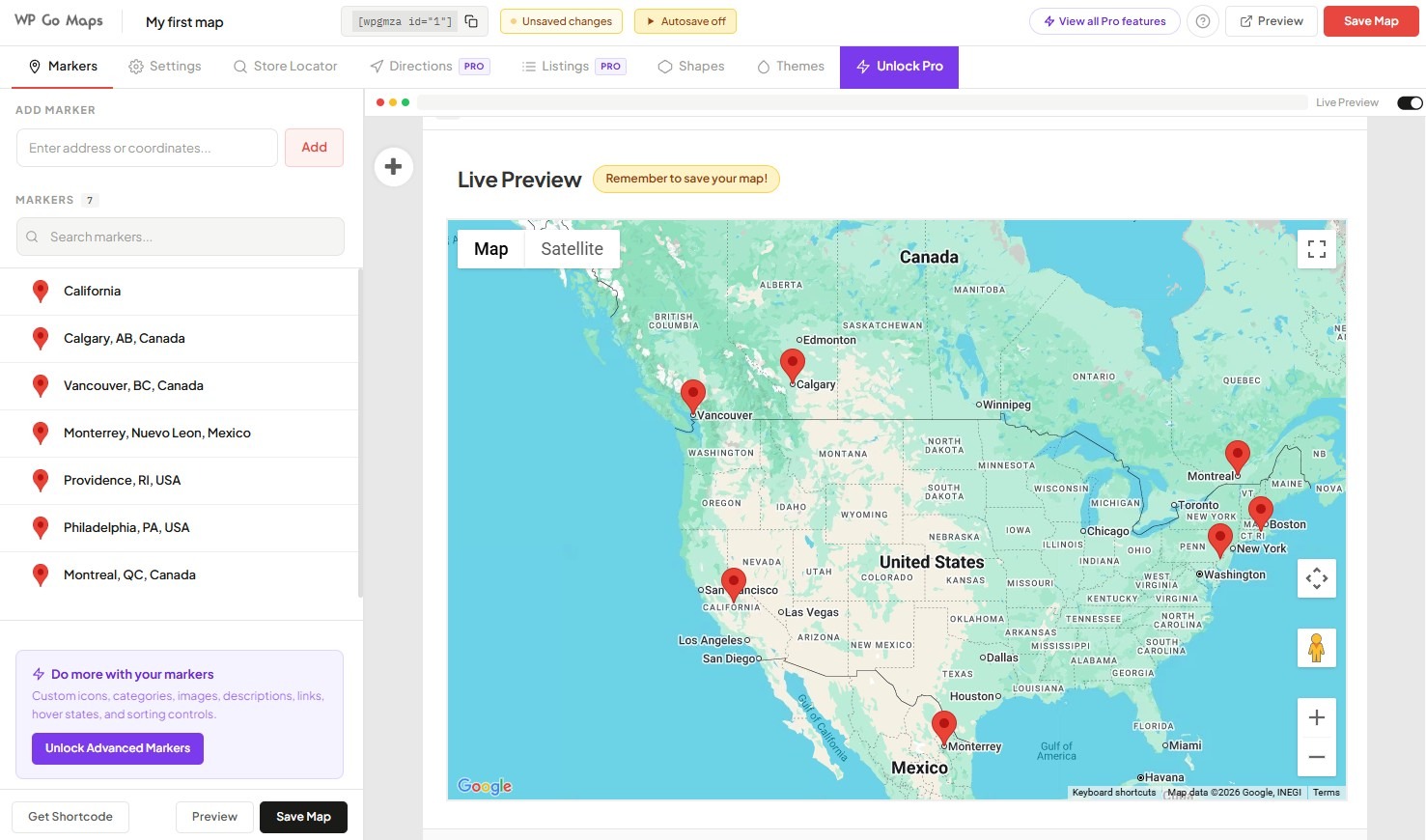
WP Go Maps (formerly WP Google Maps) is the most widely used maps plug-in for WordPress, with 300,000-plus active installations and a 4.8-star average across about 3,000 reviews. You can build a store locator, maps with image overlays, custom themes, real-time route planners, and location markers with embedded videos and images. WP Go Maps gets high praise for its customer support: One user says, “When I asked for a specific feature which was not included, they didn’t say no, it can’t be done … Instead, they sent hand-coded JavaScript that enabled my feature request!”
I found this to be the most polished WordPress map plug-in I tested. While using the free plan, I was able to add shape overlays, a store locator, and as many markers as I wanted. However, you can create only one map unless you upgrade. WP Go Maps offers a total of seven map engines. If you don’t want to generate a Google Maps API key, or if you’re expecting more than 10,000 requests per month and want to avoid API costs, you can switch to a zero-cost map engine such as Leaflet.
Key features
- Seven map engines, including Google Maps, Leaflet, OpenLayers, and MapTiler
- Custom marker icons, categories, descriptions, images, and links
- Shapes, heat maps, and image overlays for coverage areas and territory maps
Pricing: Free version available; Pro has a one-time fee of $69 for one site, $99 for five sites, or $299 for unlimited sites.
2. WP Store Locator

WP Store Locator runs on about 50,000 sites and is one of the most actively developed options on this list. You can build a searchable branch finder with radius filtering, driving directions, category filters, and opening hours per location. Store locations are unlimited, even on the free version. Users rave about this plug-in’s CSV import add-on, which lets you bulk-upload locations rather than adding them one by one. One reviewer said, “I’m setting up a list of veterans memorials around the US for a client. He gave me over 7,000 to upload. With the addition of the CSV upload add-on, this plug-in does exactly what we want it to do.”
I found WP Store Locator’s setup more confusing than the other options on this list. It wants two Google API credentials rather than one: a browser key for the map and a separate server key with IP restrictions. That means more time spent clicking around in Google Cloud Console, which may scare off nontechnical users.
Key features
- Unlimited store locations with phone, email, URL, description, and opening hours per entry
- Custom map styles, editable front-end templates, and a variety of marker icons
- Radius search with driving directions from the user’s location
Pricing: The core plug-in is free, with paid add-ons for extras such as CSV import, a statistics dashboard showing user activity, and a store search widget you can add anywhere on your site. You can buy each add-on individually or pay a one-time $59 fee for a discounted bundle.
3. MapPress

MapPress runs on about 30,000 sites with a 4.7-star average and connects with Google Maps, as well as with alternatives that don’t require an API key. Unlike WordPress plug-ins that require lots of admin-facing setup, MapPress lets you build the maps you need directly within the page or post you’re working on. I found that to be a big workflow advantage. Jumping back and forth from a WordPress post to the admin area slows me down, so it was nice to be able to do everything on one screen.
Users of the free plan will appreciate MapPress for one big reason: You get unlimited maps and markers. (As one reviewer says, “This plug-in’s free version provides what other map plug-ins are charging for.”) If you upgrade to Pro, you’ll get search and filtering, custom icons, and customizable templates. You can also build mash-up maps that pull locations automatically from posts, custom fields, or ACF data, which is great for programmatic use cases such as directories. However, unlike many competitors, MapPress Pro charges annual rather than one-time fees.
Key features
- Gutenberg blocks and a classic-editor popup builder, with unlimited maps and markers on the free tier
- Mash-up maps that pull locations from posts, custom fields, or ACF data automatically
- Responsive sizing by pixels, percentage, or aspect ratio, with a collapsing sidebar
Pricing: Core functionality is free; MapPress Pro starts at $39 per year for three sites or $79 per year for 25 sites. Both include custom icons, search and filter, and popup templates.
4. Easy Google Maps
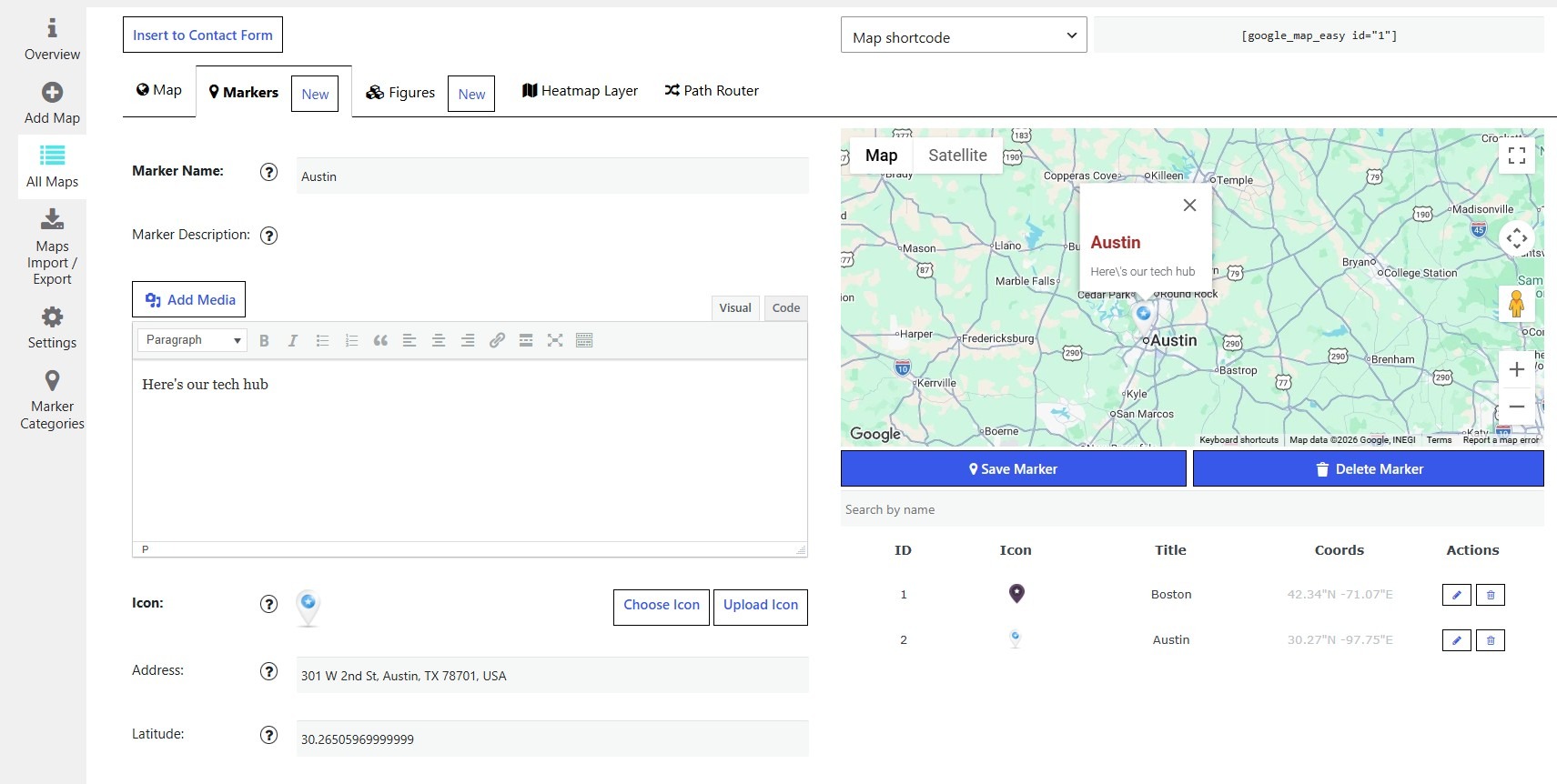
Easy Google Maps runs on 20,000-plus sites and offers a solid free tier with features that other plug-ins often charge for: bulk import from CSV, marker clustering, and images inside marker popups. If you’re uploading lots of locations and you want to do it for free, Easy Google Maps is a good option. And with the Pro plan, you get heat maps, path routing, polygon overlays, and traffic and transit layers.
I found Easy Google Maps to be less polished than the other plug-ins I tested. That didn’t affect the plug-in’s functionality, although I did struggle with some basic user interface tasks, including putting markers on the map. (Unlike other plug-ins, you can’t just right-click to add a marker; instead, you need to type in an address before a marker icon appears.)
Key features
- Bulk location import via CSV
- Polygon and region overlays for delivery zones and coverage areas
- 300-plus map themes, with images and video inside marker popups
- Gutenberg block and shortcode placement
Pricing: Free version available; Pro is $49 per year, or $149 for a lifetime license.
5. WP Google Map
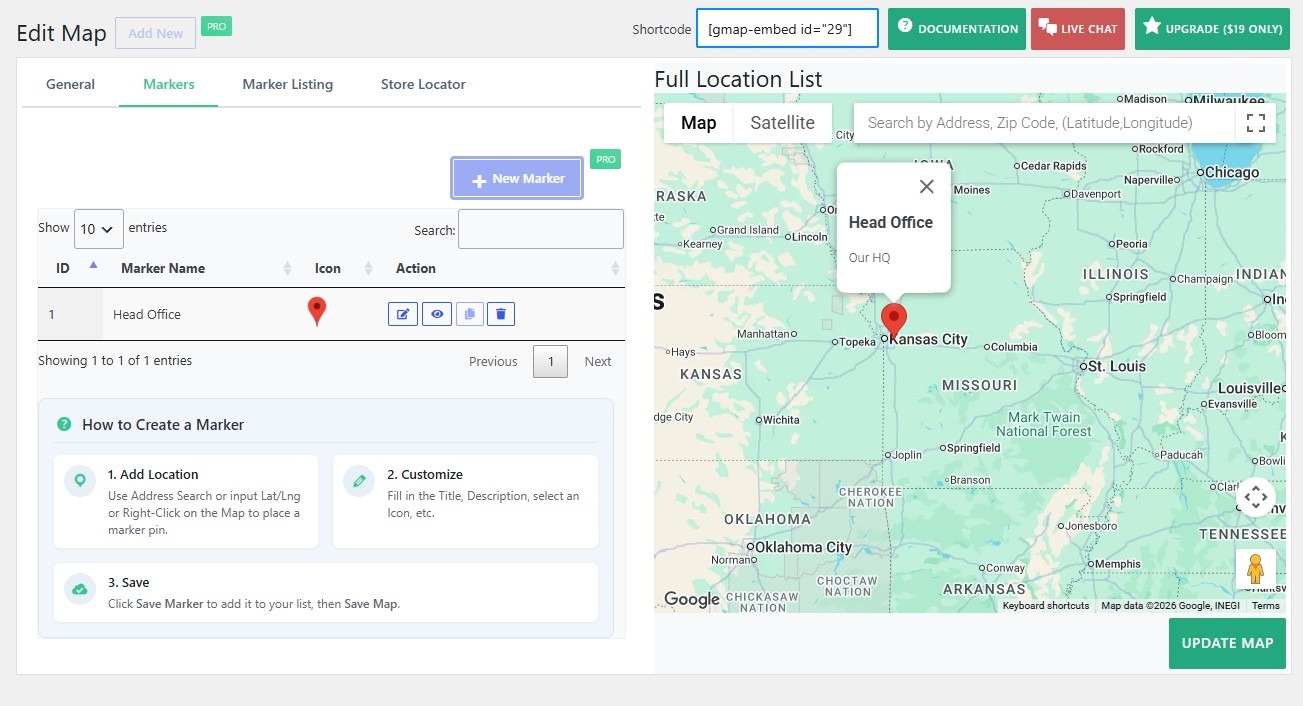
WP Google Map is more affordable than most competing plug-ins. Its Pro plan costs just $19 per year, or it’s $59 for a lifetime license. Its user base (10,000-plus installations) is smaller than that of other plug-ins. But it’s well regarded: WP Google Map has a 4.8-star average rating, and many reviewers are impressed at how quickly the developer responds to questions.
While there’s a free tier, you can’t do much with it. I tested the Lite version and was able to add only one marker per map, which is a stricter limit than other plug-ins on this list. One-location businesses might be able to use the free version for their contact page; anyone else will probably need the Pro plan. The store locator, category filtering, marker listings, and CSV import are all paid features, too.
Key features
- Store locator with search, category filtering, and sortable marker listings
- Custom marker icons and custom-styled map themes
- CSV and JSON import and export for bulk location management
Pricing: Free Lite version; Pro starts at $19 per year, and it’s $59 for a lifetime license.
Adding maps to your website doesn’t have to mean maintaining another plug-in
WordPress is one of the easiest online publishing platforms to use, but maintaining it requires careful attention. PHP updates, WordPress core updates, security vulnerabilities, outdated plug-ins, and conflicts between plug-ins can affect the performance of your site. The plug-ins I tested for this article have been running relatively smoothly for years; even so, using them means you’re relying on a small team (or sometimes a single developer) to quickly patch security and compatibility issues.
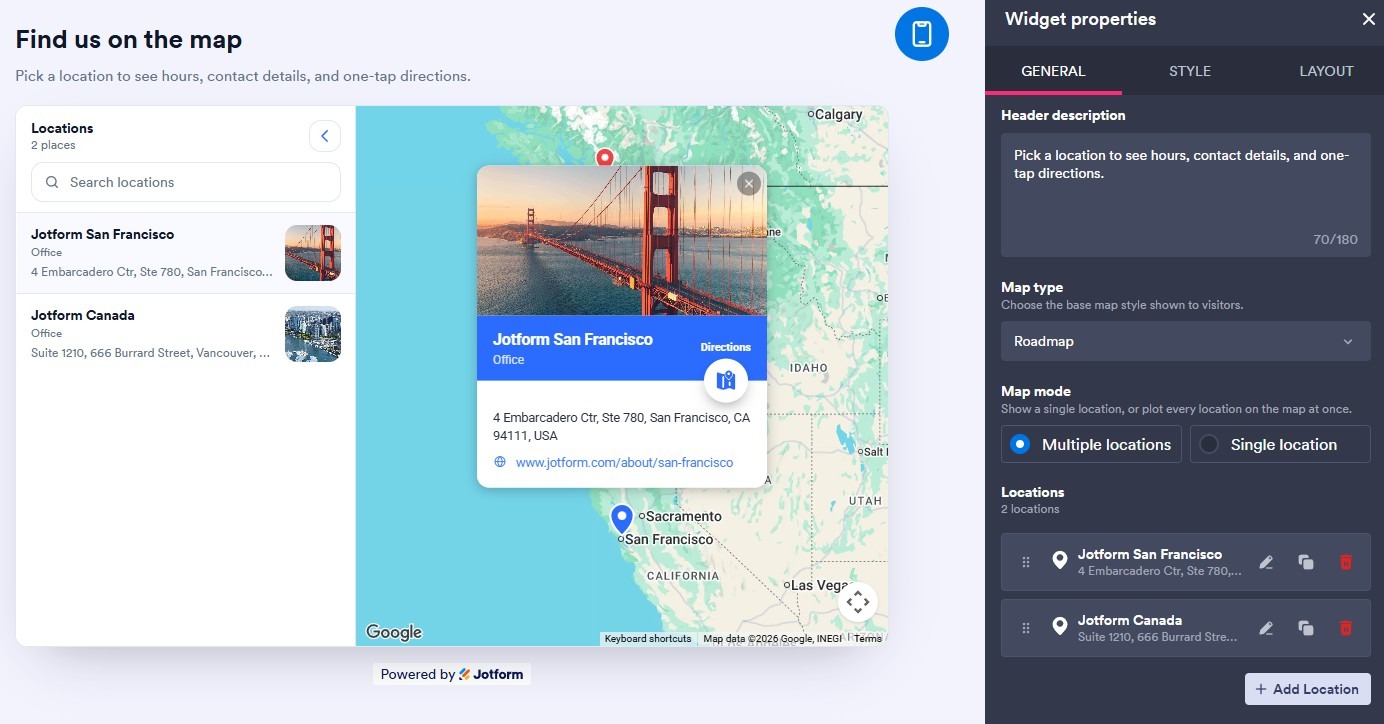
The Jotform Google Maps Widget sidesteps all of that. Nothing installs into WordPress, so there’s no plug-in to update, nothing added to your database, and nothing on your site to patch when a WordPress or PHP vulnerability arises. Any changes you need to make happen in Jotform’s app, including adding location pins and defining layouts, map height and zoom settings, themes, and custom CSS. You’ll still connect your Google Maps API key, but once that’s done, it’s just a matter of copying and pasting the embed code onto your website.
Features such as search, category filters, and “Get directions” are built into Jotform. Unlike most WordPress map plug-ins, it lets you create as many maps as you need for free. And because the Jotform Google Maps Widget is an embed rather than a plug-in, you can easily move your map to another WordPress site or a different platform entirely.
Jotform has widgets that handle other aspects of your website, too. Jotform’s WordPress integration and its WordPress forms handle form intake, and Jotform also has a dedicated Store Locator widget for managing a multi-location retail business. The Jotform website widgets directory, which includes more than 150 widgets, lets you modernize your WordPress website without having to worry about evaluating dozens of plug-ins.
This article is for WordPress site owners, local business owners, event organizers, real estate agents, and web designers who need to display store locations, physical addresses, or interactive territory maps on their site without tanking page load speeds or struggling through complicated API setups.







































































































Send Comment: