

Team Collaboration Apps

Virtual Assistant Operations App
The Virtual Assistant Operations App gives independent assistants, remote support teams, consultants, and small businesses a central workspace for managing day-to-day administrative work. It brings service requests, assigned tasks, and daily reports into one accessible experience, helping teams clarify ownership, due dates, priorities, and progress. Assistants can review incoming work, document completed activities and blockers, and consult standard operating procedure resources without searching across disconnected files. Managers gain better visibility into workloads and follow-up needs, while assistants have a consistent process for handling recurring client or internal responsibilities. This app template is especially useful for distributed teams coordinating scheduling, research, inbox support, data entry, and other delegated work.Jotform makes this template easy to adapt with a no-code app builder and an intuitive drag-and-drop interface. Add or rearrange pages, update branding, connect forms and tables, and shape the workflow around your team’s operations without writing code. Jotform App Templates can support organized data collection, mobile-friendly resource access, and convenient self-service from a single link. Publish the app when it is ready, then share it with assistants, managers, or clients so everyone can access the information and actions relevant to their role.
Go to Category:Operations & Logistics Portal Apps
Weekly Schedule Review App
The Weekly Schedule Review App is an app template for reviewing planned work, documenting progress, and identifying blockers from one week to the next. Team leads, project managers, consultants, contractors, and operations teams can use it to browse scheduled items, add new work, submit weekly reviews, and view a concise status summary. Individual schedule records keep dates, planned time, notes, and related review details accessible without relying on scattered documents. It supports recurring check-ins, workload discussions, project updates, and personal planning while giving teams a consistent record of weekly activity and unresolved obstacles.Jotform Apps helps organizations turn this weekly review process into a convenient, mobile-friendly experience without coding. Start with the Weekly Schedule Review App, then use the drag-and-drop interface to adjust pages, navigation, buttons, visual styling, and branding. The no-code app builder can connect forms and organized records to support data collection and a more coordinated workflow. Jotform App Templates can also be shared by link or QR code, making the finished app easy to access for employees, managers, clients, or project partners wherever weekly planning takes place.
Go to Category:Scheduling and Planning Apps
Video Research Workspace App
The Video Research Workspace App provides researchers, content teams, educators, students, journalists, and creative professionals with a central place to collect and review source material for video-focused projects. Users can submit research entries, browse collected findings, open source links, and revisit saved references without searching across scattered documents. Notes, topics, tags, and reference context make each entry easier to understand and retrieve. This app template supports literature reviews, documentary research, lesson preparation, content planning, source analysis, and collaborative investigations where clear organization and reliable access to supporting material are essential.Jotform App Templates help teams turn repeatable processes into accessible digital experiences without coding. Customize the Video Research Workspace App through an intuitive drag-and-drop interface, adjust its pages and branding, and connect forms or tables to support data collection and workflow management. Jotform also makes it easy to organize research resources for self-service access and share the finished workspace through a direct link, QR code, or embedded experience. Whether used by one researcher or a distributed team, the no-code app builder creates a mobile-friendly research hub that can evolve alongside new topics and projects.
Go to Category:Resource & Learning Portal Apps
Open Inquiry Research App
The Open Inquiry Research App is a shared workspace for investigating open questions with clear context, connected sources, and traceable evidence. Researchers, educators, students, nonprofit teams, consultants, and community groups can use it to submit inquiries, browse active research topics, review supporting material, and add research notes. It brings questions and findings into one accessible location, helping contributors avoid scattered documents, preserve the reasoning behind conclusions, and make evidence easier to review. Teams can use this app template for academic investigations, policy research, community studies, collaborative fact-finding, and exploratory projects where answers develop over time.Jotform Apps makes the Open Inquiry Research App easy to adapt with a no-code app builder and a flexible drag-and-drop interface. Customize pages, navigation, headings, and visual elements to match a research program or internal workflow. Connected forms support consistent data collection for new inquiries and research notes, while organized app pages provide convenient self-service access to current questions and findings. Like other Jotform App Templates, it can be published quickly and shared through a direct link or QR code, giving contributors a mobile-friendly way to participate from nearly any device.
Go to Category:Resource & Learning Portal Apps
Ad Campaign Feedback App
Ad Campaign Feedback App gives marketing teams, agencies, creative reviewers, and campaign managers a central place to collect and evaluate feedback on advertising initiatives. Reviewers can submit campaign feedback, browse previous responses, and open campaign summaries that show the channel, reviewer, recommendation, status, and review notes. This app template is useful during concept reviews, launch preparation, performance discussions, and post-campaign analysis. It replaces scattered messages and disconnected documents with an accessible review workspace, helping stakeholders compare recommendations, preserve context, identify recurring concerns, and make informed campaign decisions.Jotform makes it easy to adapt this experience to a team’s review process without writing code. Using the no-code app builder and drag-and-drop interface, organizations can modify pages, navigation, branding, and connected forms to support their preferred workflow. Feedback collection can connect with tables, notifications, approvals, and other Jotform tools for better data organization and follow-up. Once the Ad Campaign Feedback App is ready, teams can share it through a direct link, QR code, or embedded experience. Jotform App Templates also provide a practical starting point for creating mobile-friendly self-service resources that keep campaign information and review actions within easy reach.
Go to Category:Sales & Marketing Portal Apps
Network Incident Management App
The Network Incident Management App is an app template for IT operations teams, network administrators, service desks, managed service providers, and engineering groups that need a shared place to coordinate network disruptions. Teams can report incidents, browse active and historical records, and add updates as investigations progress. Centralized context helps responders understand affected services, locations, current status, and next steps without relying on scattered messages. It is especially useful for outages, connectivity failures, degraded performance, hardware issues, and other events that require clear ownership and timely communication.Jotform App Templates make it easier to turn incident handling procedures into an accessible digital workflow. With Jotform’s no-code app builder and drag-and-drop interface, teams can adapt the Network Incident Management App to their escalation paths, terminology, branding, and operational needs. Connected forms support consistent data collection, while tables, approvals, notifications, and other workflow tools can help route reports and keep stakeholders informed. Publish the app with a shareable link or QR code so authorized responders can access guidance, review incidents, and contribute updates from a phone, tablet, or computer.
Go to Category:Information Technology Apps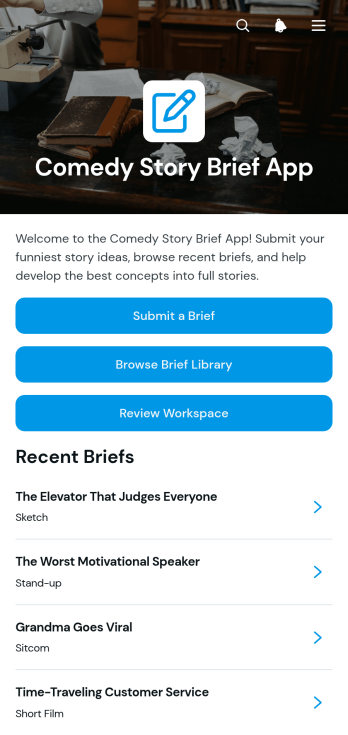
Comedy Story Brief App
The Comedy Story Brief App gives comedy writers, creative teams, producers, educators, and content departments a shared place to capture and develop story concepts. Contributors can submit a brief, browse an organized brief library, and move selected ideas into a review workspace. Each brief can preserve essential creative context such as the intended audience, setting, characters, constraints, and workflow status without scattering details across messages or documents. It is useful for writers’ rooms, sketch groups, production teams, classroom assignments, branded entertainment projects, and editorial pipelines that need a consistent way to receive, compare, and refine comedy story ideas.With Jotform, this app template can be adapted in a no-code app builder using an intuitive drag-and-drop interface. Teams can update pages, navigation, colors, fonts, and branded visual elements while connecting forms, tables, approvals, and notifications to support their workflow. The finished app can provide mobile-friendly self-service access through a direct link, QR code, or embedded experience. Starting with customizable App Templates also reduces setup time, helping creators centralize data collection, coordinate reviews, and keep promising concepts accessible as projects progress.
Go to Category:Entertainment Apps
Contact Group Management App
The Contact Group Management App is a ready-to-use workspace for organizing people into searchable groups and keeping essential contact details easy to find. Sales teams, community coordinators, membership managers, nonprofit staff, event organizers, and small businesses can use it to add groups, browse grouped records, review individual contacts, and monitor useful insights. It replaces scattered spreadsheets and disconnected lists with a central location for names, email addresses, phone numbers, categories, and notes. Teams gain a clearer view of their networks, spend less time searching for information, and can maintain more consistent records for outreach, relationship management, event coordination, or internal communication.Jotform makes this app template easy to adapt with a no-code app builder and an intuitive drag-and-drop interface. Customize pages, navigation, cards, buttons, colors, and fonts to match the way your team works, then connect forms and tables to support data collection and related workflows. The finished app can be shared through a direct link, QR code, or embedded experience, giving authorized users mobile-friendly access from nearly any device. Starting with Jotform App Templates also reduces setup time while leaving room to create a branded contact management and self-service experience that fits changing operational needs.
Go to Category:CRM Apps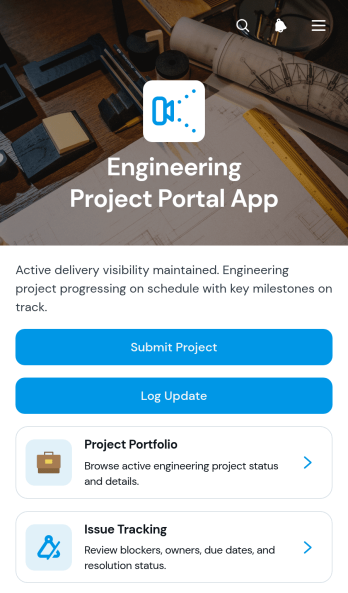
Engineering Project Portal App
Engineering Project Portal App is an app template for engineering firms, project managers, technical consultants, contractors, and multidisciplinary teams that need a central place to coordinate active work. It brings project portfolio browsing, progress updates, and issue tracking into one accessible workspace. Teams can review project context, schedules, priorities, scope, risks, blockers, next steps, and assigned resolution details without searching across disconnected records. It is especially useful for managing client projects, internal engineering initiatives, site work, product development, and technical delivery programs where stakeholders need current information and clear ownership.Jotform helps organizations turn this Engineering Project Portal App into a branded experience without writing code. Its no-code app builder and drag-and-drop interface make it easy to adjust pages, navigation, buttons, and visual elements for existing workflows. Connect forms and tables to support data collection, resource sharing, project submissions, and routine reporting. Once the app template is ready, publish it through a direct link or QR code so office teams, field personnel, clients, and partners can access relevant information from a phone, tablet, or computer.
Go to Category:Engineering Apps
Professional Color Palette App
Professional Color Palette App helps designers, creative consultants, marketing teams, and product teams create, review, and organize color systems for visual projects. Users can build a palette, browse professional options, view primary, secondary, accent, and background color roles, and analyze how colors relate to one another. Practical usage notes and guidance support clearer decisions for brand materials, websites, presentations, campaigns, and client projects. By keeping palette information in one accessible workspace, the app reduces scattered references, encourages visual consistency, and makes creative handoffs easier for internal teams and external collaborators.Jotform Apps makes this app template easy to adapt with a no-code app builder and an intuitive drag-and-drop interface. Add branded pages, navigation cards, forms, connected tables, and workflow steps without writing code. Teams can tailor the experience to their review process, collect palette details through data collection forms, and create a self-service color resource for colleagues or clients. Publish the finished app with a direct link, QR code, or embedded experience so users can access current color guidance from a phone, tablet, or computer.
Go to Category:Resource & Learning Portal Apps
Smart Contract Workflow App
The Smart Contract Workflow App provides legal teams, contract managers, consultants, procurement staff, and growing businesses with a central place to coordinate contract intake and review. Users can submit a new contract, browse open contracts, start a review, and view key information such as parties, dates, value, terms, and attachments. It is well suited to organizations replacing scattered emails and files with a consistent workflow that improves visibility, supports collaboration, and helps reviewers keep contract activity moving.Jotform App Templates make it easy to adapt this app template to existing contract operations without writing code. With Jotform’s no-code app builder and drag-and-drop interface, teams can update pages, navigation, branding, and connected forms to match their processes. The app builder can connect data collection with tables, approvals, notifications, and other workflow steps, creating a convenient self-service experience. Once ready, the app can be shared by link or QR code and accessed from phones, tablets, or computers.
Go to Category:Legal Apps
Creative Asset Intake App
Creative Asset Intake App gives marketing teams, creative departments, agencies, freelancers, and internal project coordinators a central place to receive and manage requests for visual and written materials. Requesters can submit a new brief, browse existing requests, and check a status overview without relying on scattered messages or documents. Key information such as the requester, due date, contact email, priority, project brief, and reference material stays connected to each request. This helps teams clarify expectations early, prioritize incoming work, reduce missing details, and maintain visibility as projects move from intake to delivery.With Jotform Apps, organizations can turn this app template into a branded intake experience using a no-code app builder and drag-and-drop interface. Teams can adjust pages, navigation, colors, fonts, and content while connecting forms, tables, approvals, notifications, and other workflow steps. The app can be shared through a direct link or QR code for convenient mobile access and self-service. Among Jotform App Templates, this option supports organized data collection while giving creative teams a flexible app builder for managing requests at any volume without writing code.
Go to Category:Project Management Apps
Geopolitical Briefings App
The Geopolitical Briefings App is an app template for analysts, consulting teams, research groups, educators, nonprofits, and organizational leaders who need a central place to publish and review geopolitical intelligence. It organizes current briefing signals while helping readers explore analysis by region or topic, understand source context, and identify urgency and publication status. Contributors can submit briefings for review, while editors use a dedicated queue and shared methodology to maintain consistent coverage. This focused structure reduces scattered documents, makes important developments easier to find, and supports better-informed planning, research, risk discussions, and stakeholder updates.Jotform App Templates help teams turn information and workflows into accessible digital experiences without writing code. With Jotform’s no-code app builder and drag-and-drop interface, users can adapt this app template with branded pages, navigation cards, forms, tables, approval steps, and notifications. Organizations can manage data collection, connect briefing submissions to a review workflow, and offer convenient self-service access from computers or mobile devices. Once customized, the app can be shared through a direct link, personalized address, embedded experience, or scannable code.
Go to Category:Report Apps
Document Review Workspace App
Document Review Workspace App gives teams a central place to submit documents, open a review queue, and evaluate materials with a consistent checklist. It is well suited to operations teams, project managers, consultants, administrators, and internal reviewers who need to organize document assessments without relying on scattered messages or files. Reviewers can open individual records, see review dates and statuses, add checklist results, and record notes. This shared workspace makes it easier to identify pending work, maintain consistent review criteria, and give stakeholders a clearer view of progress.With Jotform Apps, organizations can adapt this app template to match their review process without writing code. The drag-and-drop app builder supports branded pages, intuitive navigation, connected forms, tables, and workflows in a mobile-friendly experience. Teams can adjust submission questions, checklist content, status options, and visual styling, then share the app through a direct link or QR code. Jotform App Templates help businesses build practical self-service experiences that improve data collection, centralize review records, and keep recurring work accessible from one place.
Go to Category:Team Collaboration Apps
Trade Proposal Management App
Trade Proposal Management App gives teams a central place to submit, review, and manage proposals involving offered and requested items. It suits purchasing teams, inventory coordinators, operations departments, business networks, and organizations that arrange exchanges between internal groups or external partners. Users can submit a proposal, browse available proposals, view key terms such as expiration dates, and monitor or update each proposal’s current status. This organized experience reduces scattered communication, makes active offers easier to compare, and helps participants respond before opportunities expire.Jotform Apps helps organizations turn proposal processes into accessible, interactive experiences without writing code. Start with this app template, then use the no-code app builder and drag-and-drop interface to adjust pages, branding, navigation, and connected forms. Teams can support data collection and workflow needs from one convenient location while offering users a straightforward self-service experience. The finished app can be shared through a direct link or QR code, making proposal access convenient on phones, tablets, and computers.
Go to Category:Management Apps
Inline Record Editor App
The Inline Record Editor App is a ready-to-use app template for teams that need a convenient place to review and update operational records. Users can browse a record list, open individual entries, check key details such as category, due date, and notes, add new records, and edit a selected record through a connected form. It is well suited to operations coordinators, project teams, service departments, administrators, and small businesses that maintain changing task, case, asset, or customer information. Bringing record navigation, data collection, and editing into one mobile-friendly experience helps teams keep information current and spend less time moving between disconnected resources.Jotform Apps makes this template easy to adapt with a no-code app builder and an intuitive drag-and-drop interface. Change the pages, navigation, colors, typography, buttons, and branding to match an existing workflow, then connect forms, tables, approvals, or notifications as needed. Teams can turn the Inline Record Editor App into a practical self-service resource without writing code. Once it is ready, publish it with a shareable link or custom app URL so authorized staff can reach records from a phone, tablet, or computer.
Go to Category:Management Apps
Legal Matter Evidence App
Legal Matter Evidence App is an app template for organizing evidence intake and review around individual legal matters. Law firms, in-house legal teams, investigators, consultants, and claims professionals can use it to submit evidence, browse records by matter, and move items through a review queue. Matter references, sources, descriptions, case notes, review notes, and statuses keep essential context together. This shared structure helps teams reduce scattered records, find relevant material sooner, coordinate reviews, and maintain a clearer view of evidence associated with active or historical matters.Jotform App Templates make it easier to turn recurring processes into accessible digital experiences without writing code. Customize this app template with the no-code app builder and its drag-and-drop interface, then connect forms, tables, approval steps, and notifications to support data collection and workflow automation. Teams can adjust pages, navigation, visual styling, and branding to suit internal procedures. Once published, the app can be shared through a direct link or QR code, giving authorized contributors and reviewers convenient mobile-friendly access to evidence submission, matter browsing, and self-service resources.
Go to Category:Legal Apps
Esports Team Randomizer App
Esports Team Randomizer App helps tournament organizers, gaming clubs, school esports programs, community groups, and team captains create balanced matchups without manually sorting every participant. Organizers can create teams, randomize team assignments, browse generated rosters, and review member details or notes from one convenient location. It is useful for casual competitions, practice sessions, tryouts, league events, and social gaming activities where impartial assignments save time and reduce disputes. A clear, mobile-friendly experience also makes it easier for participants and coordinators to check placements before play begins.Jotform provides flexible App Templates for turning repeatable processes into interactive experiences without coding. Start with this app template, then use the no-code app builder and drag-and-drop interface to adjust pages, navigation, colors, fonts, and content for your event or organization. Connected forms support data collection, while tables and workflows help organizers maintain team information and process updates. Publish the finished app through a direct link or scannable code so coordinators and players can access team details on phones, tablets, or computers.
Go to Category:Sports Apps
Coaching Task Management App
The Coaching Task Management App is a ready-to-use app template for coaches, consultants, mentors, training teams, and wellness professionals who need one place to organize client assignments. Coaches can add tasks, browse current work, review status and priority details, connect relevant resources, and monitor progress without relying on scattered messages or documents. It supports individual coaching, group programs, employee development, skills training, and recurring accountability sessions. Clear access to task briefs and supporting materials helps participants understand their next steps, while progress review gives coaches a practical view of ongoing work.Jotform makes this experience easy to adapt with a no-code app builder and an intuitive drag-and-drop interface. Customize pages, buttons, visual elements, and navigation to reflect your coaching process, then connect forms and tables for data collection and workflow management. You can publish the app with a personalized link and share it with clients or team members for convenient mobile-friendly self-service. Jotform App Templates provide a flexible starting point, helping you create a polished coaching workspace without writing code.
Go to Category:Task Management Apps
Performance Group Audition App
The Performance Group Audition App is an app template for performance companies, casting teams, event organizers, educational programs, and community groups that need a central place to receive and assess group audition applications. Performers can submit their audition information, while reviewers can browse candidate profiles, check performance categories, experience levels, contact details, and availability, and open individual records for evaluation. This organized process helps teams keep audition details accessible, reduce scattered communications, and make informed casting or membership decisions. It is suitable for stage productions, dance groups, music ensembles, touring companies, talent programs, and other organizations coordinating auditions for multiple roles or categories.Jotform Apps makes it easy to customize this Performance Group Audition App without writing code. Using the drag-and-drop app builder, organizers can adjust pages, update branding, connect audition and evaluation forms, and arrange navigation around their selection process. The app can also work with Jotform tables, approvals, notifications, and other workflows to support data collection and team review. Once ready, it can be shared through a direct link or QR code, giving performers and evaluators convenient mobile-friendly access. Jotform App Templates offer a practical starting point for creating a polished audition experience that matches an organization’s process.
Go to Category:Entertainment Apps
Video Concept Submission App
Video Concept Submission App gives marketing teams, creative agencies, production groups, social media managers, and independent creators a central destination for collecting and reviewing video ideas. Its focused page can present campaign guidance, creative expectations, and submission access without scattering information across messages or documents. Teams can use this app template for advertising pitches, social content proposals, client campaigns, internal brainstorming, educational videos, or community storytelling. A consistent intake experience helps contributors understand what is needed, gives reviewers more useful concepts to assess, and supports smoother planning before scripting or production begins.With Jotform’s no-code app builder, organizations can adapt App Templates through a drag-and-drop interface and create a polished experience without programming. Customize the page with brand colors, explanatory content, buttons, and links, then connect forms, tables, approvals, or other workflow tools as requirements grow. The finished app can be shared by direct link or QR code, making data collection and self-service access convenient on phones, tablets, and computers. This flexible app builder helps creative teams keep campaign resources and concept intake together while providing contributors with a clear path from idea to submission.
Go to Category:Social Media Management Apps
Game Thumbnail Brief App
The Game Thumbnail Brief App is an app template for game studios, creative agencies, marketing teams, content producers, and independent creators who need a consistent way to request thumbnail artwork. Team members can create briefs, browse existing requests, and open individual brief details from one organized location. This helps requesters communicate campaign goals and visual direction while giving designers clearer context before production begins. It is useful for coordinating artwork across game launches, updates, promotional videos, social posts, storefront content, and recurring creative campaigns. Centralizing requests reduces scattered instructions, supports more consistent handoffs, and gives collaborators an accessible reference point throughout each project.Jotform Apps lets teams adapt the Game Thumbnail Brief App with a no-code app builder and an intuitive drag-and-drop interface. Users can customize pages, navigation, colors, fonts, buttons, and branding without writing code. Connected forms support data collection, while organized brief listings make it easier to manage the creative workflow and provide team self-service. The finished app can be shared through a direct link or QR code and accessed from phones, tablets, or computers. Among Jotform App Templates, this option offers a practical starting point for building a branded creative request experience that can evolve with changing production needs.
Go to Category:Project Management Apps
Communication Channel Directory App
The Communication Channel Directory App gives employees, distributed teams, and growing organizations a central place to find approved ways to communicate. Users can browse all channels or narrow the directory by email, voice, and collaboration options, then review essential details such as audience, availability, channel type, and primary use. Direct website links help people reach the right resource without searching across scattered documents or asking colleagues for guidance. This app template is especially useful for internal communications, human resources, information technology, operations, and project teams that need to clarify where different conversations, announcements, meetings, and requests should take place.Jotform App Templates make it easy to turn this directory into a branded, mobile-friendly resource without writing code. Use the no-code app builder and drag-and-drop interface to update pages, organize navigation, add or remove channel listings, and adjust visual elements for your organization. The app can also connect with forms, tables, approvals, and workflows to support data collection and related internal processes. Once customized, share the Communication Channel Directory App through a direct link or QR code so employees can access self-service communication guidance from nearly any device.
Go to Category:Company Portal Apps
Operations Task Management App
Operations Task Management App gives operations teams a central place to add, review, and update day-to-day work. Managers, coordinators, supervisors, field teams, warehouse staff, and service businesses can use it to organize open tasks, clarify ownership, and keep deadlines visible. Team members can browse current assignments, open task details, record updates, and review reports without relying on scattered messages or spreadsheets. Information such as work area, assignee, priority, due date, and task description helps everyone understand what needs attention. This app template is especially useful for recurring operational work, cross-department requests, shift handoffs, facilities tasks, and service delivery activities where progress must remain easy to follow.Jotform App Templates make it easier to turn routine processes into accessible digital experiences. With Jotform’s no-code app builder and drag-and-drop interface, you can adapt this app template to match your workflow, branding, and team structure. Connect forms for data collection, organize task information across mobile-friendly pages, and guide users toward the right action from one convenient location. You can also share the finished app through a direct link or QR code, helping employees access task information and self-service tools wherever work takes place. No programming knowledge is required, so teams can update the experience as operational needs change.
Go to Category:Task Management Apps